Installation guide
 Owner’s manual
 Error Codes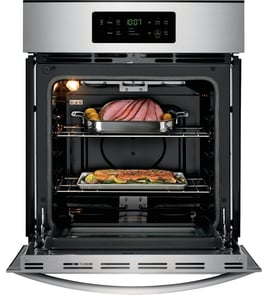


How do I reset my KitchenAid wall oven?
To reset your KitchenAid wall oven model KEBC207KSS04, turn the oven off at the control and then restore power; when power returns, the display typically lights briefly and may show “PF” (power failure). Press CANCEL/OFF to clear the display and reset the clock if needed (see the KEBC207KSS04 owner's manual).
Quick reset options (from simplest to strongest)
- Clear a bad entry: If “Err” shows, press CANCEL/OFF and re-enter the setting.
- Clear a power-failure message: If “PF” shows, press CANCEL/OFF, then set the clock.
- Control lock check: If the keypad seems unresponsive, confirm Control Lock is not enabled; when locked, only certain pads work (timer, oven light, cancel/off).
- Hard reset (power cycle): Turn the breaker OFF for about 1 minute, then turn it ON.
- After self-clean: If the door is locked, press CANCEL/OFF to stop the cycle; the door stays locked until the oven cools.
What you should see on the display
When power is first supplied, the display behavior is predictable. Use this as a quick confirmation that the reset worked.
| Display message | What it means | What to do next |
|---|---|---|
| Display lights up briefly | Power was restored | Wait a few seconds for normal mode |
| “PF” | Power failure occurred | Press CANCEL/OFF, then reset clock |
| “Err” | Invalid pad press | Press CANCEL/OFF, retry entry |
| Blank (when not cooking) | Normal idle state | Select a cooking mode to test |
Why it matters
A reset clears many temporary control glitches (stuck key input, interrupted cooking cycle, power-failure state) so the oven can return to normal bake, broil, convection, and timer operation without replacing parts.
Last updated: February 2026
What size is a KitchenAid wall oven?
Most KitchenAid single electric wall ovens, including model KEBC207KSS04, are built to fit standard cabinet cutouts in 24-inch, 27-inch, or 30-inch widths. Typical overall depth is about 22 to 24 inches, with heights commonly around 27 to 29 inches for many single-oven installations; confirm the exact cutout and overall dimensions in the KEBC207KSS04 installation guide.
Typical wall oven size ranges (what you can plan around)
These are the common sizing buckets used for built-in electric wall ovens and the cabinets made for them:
- Width: 24 in, 27 in, or 30 in (most common)
- Depth: about 22 to 24 in (to align with standard cabinetry)
- Height (single oven): often about 27 to 29 in
- Capacity: commonly about 2 to 5 cubic feet (varies by width and design)
How to confirm the exact size for KEBC207KSS04
Use the installation specs to match your cabinet opening and electrical setup. We recommend checking these items before ordering trim, cabinets, or scheduling installation:
- Cabinet cutout width, height, and depth (this is the most important measurement)
- Overall oven dimensions (helps confirm door clearance and protrusion)
- Required clearance around the oven for airflow and safe operation
- Electrical requirements (circuit size and junction box location)
Quick measurement checklist
Measure in inches and record each value in two places (cabinet opening and oven location):
| What to measure | Where to measure | Why it matters |
|---|---|---|
| Cutout width | Inside cabinet opening | Ensures the oven fits without forcing |
| Cutout height | Inside cabinet opening | Prevents gaps or binding |
| Cutout depth | Back of cabinet to front | Confirms the oven body clears the cabinet |
| Door swing clearance | In front of oven | Ensures the door opens fully |
Why it matters
Wall ovens are sized around cabinet cutouts, not just the visible front. Using the correct cutout dimensions prevents installation problems like trim not covering gaps, the oven not seating fully, or airflow restrictions that can lead to overheating.
Last updated: February 2026
Why does my KitchenAid oven turn off by itself?
Your KitchenAid KEBC207KSS04 electric wall oven usually turns off by itself when a timed setting ends, the Cancel/Off pad is pressed, the control is locked and a function is canceled, or a safety control stops heating after an overheat condition. Start by checking Timer, Cook Time, and Sabbath Mode settings in the KEBC207KSS04 owner's manual.
Quick checks (most common causes)
- Make sure Cook Time or Delay Start is not set; timed cooking can shut the oven off automatically.
- Check whether someone pressed CANCEL/OFF (on some models, pressing Cancel/Off turns the oven off immediately).
- Confirm Control Lock is not enabled; locked controls can lead to canceled selections if the sequence is interrupted.
- If the oven shuts off when you open the door, remember some elements stop heating immediately and resume after the door closes.
- If the oven shuts off after running a while, suspect overheating and a protective shutdown.
Overheating and airflow issues
Built-in ovens rely on cooling airflow. If the cooling fan is weak or vents are blocked, internal temperatures can rise and the oven can shut down to protect components.
- Listen for the cooling fan during and after baking.
- Keep the oven vent area clear (no foil, pans, or insulation blocking airflow).
- If the fan is noisy, intermittent, or not running, check the blower WPW10176670.
Parts that commonly cause shutdowns
If settings are correct and the oven still turns off, these parts are common suspects on electric built-in ovens:
| Symptom | Likely area | Example part for KEBC207KSS04 |
|---|---|---|
| Oven temperature seems erratic, then shuts down | Temperature sensing | Wall oven temperature sensor WPW10131825 |
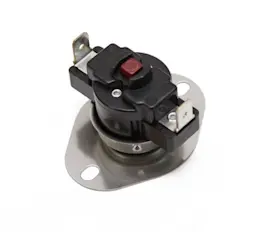
| Oven stops heating after getting very hot | Overheat protection | Range high-limit thermostat WP9759242 |
| Oven shuts down after extended use, fan not running | Cooling system | Blower WPW10176670 |
Why it matters
Random shutoffs can cause undercooked food and can also point to overheating that stresses wiring, controls, and heating circuits. Fixing the root cause helps protect the control board, bake element, and broiler element.
Last updated: February 2026
What is Sabbath mode on my KitchenAid oven?
Sabbath mode on your KitchenAid KEBC207KSS04 keeps the oven running in a bake setting until you turn it off (or until a timed Sabbath setting ends). While it’s on, tones are muted and the display does not show temperature changes or status messages.
What changes when Sabbath mode is on
- The oven stays in Bake operation until you exit Sabbath mode.
- No tones will sound.
- The display will not show messages or temperature changes.
- When you open or close the door, the oven light does not automatically change, and heating elements do not react immediately.
- If there is a power failure while Sabbath mode is set, the oven returns to Sabbath mode in an untimed bake at 350°F (180°C).
Controls that still work (typical behavior)
Exact active keys vary by single vs. double oven configurations, but in Sabbath mode you typically can use:
- Number pads (used for settings and temperature mapping)
- Start
- Cancel/Off (or the oven cancel/off key for the selected oven)
For the exact key sequence and which pads apply to your configuration, follow the steps in the KEBC207KSS04 owner's manual.
Quick reference: what you will and won’t notice
| Feature | Normal operation | Sabbath mode |
|---|---|---|
| Beeps/tones | On | Off |
| Display updates | Shows changes | Does not show temp/message changes |
| Door light behavior | Changes when door opens/closes | Does not automatically change |
| Element response | Immediate | Delayed (short delay is normal) |
Why it matters
Sabbath mode is designed to keep oven operation steady and predictable during extended bake periods while limiting audible alerts and display changes. If your oven seems “stuck” in bake, won’t beep, or the display looks unusually quiet, Sabbath mode is a common cause.
Last updated: February 2026