


Where is the model number on a Craftsman rear tine tiller?
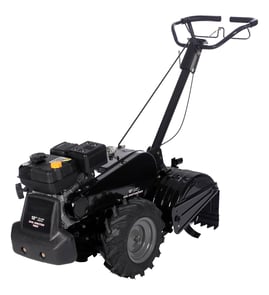
On a Craftsman rear-tine tiller like model 917293201, the model number is printed on a product ID label (a sticker or metal tag) attached to the tiller frame. It’s most often found near the tine shield/guard area or on the engine area near the fuel tank.
Most common places to check
Look for a rectangular label with the model number and other ID details. Check these spots first:
- On the tine shield (tine guard) above or behind the tines
- On the main frame rail near the transmission/gear case
- Near the engine mounting area
- On or near the fuel tank support or engine shroud area
- Near the handlebar base where the handles bolt to the frame
What the label looks like (and what to write down)
The label usually includes more than just the model number. Recording all of it helps us match the correct parts list.
| Label item | Example | Why it matters |
|---|---|---|
| Model number | 917293201 | Identifies the exact tiller version |
| Product number | Varies | Helps confirm the correct parts breakdown |
| Serial number | Varies | Useful for production run differences |
If the label is missing or unreadable
If the sticker is worn off, you can still identify the right parts by matching what you see on the machine.
- Compare your drive and tine engagement setup to the parts diagrams
- Check whether your unit uses a clutch cable and where it routes
- Match wear items by shape and mounting style
- Use the parts list to confirm hardware sizes and assemblies
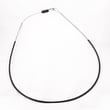
For example, if you’re diagnosing tine engagement issues, the tiller clutch cable 532110675 is a common part to inspect for stretching, kinks, or a broken end fitting.
Why it matters
Craftsman tillers often have multiple versions that look similar; the exact model number ensures you get the correct belt, cable, chain, gear case, and tine hub parts the first time.
Last updated: February 2026
What are the common problems with lawn tillers?
Common lawn tiller problems include hard starting, rough running, tines or wheels not turning, poor tilling performance, and drive or shifting issues. On Craftsman model 917293201, these symptoms usually trace back to fuel/ignition maintenance, belt or chain drive wear, or clutch cable adjustment.
Most common symptoms and what usually causes them
- Engine will not start: stale fuel, clogged fuel path, dirty spark plug, or ignition issues
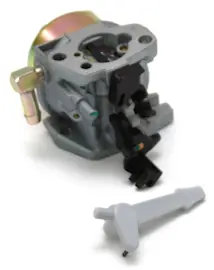
- Engine runs rough or misfires: dirty carburetor, restricted airflow, old fuel, fouled plug
- Tines will not turn (wheels may still move): clutch cable out of adjustment, worn drive components, damaged chain
- Wheels and tines will not turn: drive system not engaging, broken linkage, internal gear case issue
- Poor tilling (skips, shallow cut, uneven churn): worn tines, incorrect depth stake setting, drive slippage
- Oil or gas leaking: loose fasteners, deteriorated fuel line, gasket or seal wear
Quick checks we recommend before replacing parts
- Start with fuel: drain old gas, refill with fresh fuel, and confirm the fuel valve is open (if equipped).
- Inspect ignition: remove and inspect the spark plug; replace if fouled, cracked, or heavily worn.
- Confirm engagement: squeeze the tine/clutch control and verify the linkage moves freely.
- Check drive components: look for slack, damage, or binding in the chain and pulleys.
- Look for leaks: clean the exterior first, then run briefly to pinpoint the source.
Parts that commonly relate to these problems (model 917293201)
If your tines do not engage or engagement feels weak, the clutch cable is a frequent fix on rear-tine units.
| Symptom | Likely area | Example part for this model |
|---|---|---|
| Tines will not turn or slip | Clutch engagement | Tiller clutch cable 532110675 |
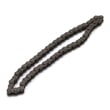
| Grinding, binding, or intermittent tine drive | Chain drive | Tiller chain, #25-50 532102134 |
| Oil seepage around a cover | Sealing surface | Gasket 532431022 |
Why it matters
A tiller that is not engaging correctly can overheat belts, wear chains and gears faster, and make the machine harder to control. Catching a stretched cable, worn chain, or leaking gasket early helps prevent bigger gear case repairs.
For step-by-step troubleshooting by symptom, we recommend starting with rear tine tiller troubleshooting tips wheels and tines.
Last updated: February 2026
Can a rear tine tiller cut through roots?
Yes. A rear-tine tiller like the Craftsman 917293201 can cut through small, shallow roots while it tills, especially in previously worked soil. For thick roots or woody stumps, we recommend cutting the roots first and then tilling in shallow passes to avoid drivetrain damage.
What to expect (roots vs. tiller capability)
Rear-tine tillers have the traction and tine drive to chew into tough ground, but roots behave differently depending on size and moisture.
- Fine feeder roots (hairlike to pencil-size): tills through in most soils
- Small roots (up to about 1/2 inch): usually manageable with slow, shallow passes
- Larger roots (over about 1/2 inch): can stop the tines, cause bouncing, or overload the clutch/chain drive
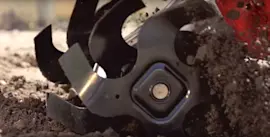
- Wet, stringy roots: tend to wrap around the tine shaft and hubs
- Dry, woody roots: tend to jam and shock-load the drivetrain
Best practices for tilling where roots are present
Use technique first; it prevents broken shear points, stretched cables, and chain wear.
- Till shallow first (2 to 3 inches), then deepen gradually
- Work at low ground speed and let the tines do the cutting
- If the tines start to hop, raise the depth stake and reduce bite
- Stop and clear wrapped debris before it tightens around the shaft
- If the drive feels like it is slipping or not engaging cleanly, inspect and adjust the clutch cable
Parts that commonly take the hit when roots bind the tines
If roots repeatedly stall the tines, these are the parts we see affected most often on rear-tine units.
| Symptom | What it often points to | Example part for model 917293201 |
|---|---|---|
| Tines stop but engine keeps running | clutch not fully engaging or cable stretched | Tiller clutch cable 532110675 |
| Grinding, popping, or intermittent drive | worn or damaged chain drive | Tiller chain, #25-50 532102134 |
| Wheels/tines bind after impact | internal linkage or shift components stressed | Rally tiller shift fork 532008353 |
Why it matters
Roots create sudden load spikes. That shock can stretch a clutch cable, accelerate chain wear, and damage gears or shafts. Using shallow passes and clearing wraps early protects the gear case and keeps tilling performance consistent.
For more technique and troubleshooting, use our DIY article: rear tine tiller troubleshooting tips wheels and tines.
Last updated: February 2026
Why are the tines on my tiller not turning?
On your Craftsman 917293201 rear-tine tiller, tines usually stop turning when the drive system is not transferring power to the tine shaft. The most common causes are a loose or broken drive belt, a clutch cable that is out of adjustment, or a problem in the chain and gear case.
Quick checks (fastest to most likely)
- Shut the engine off, remove the spark plug wire, and wait for all moving parts to stop.
- Clear wrapped weeds, twine, or roots from the tine area and tine shaft.
- Squeeze the tine engagement lever and watch the cable; if it barely moves, the cable is stretched, misrouted, or broken.
- Check for belt slip (burnt rubber smell, glazing, or belt dust near the pulleys).
- If the wheels drive but the tines do not, focus on the tine drive chain and gear case.
Parts that commonly cause “tines not turning”
If the engagement control feels loose or inconsistent, the clutch cable is a top suspect.
Step-by-step troubleshooting
- Confirm engagement is working: With the engine off, engage the tine lever and check for firm resistance. A “floppy” lever usually points to cable or linkage issues.
- Inspect the belt and pulleys: A worn belt can slip under load, so the engine runs but the tines do not.
- Check chain drive: If the belt turns the input but the tines still do not move, inspect the chain for breakage, derailment, or excessive slack.
- Check for internal binding: If the chain is intact but the tine shaft will not rotate by hand (engine off), the gear case or bearings may be binding.
Why it matters
When the tines are not turning, continuing to force engagement can quickly damage the belt, chain, pulleys, or gear components. Catching a stretched cable or loose chain early often prevents a bigger gear case repair.
Helpful DIY guidance
Use our step-by-step instructions in tiller tines won't turn but wheels do and, if belt slip is suspected, follow how to replace a tiller drive belt.
| Symptom | Most likely area | What to check first |
|---|---|---|
| Engine runs, wheels move, tines do not | Tine drive (chain/gear case) | Chain condition and tension |
| Tines try to move then stop under load | Belt or clutch cable | Belt wear and cable adjustment |
| Nothing moves when engaged | Engagement control | Cable routing, stretch, break |
Last updated: February 2026
How often should I change the oil in my tiller?
For your Craftsman 917293201 rear-tine tiller, change the engine oil after the first few hours on a new or newly serviced engine, then every 25 to 50 hours of use or at least once per season (yearly). Change it sooner in dusty or heavy-use conditions.
Recommended oil-change schedule
- Break-in (new or rebuilt engine): change after the first 5 hours
- Normal homeowner use: every 50 hours or once per season
- Dusty soil, hot weather, heavy tilling: every 25 hours
- Before seasonal storage: change oil so acids and debris are not sitting in the crankcase
- If oil looks dirty or smells like fuel: change it immediately
Oil type to use for this model
Use the viscosity that matches operating temperature for the 917293201:
| Outdoor temperature | Oil viscosity to use | Why it helps |
|---|---|---|
| Above 32°F (0°C) | SAE 30 | Stable protection in warm weather |
| Below 32°F (0°C) | SAE 5W-30 | Easier starting and faster lubrication in cold |
Quick oil-check and change tips
- Shut the engine off; let it cool 10 to 15 minutes.
- Park level; check oil before every use.
- Clean around the fill/dipstick before opening it.
- Drain oil while slightly warm; refill to the dipstick mark (do not overfill).
Why it matters
Fresh oil reduces wear on the crankshaft, piston, and bearings, and it helps the engine run cooler. A consistent oil-change routine is one of the best ways to extend tiller engine life.
Related DIY help
For more maintenance and operating tips that prevent common tiller problems, use our tiller common questions article.
Last updated: February 2026