Owner’s manual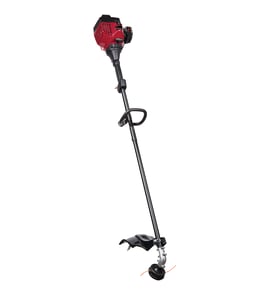


How to install trimmer line on troy bilt TB425CS?
To install trimmer line on your Troybilt TB425CS, use the SpeedSpool method: cut two lengths of 0.095 in (2.41 mm) line, feed each through an eyelet and the inner reel loading hole, then wind the inner reel counterclockwise until about 4 in of line remains. See the TB425CS owner's manual for diagrams and safety notes.
- Turn the trimmer OFF and let the engine and muffler cool.
- Keep hands clear of the line cutting blade on the shield.
- Use only 0.095 in (2.41 mm) trimmer line (metal-reinforced line is unsafe).
- Work on a flat surface so the spool parts do not roll away.
- If the line is jammed, pull the line ends out slightly, then continue winding.
- Cut two pieces of line, 10 ft (3 m) each.
- Hold the outer spool; rotate the inner reel counterclockwise to align the arrows on the outer spool and inner reel.
- Pull any old line out of the loading and locking holes.
- Insert one line end through an outer spool eyelet, then push it through the line loading hole in the inner reel (do not bend the line).
- Repeat with the second line through the other eyelet and loading hole.
- Wind the inner reel counterclockwise until about 4 in (102 mm) of line remains.
- Seat each line end into its locking hole (it should form a small loop when inserted correctly).
| What to check | What “good” looks like | What to fix |
|---|---|---|
| Line size | 0.095 in (2.41 mm) | Replace with correct diameter line |
| Arrow alignment | Arrows line up before feeding | Rotate inner reel to align |
| Winding direction | Counterclockwise | Rewind in correct direction |
| Line length left out | About 4 in each side | Unwind or wind to correct length |
Correct line diameter, arrow alignment, and winding direction help the bump-feed release line smoothly and prevent overheating, poor cutting, and line jams.
Last updated: February 2026
Is Troy Bilt a 4-cycle engine?
Yes. The Troy-Bilt TB425CS is a 4-cycle gas trimmer, so the engine runs on straight gasoline (no gas and oil mixing for normal fueling). For model-specific operating details and maintenance intervals, follow the TB425CS owner's manual.
We use the model identification and engine parts listing to verify the engine type.
- Check the model tag and confirm it reads TB425CS.
- In the manual, look for the engine parts section labeled “TB425CS 4-cycle gas trimmer.”
- If you are shopping parts, match parts by model number TB425CS, not by appearance.
- Use the correct engine oil type and fill level procedure listed in the manual.
- Keep up with routine items like the spark plug, air filter, and fuel lines.
| Feature | 4-cycle (TB425CS) | 2-cycle (typical) |
|---|---|---|
| Fuel | Gasoline only | Gas mixed with 2-cycle oil |
| Oil | Separate crankcase oil | Oil is in the fuel mix |
| Common upkeep | Check/change engine oil, air filter | Mix ratio accuracy, exhaust screen |
Using the correct fueling and oil routine prevents hard starting, poor performance, and premature engine wear. A 4-cycle trimmer like the TB425CS is also simpler at the gas can because you do not mix oil into the fuel.
Last updated: February 2026
What does code 425 mean?
Code 425 is most commonly an HTTP status code meaning “Too Early”; it indicates a server refused to process a request because it could be replayed (a security risk). On a Troybilt TB425CS 4-cycle gas trimmer, “425” is not a standard on-tool error code; use the troubleshooting steps in the TB425CS owner's manual to pinpoint the actual starting or running problem.
- If it appears in a web browser, app, or developer tool: it is the HTTP 425 “Too Early” status.
- If it appears on a receipt, listing, or label: it is usually part of the model name (TB425CS), not a fault code.
- If the trimmer will not start or stay running: treat it as a fuel, spark, or airflow issue and troubleshoot by symptom.
Before you adjust anything, let the engine cool and move to a well-ventilated area.
- Confirm fresh fuel is in the tank (old fuel causes hard starting and stalling).
- Check the spark plug condition and gap; replace if fouled.
- Inspect and clean the air filter; a restricted filter can cause bogging.
- Verify the choke and throttle controls move freely and return properly.
- Check the spark arrestor screen; a clogged screen can reduce power and cause stalling.
| Symptom | Most likely area to check | What to do next |
|---|---|---|
| Won’t start | Fuel, spark, choke | Follow the starting steps in the manual; then check spark plug and fuel freshness |
| Starts then dies | Air filter, spark arrestor, carburetion | Clean air filter and spark arrestor; then review the troubleshooting chart |
| Low power | Spark arrestor, air filter | Clean/inspect both; confirm correct operating technique |
Mixing up an internet “code 425” with a trimmer problem can send you down the wrong path. For the TB425CS, diagnosing by symptom (no-start, stall, low power) gets you to the right maintenance or repair step faster.
Last updated: February 2026