 Owner’s manual
 Error Codes
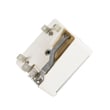


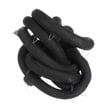
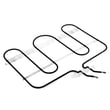
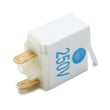
What are the parts of an electric oven?
An electric oven in your Amana AER5845QAS range is built around heating elements, racks, a light, and door components that control heat, airflow, and visibility while cooking. For your model’s exact component names and safety notes, use the AER5845QAS owner's manual.
Main electric oven parts (what they do)
- Bake element: bottom heating element used for most baking and roasting
- Broil element: top heating element used for broiling and browning
- Oven racks: support cookware at different heights
- Oven light and bulb: illuminates the oven cavity (replace only when power is off)
- Oven door assembly: glass, hinges, and gasket that retain heat and allow viewing
- Oven vent: routes hot air out; keep it unblocked for proper baking
Model-specific parts we commonly see replaced on AER5845QAS
| Part | What it affects | Common symptom |
|---|---|---|
| Range bake element WPW10276482 | Baking heat | Oven won’t heat or heats unevenly |
| Range broil element WP74008692 | Broiling heat | No broil, weak browning |
| Range oven rack WP74008763 | Rack support | Rack won’t slide well, bent rack |
| Oven bulb 8009 | Oven light | Light out (bulb burned out) |
| Door gasket WP74009029 | Heat seal | Heat leaks, longer cook times |
Quick safety and care notes (important on electric ovens)
- Keep the oven vent clear; blocking airflow can affect performance.
- Heating elements and interior surfaces can stay hot after cooking; avoid contact until cooled.
- Replace the oven bulb only with power disconnected; a hot bulb can break if touched with a damp cloth.
- Do not cover the oven rack or oven bottom with foil unless the manual specifically directs it.
Why it matters
Knowing the core oven parts helps you troubleshoot faster. For example, if the clock and indicator lights work but the oven does not heat, we focus on heating circuits and controls; if heat leaks, we focus on the door gasket and hinges.
Last updated: February 2026
Where is the igniter on an Amana gas oven?
Amana model AER5845QAS is an electric freestanding range, so it does not use a gas oven igniter. If your oven is not heating, the most common heat-source parts to check are the bake element and broil element; our AER5845QAS owner's manual covers normal oven operation and troubleshooting basics.
What to check instead on an electric Amana AER5845QAS
Before replacing parts, confirm the range is getting full power and the oven is being set correctly.
- Verify the range has 240 VAC at the outlet (a tripped double breaker can leave you with partial power).
- Test Bake and Broil separately to see if one mode works and the other does not.
- Look for visible damage: blisters, cracks, or burn spots on the bake element.
- If the oven overheats or shuts down, check the temperature limit circuit.
- If the oven light behavior is odd, confirm the door switch is working.
Parts that commonly affect oven heating on this model
These are model-matched parts we commonly see involved in “no heat” or weak heat complaints:
| Symptom | Most likely part to check | Example model-matched part |
|---|---|---|
| No bake heat, broil works | Bake element | Range bake element WPW10276482 |
| No broil heat, bake works | Broil element | Range broil element WP74008692 |
| Oven shuts off or won’t heat after overheating | Temperature limit switch | Range oven temperature limit switch 74008715 |
Why it matters
Gas ovens use an igniter to light the burner; electric ovens heat using resistance elements. Looking for an igniter on an electric range can waste time and lead to the wrong repair path. Using the correct diagnosis steps helps you restore safe, consistent baking temperatures faster.
Last updated: February 2026
Why is my Amana electric range oven not working?
If your Amana AER5845QAS electric range oven is not working, the most common causes are a power supply problem (tripped breaker or loose cord connection), the control being in Standby Mode, or a failed heating component such as the bake element. Use the AER5845QAS owner's manual to confirm control settings and basic checks.
Quick checks we recommend first
- Verify the range has power: check the house breaker(s) for a 240V electric range and reset if tripped.
- If the display is blank, press any keypad to wake the control from Standby Mode (the control can go blank after about 15 minutes).
- Make sure you did not set a delayed cook/clean cycle that prevents normal operation.
- Confirm the oven door is fully closed.
- Try Bake at 350°F and watch for heat after preheat starts (no heat points to an element, wiring, or control issue).
Most likely failed parts (and what symptoms look like)
| Symptom | Most likely issue | What to check next |
|---|---|---|
| Oven will not heat in Bake, broil may still work | Failed bake element | Inspect for blisters, cracks, or burn spots; consider replacing the range bake element WPW10276482 |
| Oven heats unevenly or not at all in Broil | Failed broil element | Look for visible damage on the upper element |
| Oven works sometimes, then quits | Overheat protection opening | Check airflow around the oven vent; test the range oven temperature limit switch 74008715 |
| No heat and signs of electrical issue | Loose/burned power connection | Inspect the cord connection area; replace the terminal block WPW10245259 if overheated |
Safe troubleshooting steps (power off when inspecting)
- Turn off power at the breaker before removing panels or touching wiring.
- Check the terminal block area for melted wires or discoloration.
- Visually inspect the bake and broil elements for damage.
- If you use a meter, test elements and safety devices for continuity.
Why it matters
An electric oven needs full 240V power and a working heating circuit. A single failed component (like a bake element, limit switch, or burned terminal block connection) can stop heating completely or cause intermittent operation.
Last updated: February 2026
Why is the display not working on my Amana gas stove?
Your Amana AER5845QAS is an electric freestanding range (not a gas stove); a blank or “dead” display is usually caused by the clock display being turned off, the control going into standby mode, or a power interruption. If it stays blank after a reset, focus on the incoming power connections and the electronic control.
Quick checks (no tools)
- Press any keypad to wake the control; this model can enter standby and leave the display blank.
- Toggle the clock display back on: press and hold Cancel and Clock for 3 seconds (see the AER5845QAS owner’s manual).
- If BAKE or LOCK flashes rapidly, press Cancel.
- Reset power: turn the range breaker off, wait 2 to 5 minutes, then turn it back on.
- Check the home electrical panel; most electric ranges use a 240V double breaker.
If the display is still blank after the reset
A persistent blank display typically points to a power-supply path problem or a failed control.
Common causes to inspect:
- Loose, burned, or arced power cord connections at the terminal block
- Damaged wiring harness or overheated connector
- Failed electronic oven control (clock/control board) or control panel
Part that commonly fixes burned power connections
If you see heat damage where the power cord attaches, replacing the terminal block is a common repair on electric ranges.
What the symptoms usually mean
| What you notice | Most likely area | What it points to |
|---|---|---|
| Display blank but surface elements heat | Control/display circuit | Control board or control panel issue |
| Display blank and nothing works | Incoming power path | Breaker, cord, terminal block, wiring |
| BAKE/LOCK flashing repeatedly | Control fault state | Needs reset; service if it returns |
Why it matters
The display is part of the electronic oven control; when it is blank, you lose reliable timing, temperature management, and fault-code visibility. Checking power and connection points first helps prevent repeat overheating at the wiring.
Last updated: February 2026




