 Installation guide
 Owner’s manual
 Error Codes

How do you reset a Kenmore electric stove?
To reset your Kenmore electric range model 79096019401, turn the range OFF, then shut off power at the breaker (or unplug it) for about 1 minute. Restore power and then reset the clock and any oven settings per the 79096019401 owner's manual.
- Turn all surface burner knobs to OFF.
- If the oven is running, press Cancel/Off (if your control has it).
- Turn OFF the range circuit breaker (or unplug the range).
- Wait 60 seconds.
- Turn the breaker ON (or plug back in).
- Set the clock and reselect your cooking mode.
A power reset clears many temporary control glitches, but it will not repair a failed heating circuit.
| Symptom after reset | Most likely cause | What to check next |
|---|---|---|
| Display is normal again | Control glitch after a power event | Reprogram clock and test Bake/Broil |
| Oven still will not heat | Heating element, wiring, or control issue | Inspect elements; test with a meter |
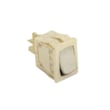
| Surface burner still misbehaves | Switch or element issue | Check the burner switch and element |
| Error code returns | Stored fault condition | Use the error code guide below |
On this model, the most common no-heat causes are a failed bake element, a failed broil element, or a control problem.
- Look for blisters, cracks, or burn spots on the bake element.
- Test the bake element for continuity (power off).
- Check for a loose or burned wire connection at the element terminals.
- If Bake fails but Broil works (or vice versa), suspect the element that is not heating.
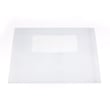
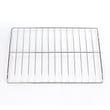
Helpful parts for this model:
The manual warns not to operate the range during a power failure; when power returns, the range can resume operation and you will need to reset the clock and oven function. Following the reset steps above helps you restart safely and confirm whether you have a control glitch or a true part failure.
Related troubleshooting help: Kenmore 790 self-cleaning range error codes
Last updated: February 2026
What is the F1 code on a Kenmore range?
On the Kenmore electric range model 79096019401, an F1 error usually points to a problem the control is detecting in the electronic oven control system, commonly a stuck key/touch input, a wiring issue, or a temperature-sensing circuit problem that makes the control beep and show an F code. See the 79096019401 owner’s manual for model-specific checks and reset steps.
- Turn the range off, then shut off power at the breaker for 1 minute and restore power.
- If the beeping returns immediately, do not keep resetting; the control is still seeing the fault.
- If the code appears during baking or preheat, stop the cycle and let the oven cool.
- If the code appears when you press keys, check for a stuck or unresponsive keypad.
- If you recently moved the range, confirm it is stable and properly installed (anti-tip engaged) using the 79096019401 installation guide.
| Likely cause | What you typically notice | What usually fixes it |
|---|---|---|
| Keypad or control input problem | Beeping, F1 returns when idle or when pressing keys | Control panel/keypad service or replacement |
| Wiring/connection issue | Intermittent F1, may change with heat or vibration | Reseat/repair wiring connections |
| Temperature sensor circuit issue | F1 during heating, uneven temps, shutdowns | Sensor or wiring repair |
An F1 is the range telling you the control is seeing an abnormal signal. Addressing it quickly prevents repeated shutdowns, nuisance beeping, and unreliable oven temperature control.
For Kenmore 790-series ranges, we use the error-code patterns in the Kenmore 790 self-cleaning range error codes guide to narrow down whether the issue is more likely control-input related or temperature-sensing related.
Last updated: February 2026
Where can I find my Kenmore electric range model number?
On Kenmore electric range model 79096019401, the model and serial number are printed on an identification (serial) plate located on the right side of the oven front frame inside the storage or warmer drawer compartment. Use the 79096019401 owner's manual to match the exact plate location to your range style.
Check these common spots first (in order):
- Open the storage drawer (or warmer drawer) and look along the right side of the oven front frame.
- Look at the drawer opening frame (the front frame area the drawer slides into).
- If your model uses a front lower panel instead of a drawer, remove or open that panel and check the same right-side frame area.
- Record both the model number and serial number exactly as shown.
- Turn the range off and let it cool.
- Pull the storage drawer fully open (or remove it if needed).
- Use a flashlight to read the plate on the right-side front frame.
- Write the numbers down or take a clear photo.
The model number confirms the exact Kenmore range design and wiring configuration, so we can match the correct parts (such as a bake element, surface element control switch, or oven light bulb) and the correct troubleshooting steps.
| Item | Example format | Used for |
|---|---|---|
| Model number | 790.9601 (may include a color suffix) | Parts lookup and diagrams |
| Serial number | Letters and numbers | Production details and service history |
Last updated: February 2026
Why is my Kenmore Elite oven not working?
If your Kenmore electric range model 79096019401 oven is not working, the most common causes are a power supply issue, a control fault (often shown as an F code), or a failed heating component such as the bake element. Start with the quick checks in the 79096019401 owner's manual.
- Confirm the range has power; check the house breaker(s) for a tripped 240V circuit.
- If there was a power outage, turn the range off; when power returns, reset the clock and oven function.
- If the control is beeping and showing an F code, press STOP/CLEAR to clear the display.
- Make sure you are using the correct oven mode (Bake vs. Broil) and temperature setting.
- If the oven light is out, tighten or replace the bulb; a burned-out light does not stop heating.
On model 79096019401, an oven that will not heat usually points to a failed heating element or a control-related issue.
- Bake element: Look for blisters, cracks, or a separated spot; replace if damaged. Consider the frigidaire range bake element 316075103 if your bake element is the failed part.
- Broil element: If broil will not heat (or preheat is very slow), inspect the broil element for visible damage.
- Control fault: Repeated F codes after clearing can indicate a problem the control is detecting (sensor, wiring, or control).
| Symptom | Most likely cause | Best first action |
|---|---|---|
| Entire range dead (no display) | Power supply problem | Check breaker, outlet, cord connection |
| Display works but oven will not heat | Failed bake element or control fault | Inspect bake element; clear any F code |
| Beeping with F code | Electronic control detected a fault | Press STOP/CLEAR; then retry Bake |
| Broil smokes excessively | Door not at broil stop position or rack too high | Open to broil stop position; reposition rack |
An electric oven needs stable 240V power and a working heating circuit. A tripped breaker, an active fault code, or a burned-out bake element can stop heating completely or cause erratic temperatures.
Last updated: February 2026







