Owner’s manual
 Error Codes



Does my Samsung dishwasher have a filter?
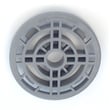
Yes. Your Samsung DW80F600UTB dishwasher uses a self-cleaning filter system that keeps food waste inside while the dishwasher runs, then drains it out automatically with the wash water. For care and cleaning details, follow the DW80F600UTB owner's manual.
This dishwasher is designed so you typically do not need to remove and hand-clean a filter after normal use.
- Food soil is managed internally during operation
- Waste is flushed out during draining
- Routine performance issues usually point to a drain or spray circulation problem, not a “dirty filter”
Even with a self-cleaning system, debris can still cause symptoms that feel like a filter problem.
- Standing water in the bottom after a cycle
- Grinding or rattling noises during drain
- Poor cleaning (grit left on dishes)
- Slow draining or intermittent draining
- Bad odor that returns quickly after cleaning
| Symptom | Most common cause | What to check first |
|---|---|---|
| Not draining | Drain path restriction | Air gap or garbage disposal inlet, then hose routing |
| Water left in tub | Drain pump issue or blockage | Sump area for debris, then pump operation |
| Poor cleaning | Spray circulation issue | Spray arms and water feed path |
| Leaking into base | Leak detection triggered | Base pan moisture and source of leak |
If you’re chasing a no-drain issue, the dishwasher not draining video walks through the most common checks.
Knowing this model is self-cleaning helps you avoid unnecessary disassembly and focus on the real causes of poor cleaning or draining, such as a blocked drain hose, a failing drain pump, or a water inlet problem.
Last updated: February 2026
How do I force reset my Samsung dishwasher?
For a Samsung DW80F600UTB dishwasher, the most reliable “force reset” is a power reset: turn the dishwasher off at the breaker (or unplug it) for 5 minutes, then restore power and start a cycle. If you need to stop a running cycle, use the built-in cancel and drain function.
- Power reset (best for glitches): Switch the dishwasher circuit breaker OFF for 5 minutes, then ON.
- Cancel and drain (best when it is stuck mid-cycle): Hold Start/Drain for 3 seconds to cancel the cycle and drain.
- Restart after an error code: After a power reset, start a new cycle and watch the display for an information code.
- Turn the dishwasher OFF.
- Turn the dishwasher breaker OFF (or unplug the unit if accessible).
- Wait 5 minutes.
- Restore power.
- Select a cycle and press Start/Drain before closing the door.
A “reset” will not fix a hard fault like a water supply problem, drain restriction, or leak detection.
- Confirm the water supply valve is open.
- Check the drain hose for kinks or clogs.
- If the display shows an information code, use our Samsung dishwasher error codes guide to match the code to the likely cause.
- If the unit will not start at all, a door latch or switch problem can prevent operation; the dishwasher door switch dd81-02132a is a common part involved in door-closed detection.
| Situation | Best action | What it does |
|---|---|---|
| Control panel acting odd | Power reset (5 minutes) | Clears temporary control glitches |
| Stuck mid-cycle | Hold Start/Drain 3 seconds | Cancels and drains |
| Error code keeps returning | Power reset, then diagnose code | Points to the failing system |
Resetting correctly prevents repeated stops and helps you tell the difference between a temporary control issue and a real problem (like water supply, draining, or a door-closed signal). For model-specific button behavior and troubleshooting steps, follow the DW80F600UTB manual.
Last updated: February 2026
What are common problems with DW80F600UTB?
Common problems we see with the Samsung DW80F600UTB dishwasher include leaking or overfilling, lights flashing with an error code, and draining issues (water left in the tub). Many of these trace back to loading, a clogged drain path, or a failed sensor, pump, or valve; use the DW80F600UTB owner's manual to match symptoms to checks.
- Leaking: water in the base, door not sealing, or a leak detection event
- Overfilling: inlet valve not closing, water level error, or control-related fault
- Lights flashing or blinking: an error code tied to water level, leakage, or a functional error
- Not draining: clogged drain hose, obstruction in the pump chamber, or a weak drain pump
- Poor cleaning: clogged spray/nozzle holes or spray arms blocked by dishes
- Reset the cycle: hold the Start/Drain buttons for 3 seconds to cancel and drain (if applicable), then restart.
- Confirm loading is not blocking spray: after loading, rotate the nozzles by hand to ensure nothing interferes.
- Clean spray/nozzle holes: remove debris that can reduce wash pressure.
- Check the drain path: look for kinks or clogs in the drain hose and clear the sink/disposer connection.
- Level the dishwasher: an unlevel unit can contribute to performance and water handling issues.
| Symptom | Common part area | Example part for DW80F600UTB |
|---|---|---|
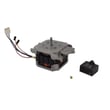
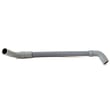
| Won’t drain, water left in tub | Drain system | Dishwasher drain pump (DD81-01527A) or dishwasher drain hose (DD67-00059A) |
| Leaking or “leakage” error | Leak detection | Dishwasher leak detector sensor (DD94-01062A) |
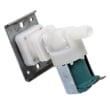
| Overfilling or not filling correctly | Water inlet | Dishwasher water inlet valve (DD62-00084A) |
When lights flash, treat it like an error-code event and follow the troubleshooting steps and safety actions listed in the DW80F600UTB owner's manual. For code lookups and plain-English explanations, use our Samsung dishwasher error codes guide.
Catching a clog, blocked spray arm, or early drain issue quickly helps prevent standing water, poor cleaning, and repeat cycle cancellations. It also helps you avoid replacing parts that are still good.
Last updated: February 2026