Error Codes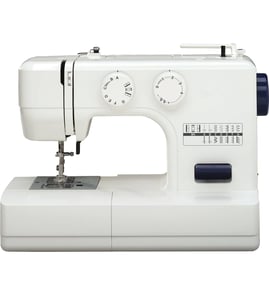
How can I find out how much my sewing machine is worth?
Your Brother XL-3010 sewing machine is typically valued based on real-world selling prices for the same model in similar condition, plus what accessories are included. For most modern mechanical machines, the price is driven more by working condition and completeness than by age.
Use recent, completed sales of the same model as your baseline, then adjust for condition and what’s included.
- Confirm the exact model number: XL-3010
- Check whether it sews smoothly (forward and reverse) and whether the needle and feed dogs move
- Note what’s included: foot pedal, power cord, bobbins, presser feet, case/cover
- Compare completed sales (not asking prices) for “Brother XL-3010”
- Adjust up or down based on cosmetic condition and whether it needs service
If you can answer these clearly, you can price the machine more accurately.
| Item | What to check | Value impact |
|---|---|---|
| Stitch quality | Even stitches, no skipping, no birdnesting | High |
| Drive system | Runs without knocking, binding, or burning smell | High |
| Controls | Stitch selector changes stitches correctly | Medium |
| Electrical | Powers on reliably; pedal speed is smooth | High |
| Completeness | Original accessories and manuals | Medium |
Most used mechanical sewing machines sell in a modest range unless they are collectible, rare, or fully refurbished.
- Non-working or “for parts”: lowest value
- Working but needs cleaning/tune-up: low to mid value
- Clean, fully working, includes accessories: mid value
- Recently serviced with proof: higher end of the typical range
A sewing machine’s resale value is mainly about buyer confidence. If the machine runs quietly, forms consistent stitches, and includes the foot control and accessories, it sells faster and for more.
If you’re troubleshooting performance before selling (skipping stitches, sluggish running, or not turning on), use our DIY resources to diagnose common issues first; see sewing machine repair-guides landing page.
Last updated: February 2026
How to thread a bobbin in Brother XL-3010?
To thread the bobbin on a Brother XL-3010, we place a correctly wound bobbin in the bobbin case (so it unwinds in the correct direction), pull the thread into the bobbin-case slit and under the tension spring, then draw the thread tail out and reinstall the cover before bringing up the bobbin thread with the handwheel.
- Turn the power switch off and raise the needle to its highest position.
- Remove the bobbin cover and take out the bobbin.
- Insert the wound bobbin so the thread unwinds smoothly (no jerking or snagging).
- Pull the thread into the bobbin-case slit, then guide it under the tension spring.
- Pull 4 to 6 inches of thread tail out; pass it through the cutter slot (if your cover has one) to trim cleanly.
- Reinstall the bobbin cover.
- Hold the upper thread tail with light tension.
- Turn the handwheel toward you one full turn until the needle goes down and comes back up.
- Pull the upper thread to lift the bobbin thread loop; pull both thread tails under the presser foot and toward the back.
- Rewind the bobbin evenly; lumpy winding causes jams.
- Rethread the bobbin through the slit and under the tension spring; that step controls bobbin tension.
- Use the correct needle size and install it fully seated; a bent or backward needle causes skipped stitches.
- Clean lint from the bobbin area; lint buildup can make the machine “lock up.”
| Symptom | Most common cause | What to do first |
|---|---|---|
| Birdnesting under fabric | Upper thread not in tension discs | Rethread upper path with presser foot up |
| Bobbin thread breaks | Bobbin not under tension spring, burrs, lint | Rethread bobbin path; clean bobbin area |
| Machine locks up | Thread jam in hook/bobbin area | Remove jam; rethread both paths |
| Skipping stitches | Needle issue or threading issue | Replace needle; rethread |
Correct bobbin threading is what stabilizes lower-thread tension. If the thread is not seated in the slit and under the tension spring, you will see looping, tangles, thread breaks, and inconsistent stitch formation.
For related troubleshooting, we use these guides often: sewing machine bobbin thread breaks and sewing machine locks up.
Last updated: February 2026
What does the word XL-3010 mean?
On the Brother XL-3010 mechanical sewing machine, XL-3010 is the model identifier, not a word with a single dictionary definition. It is used to match the correct sewing machine parts, diagrams, and repair information for your exact machine.
Manufacturers use model numbers as a shorthand for a product family plus a specific version.
- XL: commonly a series or family prefix used by the brand
- 3010: commonly the specific model within that series
- Together (XL-3010): the exact model you should use when looking up parts and troubleshooting steps
“XL” can mean different things in other contexts, but those meanings do not identify your sewing machine.
| Context | What “XL” can mean | Applies to Brother XL-3010? |
|---|---|---|
| Clothing sizes | Extra large | No |
| Roman numerals | 40 | No |
| Sewing machine model prefix | Product series/family code | Yes |
Using the full model number helps prevent mismatched parts and wasted time during repairs.
- Confirms you are viewing the correct parts list for Brother XL-3010
- Helps narrow down compatible items (motor, belt, switch, bobbin-area components)
- Improves troubleshooting accuracy when symptoms overlap across models
If your machine is acting up, start with symptom-based troubleshooting for sewing machines. For Brother models that display electronic codes, we also use code lists as a starting point.
Last updated: February 2026
What is the Brother XL-3010 sewing machine?
The Brother XL-3010 is a mechanical (non-computerized) Brother sewing machine designed for basic home sewing, mending, and simple craft projects. It uses manual dials/levers for stitch selection and settings, and it relies on standard maintenance like cleaning lint and changing needles.
A mechanical sewing machine like the Brother XL-3010 uses physical controls instead of an electronic display and programmed menus.
- Stitch selection is typically done with a dial
- Stitch length and width are usually adjusted with separate controls (when equipped)
- Most issues are caused by threading, needle condition, lint buildup, or tension settings
- Repairs often involve serviceable parts like the power switch, motor, or drive belt
The XL-3010 is best for everyday fabrics and straightforward stitching tasks.
| Task | How it typically performs | Tip for best results |
|---|---|---|
| Hemming and mending | Very good | Use the correct needle size for fabric weight |
| Light garment sewing | Good | Re-thread top and bobbin before starting a new seam |
| Crafts and simple décor | Good | Test stitch settings on scrap fabric first |
| Heavy denim or multiple thick layers | Limited | Sew slowly and use a fresh heavy-duty needle |
These quick checks prevent most skipped stitches, thread breaks, and jams.
- Install a new needle (flat side oriented correctly for your needle system)
- Thread the upper path with the presser foot raised (helps tension discs open)
- Wind and insert the bobbin correctly; pull the bobbin thread into the needle plate area
- Set tension to a mid-range starting point, then fine-tune on scrap fabric
- Clean lint from the bobbin area and feed dogs regularly
Knowing the XL-3010 is a mechanical sewing machine helps you troubleshoot correctly: most problems are adjustment or maintenance related, not “error code” related. For general Brother troubleshooting patterns (especially if you also use electronic Brother models), use our Brother electronic error codes resource.
Last updated: February 2026