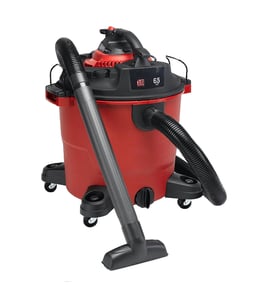

How to switch shop vac from dry to wet?
To switch a Shop-Vac 90L550A from dry pickup to wet pickup, we remove the dry filter and install the correct wet-use setup (typically a foam sleeve filter and, if equipped, a float/cage assembly). This prevents filter damage and helps protect the motor.
Steps to switch from dry to wet (Shop-Vac 90L550A)
- Unplug the vacuum.
- Empty the tank and remove any dry debris.
- Remove the dry filter (cartridge or bag, if used).
- Install the wet-use filter (commonly a foam sleeve) and make sure it seats evenly.
- Confirm the float mechanism (if your unit has one) moves freely and is not stuck.
- Reinstall the lid, then test suction briefly before starting the wet pickup.
What changes between dry and wet pickup
| Item | Dry pickup | Wet pickup |
|---|---|---|
| Main filter | Cartridge or dry filter | Foam sleeve style filter (typical) |
| Collection | Often bag optional | No bag (typical) |
| Protection | Dust filtration | Float shutoff helps prevent overfill (if equipped) |
Quick checks if it will not pick up water
- Verify the hose is fully seated and not cracked.
- Make sure the filter is not clogged or waterlogged.
- Check that the float is not stuck in the “shutoff” position.
- Confirm the lid gasket is sealing; air leaks reduce suction.
- Stop and empty the tank if suction suddenly drops (tank may be full).
Why it matters
Using a dry filter for wet pickup can ruin the filter and restrict airflow, which can overheat the motor. Setting the vacuum up for wet use first keeps suction strong and helps prevent accidental water ingestion.
For model-specific replacement filters, floats, hoses, and seals, we recommend searching by model number 90L550A on Sears PartsDirect.
What are the two holes for on a shop vac?
On the Shop-Vac 90L550A wet/dry vacuum, the two holes (ports) are for airflow: one is the inlet where the hose connects for suction, and the other is the outlet/exhaust where filtered air leaves to cool the motor. Many shop vacs also let you move the hose to the outlet to use it as a blower.
What each port does
- Inlet (suction port): Connect the hose here for normal vacuuming of dust, debris, and liquids.
- Outlet/exhaust port: Air exits here after passing through the filter; this airflow helps keep the motor from overheating.
- Blower function (on models that support it): Moving the hose to the outlet turns the vac into a blower for leaves, sawdust, or clearing a work area.
Quick check: which hole should I use?
| What you want to do | Hose connection | Filter setup (typical) |
|---|---|---|
| Pick up dry debris | Inlet | Dry filter installed |
| Pick up water | Inlet | Wet pickup setup (often no paper filter; use the correct wet filter/float setup) |
| Blow debris away | Outlet | Filter installed to protect the motor |
Why it matters
Using the correct port and filter setup protects the motor and keeps suction strong. If the exhaust is blocked or the wrong filter is used (especially for wet pickup), performance drops and the motor can run hotter than it should.
Tips if suction seems weak
- Empty the tank before it gets too full (wet or dry).
- Check for hose clogs and tight connections at the inlet.
- Confirm the filter is clean, seated correctly, and appropriate for wet vs. dry pickup.
- Inspect the lid gasket and tank rim for leaks.
- If the vac has a blower-cap or diffuser, make sure the outlet is not obstructed.
For replacement parts and model lookups, start with the parts list for your Shop-Vac 90L550A, or search by model number on Sears PartsDirect.
Last updated: February 2026
Do you take off the filter when using a wet vac?
For a Shop-Vac 90L550A wet/dry vacuum, we keep a filter installed for most wet pickup, but we remove any dry-only paper or cartridge filter that is not rated for wet use. After wet pickup, we clean and fully dry the tank and filter before switching back to dry vacuuming.
What to do before wet pickup
- Unplug the vacuum before changing filters or checking the float.
- Remove any dry-only filter (paper, pleated cartridge, or dust bag) that can be damaged by water.
- Install the correct wet-use filter or foam sleeve (if your setup uses one).
- Confirm the float shutoff moves freely and is not stuck with debris.
- Use a wet-rated hose and keep the intake clear of large chunks.
After wet pickup (so it does not smell or rust)
- Empty the tank promptly.
- Rinse and wipe the inside of the tank.
- Let the tank lid, hose, and filter area air-dry completely.
- Clean the filter you used for wet pickup and let it dry fully before storage.
Quick guide: wet vs. dry setup
| Task | Filter installed? | Key note |
|---|---|---|
| Wet pickup (water) | Yes (wet-rated) | Remove dry-only filters first |
| Dry pickup (dust/debris) | Yes (dry-rated) | Use a clean, dry filter |
| Switching wet to dry | Yes (after drying) | Dry tank and filter completely |
Why it matters
Using a dry-only filter during wet pickup can ruin the filter and restrict airflow. Drying the tank and filter after wet use helps prevent odors, corrosion, and motor strain.
Parts and help
We list model-specific replacement parts when available; you can also search by model number 90L550A on Sears PartsDirect to find compatible filters, floats, hoses, and accessories.
Last updated: February 2026
How to turn shop vac into water pump?
You can use a Shop-Vac 90L550A wet/dry vacuum to move water by setting it up for wet pickup and routing the discharge so the collected water drains where you want it. This works best for removing standing water from a basement, hot tub, or pond, but it is not a true continuous-duty pump.
Safe setup for pumping water (wet pickup)
- Unplug the vacuum before changing any setup.
- Install the wet pickup configuration (no dry dust bag; use the correct wet filter or float/cage setup if your unit has one).
- Put the hose on the suction port and place the hose end at the lowest point of the water.
- Use a GFCI-protected outlet and keep the plug and cord connection dry.
- Start the vacuum and monitor the tank level closely.
How to discharge water without carrying the tank
Most shop vacs “pump” water by collecting it in the tank and then draining it out through a drain port or by removing the tank top and pouring it out. If your 90L550A has a drain, you can run a short hose from the drain to a floor drain or outside.
| Method | What it does | Best for |
|---|---|---|
| Tank drain (if equipped) | Controlled emptying without lifting | Basement puddles, hot tub draining |
| Manual dump | Fast emptying, but you carry/tilt the tank | Small jobs, outdoor use |
| Pump accessory (if compatible) | More continuous discharge | Larger volumes of water |
Why it matters
Wet/dry vacuums are designed for pickup, not continuous pumping. Watching the fill level prevents overflow, protects the motor, and helps the float shutoff (if equipped) do its job.
Troubleshooting tips if it will not move water well
- Weak suction: Check for hose clogs, a loose lid seal, or a blocked inlet.
- Shuts off quickly: The float may be closing because the tank is full or the vacuum is tilted.
- Water leaks: Check the drain cap/gasket area and tank cracks.
- Trips breaker: Use a dedicated circuit; inspect the cord for damage.
For model-number help and to look up compatible accessories for Shop-Vac 90L550A, start with the parts list for your model, then search by model on Sears PartsDirect.
Last updated: February 2026


