Error Codes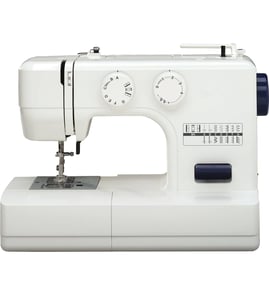
How to thread Brother XL-3030?
To thread a Brother XL-3030 sewing machine, we route the upper thread through the guides and tension path, then use the needle threader (if equipped) to pull a loop through the needle eye. Correct threading prevents skipped stitches, thread breaks, and tangles.
Upper threading steps (XL-3030)
- Turn the power off and raise the presser foot (this opens the tension discs).
- Raise the needle to its highest position using the handwheel.
- Place the spool on the spool pin and secure it with the spool cap (if your setup uses one).
- Follow the thread path through the top guides and down into the tension area.
- Bring the thread up through the take-up lever, then back down through the remaining guides.
- Thread the needle front-to-back (most common) unless your needle system specifies otherwise.
Using the needle threader (common method)
If your XL-3030 has a built-in needle threader, we use it like this:
- Lower the needle threader lever fully.
- Pass the thread under the small hook on the threader.
- Hold the thread tail lightly, then gently release the lever so the hook pulls a loop through the needle eye.
- Pull the loop the rest of the way through and leave a 3 to 4 inch tail.
Quick checks if the thread keeps breaking or nesting
- Presser foot must be up while threading (otherwise tension is wrong).
- Rethread with the needle at the highest position so the take-up lever is captured.
- Use a new, straight needle and match needle size to fabric.
- Confirm the bobbin is installed in the correct direction and the bobbin thread is in its tension slot.
- Reduce upper tension slightly if the top thread is snapping.
Why it matters
On the XL-3030, the tension discs and take-up lever control stitch formation. If the thread misses a guide or the take-up lever, the machine can loop thread underneath, skip stitches, or jam.
Common symptoms and what they point to
| Symptom | Most likely cause | First fix to try |
|---|---|---|
| Loops under fabric | Upper thread not in tension | Rethread with presser foot up |
| Skipped stitches | Dull/bent needle or wrong needle | Replace needle, rethread |
| Bobbin thread breaks | Bobbin not seated or lint | Reseat bobbin, clean area |
For troubleshooting that looks like an electronic fault on some Brother machines, we use the same starting approach: power off, rethread, and check for jams; then reference Brother electronic error codes if your machine displays an error.
Last updated: February 2026
How can I find out how much my sewing machine is worth?
The value of a Brother sewing machine like model XL-3030 depends on condition (fully sewing vs. not running), completeness (foot pedal, accessories, case), and local demand. Most used mechanical machines sell for modest amounts, while clean, fully working units with accessories sell higher.
What to check first (quick appraisal checklist)
- Confirm the exact model number: XL-3030 (label on the machine body)
- Test basic operation: powers on, needle moves, feeds fabric, makes a balanced stitch
- Note what’s included: foot pedal, power cord, presser feet, bobbins, needles, cover/case
- Inspect wear: cracked plastic, damaged handwheel, noisy motor, stiff controls
- Look for maintenance needs: lint buildup, old oil, jammed bobbin area
How to estimate a realistic resale range
Use recent “sold” prices (not asking prices) for Brother XL-3030 and similar Brother mechanical sewing machines. Compare listings that match your machine’s condition and included accessories.
| Condition | What buyers expect | Typical impact on value |
|---|---|---|
| Fully working, clean | Smooth stitching, normal sound, includes pedal | Highest resale potential |
| Working but needs tuning | Minor tension issues, noisy, needs cleaning | Moderate discount |
| Not working | Won’t run, needle won’t move, jams/locks up | Often valued for parts only |
Why it matters
Sewing machine pricing is driven more by “ready to sew today” condition than age. A simple cleaning, correct threading, and a successful stitch test can move your XL-3030 from “parts/repair” pricing into “working machine” pricing.
If it’s not running or acting up
Before you assume it’s low value, troubleshoot common issues like lockups, sluggish running, or a motor that won’t start. We recommend starting with our DIY resources, especially Brother electronic error codes.
Last updated: February 2026
What is the most trouble-free sewing machine?
The most trouble-free sewing machines are simple, well-built mechanical models with fewer electronics to fail. For everyday home sewing, brands with consistently strong reliability include Brother (like your Brother XL-3030), Janome, Juki, and Bernina; choosing the right machine for your fabric types matters as much as the brand.
What “trouble-free” usually means
A low-hassle sewing machine typically has stable stitch formation, smooth feeding, and minimal timing or tension drift over time.
Common traits we see in the most reliable machines:
- Mechanical controls (dials and levers) instead of heavy computerization
- Solid internal frame and tight tolerances (less vibration, fewer knock issues)
- Easy-to-clean bobbin area and accessible lint paths
- Standard needle system and common presser feet (easier setup, fewer fit problems)
- Strong dealer-independent parts availability (belts, motors, switches)
Best choice by user type (quick guide)
| If you mostly sew | Most trouble-free style | Why it stays reliable |
|---|---|---|
| Light to medium fabrics | Mechanical home machine (like XL-3030 class) | Simple drive train, fewer sensors |
| Denim, canvas, multiple layers | Heavy-duty mechanical or semi-industrial | More torque, less stalling |
| Quilting and decorative stitches | Quality computerized model | Convenience features, but more electronics |
How to keep any machine “trouble-free”
Most “problem machines” are actually setup, lint, needle, or thread issues. These steps prevent the most common complaints (skipped stitches, thread breaks, lockups):
- Change needles often; use the correct needle type and size for the fabric
- Rethread the upper path with the presser foot up (opens tension discs)
- Use quality thread; avoid old, fuzzy, or bargain thread that sheds lint
- Clean lint from the bobbin area and feed dogs regularly
- Oil only where your model allows (over-oiling can attract lint)
- Stop immediately if you hear knocking or the machine binds; forcing it can throw timing
Why it matters
A “trouble-free” machine is really a match between build quality and workload. A reliable mechanical machine can feel flawless on garment fabrics but struggle on heavy stacks; a heavy-duty machine can feel rough on delicate materials. Matching the machine to your projects reduces jams, motor strain, and stitch issues.
For troubleshooting reliability symptoms (won’t turn on, locks up, needle won’t move), we use the same proven checks found in our DIY guides, including Brother electronic error codes.
Last updated: February 2026
What are the common problems with Brother sewing machines?
Common problems on a Brother sewing machine like the XL-3030 include thread bunching (a “bird’s nest”), skipped stitches, thread breaking, fabric not feeding, and the machine locking up. In most cases, the fix is basic: correct threading, a fresh needle, proper bobbin setup, and cleaning lint from the hook and feed dogs.
Most common symptoms and what usually causes them
- Thread bunching under fabric: upper thread not seated in the tension path, presser foot up while threading, bobbin inserted incorrectly
- Skipped stitches: bent/dull needle, wrong needle type/size for fabric, needle installed backward or not fully seated
- Thread breaking: tension too tight, poor-quality thread, burrs on needle plate/hook area, incorrect spool cap or spool orientation
- Fabric not moving: feed dogs lowered, presser foot pressure issue (if equipped), lint packed in feed dogs, stitch length set too low
- Machine locks up or handwheel is hard to turn: thread jam in hook area, tangled bobbin thread, needle strike causing debris or a burr
Quick checks we recommend first (fast fixes)
- Rethread the top thread with the presser foot up, then sew with it down.
- Replace the needle (new, straight, fully inserted, flat side oriented correctly for your model).
- Remove and reinstall the bobbin; confirm it unwinds in the correct direction and the thread is in the bobbin tension slot.
- Clean lint from the bobbin area, hook race, and feed dogs (no compressed air into the machine).
- Test tension on scrap fabric; adjust upper tension in small steps.
Symptom-to-solution guide
| Problem you see | Most likely cause | Best first step |
|---|---|---|
| Loops/bird’s nest underneath | Upper threading issue | Rethread with presser foot up |
| Skips stitches | Needle problem | Replace needle; verify type/size |
| Bobbin thread breaks | Bobbin path or tension issue | Reinstall bobbin; clean hook area |
| Fabric not feeding | Feed dogs/lint/stitch length | Raise feed dogs; clean; increase stitch length |
| Won’t turn smoothly | Thread jam | Remove needle plate (if accessible) and clear jam |
Why it matters
Most “machine problems” are actually stitch-formation problems caused by threading, needle condition, or lint buildup. Fixing those first prevents repeated jams that can damage the needle plate, hook area, or bobbin case.
Helpful troubleshooting resources
- For stitch quality issues like missed stitches: sewing machine skipping stitches
- For jams and hard-to-turn handwheel symptoms: sewing machine locks up
- If your Brother model shows electronic codes (not typical on purely mechanical units): Brother electronic error codes
Last updated: February 2026
How do I order Brother sewing machine parts?
To order parts for your Brother XL-3030 mechanical sewing machine, we recommend using the exact model number (XL-3030) to match the correct diagrams and part descriptions before you buy. This helps you avoid ordering the wrong presser foot, bobbin case, needle plate, or drive belt.
How to order the right part (fast and accurate)
- Find the model number on the machine ID plate and match it exactly to XL-3030.
- Identify the system involved: needle and presser foot area, bobbin and hook area, feed dogs, or motor and belt drive.
- Use the parts diagrams to confirm the part’s location and how it mounts (screws, clips, shaft fit).
- Compare your old part to the diagram description (shape, mounting holes, connector style).
- Order using the part listing for this model, or search by model number on Sears PartsDirect.
What details to confirm before you place the order
Small differences can matter on sewing machines, especially around timing and stitch formation.
| What to check | Why it matters | Examples |
|---|---|---|
| Part type | Prevents buying the wrong component | Bobbin case vs hook race cover |
| Fit and mounting | Ensures it installs correctly | Screw hole spacing, shaft size |
| Electrical connection | Avoids compatibility issues | Foot pedal lead, motor terminals |
| Wear pattern | Helps you replace the real cause | Belt glazing, cracked gears |
If you are not sure which part failed
Use the symptom first, then confirm the part in the diagram.
- Machine will not power on: check power cord, foot control, on/off switch
- Motor runs but needle will not move: check drive belt, handwheel engagement
- Knocking or clunking: check hook area for thread jams, worn gears
- Skipping stitches: check needle type/size, needle installation, timing symptoms
Helpful DIY troubleshooting paths:
Why it matters
Ordering by model number and diagram position is the most reliable way to get the correct Brother XL-3030 sewing machine part the first time, especially for stitch-quality parts like the bobbin case, tension components, and feed mechanism.
Last updated: February 2026