 Error Codes





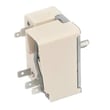

How do I reset my GE oven control board?
For a GE JB480DM2WW free standing electric range, we reset the oven control by canceling the current cycle first, then doing a power reset at the breaker to clear a locked-up keypad or minor control glitch. If the problem returns, the issue is usually power supply, wiring, or a failing control component.
- Press Cancel/Clear once to stop any bake or broil cycle.
- If the keypad is still unresponsive, press and hold Cancel/Clear for about 3 to 5 seconds.
- Turn OFF the range circuit breaker (or unplug the cord if accessible).
- Wait 60 seconds.
- Turn the breaker ON (or plug back in), then set the clock and test Bake.
A reset that only works briefly usually points to an underlying electrical or control issue.
- Check for a tripped breaker that will not fully reset (OFF then ON).
- Make sure the power cord is secure and the outlet is not loose.
- Inspect for heat-damaged wiring at the rear connection point (power must be OFF).
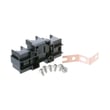
- If you see signs of overheating at the power connection, replace the range terminal block WB17T10011.
- If the display is dead or erratic after a known-good power supply, a control component may be failing.
| Symptom | Most common cause | Best next step |
|---|---|---|
| Display blank, oven dead | No 240V supply, tripped breaker | Reset breaker, verify outlet power |
| Buttons do not respond | Keypad/control glitch | Power reset for 60 seconds |
| Works, then fails again | Loose/burned connection | Inspect and repair wiring/terminal block |
| Error code returns after reset | Heat sensor/control issue | Diagnose circuit, test components |
Resetting clears temporary software lockups, but it does not fix a loose connection or failing electrical part. Catching a hot or damaged power connection early helps prevent repeated shutdowns and protects the range wiring.
For electrical testing during diagnosis, we use a meter and follow how to use a multimeter to test electrical parts video.
Last updated: February 2026
What does F2 on a stove mean?
On the GE JB480DM2WW electric range, an F2 (or F20) error code means the oven control is sensing an overheat or runaway heat condition. In bake mode this is typically triggered when the oven temperature climbs to about 650°F or higher; in self-clean it can be around 915°F or higher.
- Press Cancel/Off to stop heating.
- Keep the oven door closed until the temperature drops.
- If you smell burning wiring or see smoke, turn off the range breaker.
- After it cools, try a short bake test (10 to 15 minutes) and watch for the code returning.
Most F2/F20 events come from a temperature-sensing problem or a control that is driving heat too long.
- Oven temperature sensor circuit issue (sensor out of range, wiring problem)
- Oven control/thermostat problem (control “thinks” the oven is cooler than it is)
- Stuck relay on the control board (less common, but can cause runaway heat)
- Loose or overheated power connection at the back of the range
Turn off the breaker before opening panels.
- Inspect the power cord connection area for discoloration or melted insulation.
- Check for loose, burnt, or broken wires in the rear access area.
- If the code appeared during self-clean, let the range fully cool, then retry normal bake.
Helpful DIY reference: how to use a multimeter to test electrical parts video
These parts are commonly related to overheating symptoms or heat control issues on this model.
| Symptom you notice | What it often points to | Example part for this model |
|---|---|---|
| F2 returns quickly after starting bake | Heat control problem | Range oven control thermostat WB20K10018 |
| Intermittent power, burning smell at rear | Loose/burnt power connection | Range terminal block WB17T10011 |
An F2/F20 code is the range protecting you from unsafe temperatures. Fixing the root cause helps prevent damaged wiring, poor baking performance, and repeat shutdowns.
Last updated: February 2026
What is the electric stove?
An electric stove is a range that uses electricity to create heat for the cooktop and oven. On the GE JB480DM2WW, heat is produced by electric surface elements on top and an electric bake element in the oven, rather than a gas burner.
Electric ranges convert electrical energy into heat through resistance heating. In most homes, the range uses a 240-volt supply for high-heat cooking.
- Cooktop elements heat cookware directly (coil or smooth-top styles)
- The oven uses a bake element (and often a broil element) to heat the cavity
- Temperature is regulated by controls such as a thermostat or timer
- Wiring and connections deliver power safely to heating components
You can usually identify an electric stove by the cooktop style.
| Cooktop style | What you see | Typical behavior |
|---|---|---|
| Coil element | Exposed metal coils | Heats quickly; coils can be replaced individually |
| Smooth-top radiant | Flat glass-ceramic surface | Heats under the glass; stays hot longer after shutoff |
| Halogen (some models) | Flat glass-ceramic surface | Fast response; bright glow when heating |
If you are troubleshooting heat or lighting issues on the GE JB480DM2WW, these model-matched parts are commonly involved:
- Range bake element WB30X46987 (oven not heating or uneven baking)
- Range oven control thermostat WB20K10018 (temperature regulation issues)
- Range terminal block WB17T10011 (power connection problems)
- 40a15bulb 40A15 and range light socket WB08T10026 (oven light problems)
Knowing whether you have an electric stove helps you choose the right replacement parts and safe troubleshooting steps. Electric ranges rely on high voltage and heating elements, so symptoms like “no heat,” “slow heating,” or “oven light out” often point to specific electrical components.
Last updated: February 2026




