Owner’s manual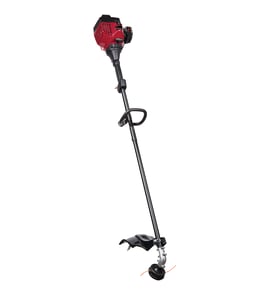


Which is better, .080 or .095 trimmer line?
For the Craftsman 316791970 gas line trimmer, .095-inch line is the better all-around choice because it holds up longer and cuts heavier weeds with fewer breaks; .080-inch line works well for lighter trimming but wears faster. For line type and replacement steps, use the 316791970 owner's manual.
How to choose between .080 and .095
- Choose .095 for thicker weeds, edging along fences, and longer run time between reloads.
- Choose .080 for light grass trimming where you want easier cutting and less load on the head.
- If you frequently hit rocks, chain link, or concrete, thicker line reduces snap-offs.
- If you want a cleaner finish on soft grass, thinner line can feel more precise.
- Use one line size consistently in the head; mixing sizes can cause uneven feed and vibration.
Quick comparison
| Line diameter | Best for | Tradeoff | What you will notice |
|---|---|---|---|
| .080 in | Light grass, touch-up trimming | Breaks sooner | More frequent line changes |
| .095 in | Weeds, heavier trimming, edging | Slightly more drag | Fewer breaks, longer life |
What the manual emphasizes for this model
The 316791970 cutting head is designed around using the correct line for the job and installing it evenly. When you reload:
- Install the glide plate first.
- Feed line through the insertion holes and positioning tunnels.
- Keep both sides the same length to prevent excessive vibration.
Those details are shown in the 316791970 owner's manual.
Why it matters
Using the right diameter line reduces vibration, improves cut quality, and helps protect wear items like the clutch and flexible drive system from unnecessary stress during heavy trimming.
Last updated: February 2026
Is TrimmerPlus compatible with Craftsman?
Yes. Craftsman attachment-capable trimmers that use the Craftsman Convertible coupler system are designed to accept compatible add-on attachments; the Craftsman 316791970 uses this coupler style, so TrimmerPlus-type attachments that connect through a release-button coupler are typically compatible.
How to confirm compatibility on model 316791970
Use the coupler features described in the 316791970 owner's manual to match what your attachment requires.
- Verify your trimmer has a release button on the coupler
- Confirm the attachment shaft slides straight into the coupler and locks
- Use the primary hole for attachments (not the 90° edging hole)
- Tighten the coupler knob fully after the button snaps in
- Shut the engine off before installing or removing any attachment
Coupler fit checklist (what must match)
| What to check | What you want to see | Why it matters |
|---|---|---|
| Coupler style | Release-button, knob-tightened coupler | Ensures the attachment can lock in place |
| Locking point | Button snaps into the primary hole | Prevents wobble and drive disengagement |
| Installation | Attachment inserts straight, no forcing | Avoids shaft and coupler damage |
| Removal | Button holds in while you pull attachment out | Prevents bending the latch mechanism |
Why it matters
Using an attachment that does not match the coupler can cause poor power transfer, vibration, or the attachment working loose. On the Craftsman 316791970, correct alignment and locking at the primary hole is the difference between safe operation and repeated drive/coupler wear.
Last updated: February 2026
How to replace trimmer head on Craftsman Weedwacker?
On the Craftsman 316791970 gas trimmer, you typically replace the trimmer head by shutting the engine off, locking the shaft/head so it cannot spin, then unthreading the head carefully to avoid cross-threading when installing the new one. Use the 316791970 operator’s manual for the exact head style and locking method.
Before you start (safety and setup)
- Turn the engine off and let hot parts cool.
- Disconnect the spark plug boot so the trimmer cannot start accidentally.
- Work on a flat surface; stabilize the shaft housing.
- Wear gloves and eye protection.
- Clean debris from the cutting head area so threads seat correctly.
Trimmer head replacement steps (general method)
- Lock the head/shaft: Many heads have a locking hole or slot; insert a screwdriver or locking pin to keep the head from turning.
- Remove the old head: Turn the head in the loosening direction for your head type (some are reverse-threaded). Keep steady pressure so you do not strip threads.
- Inspect the threads: Wipe the male and female threads clean; remove grass wrap and dirt.
- Install the new head by hand first: Thread it on slowly by hand to prevent cross-threading.
- Tighten securely: Hand-tighten firmly, then re-engage the lock and snug as directed in the manual.
Quick checks after installation
- Spin the head by hand; it should rotate smoothly without wobble.
- Confirm the head sits flush and does not rock on the shaft.
- Start the trimmer briefly; listen for vibration or rattling.
- If the head loosens during use, recheck thread direction and seating.
Common symptoms and what they usually mean
| Symptom | Most common cause | What to do |
|---|---|---|
| Head will not thread on | Cross-threading or debris in threads | Clean threads; restart by hand only |
| Excess vibration | Head not seated or damaged | Reinstall; replace head if cracked |
| Head keeps loosening | Wrong tightening direction or worn threads | Verify thread direction; inspect shaft threads |
Why it matters
A properly installed trimmer head reduces vibration, protects the drive components, and helps the line feed and cutting performance stay consistent during edging and trimming.
Last updated: February 2026
Why is my Craftsman Weedeater not starting?
If your Craftsman gas line trimmer model 316791970 will not start, the most common causes are stale fuel, a fouled spark plug, a clogged air filter, or a flooded engine. Start with basic fuel and ignition checks, then move to airflow and exhaust restrictions using the steps in the 316791970 owner's manual.
Quick checks that fix most no-start problems
- Move the stop switch to ON/RUN.
- Use fresh unleaded fuel; if fuel is old, drain and refill.
- If the engine smells strongly of fuel, it may be flooded; wait a few minutes, then try starting again.
- Inspect the spark plug boot for a tight connection.
- Check for heavy grass or debris packed around the cutting head and shield; keep the unit clean.
Parts to inspect first (common no-start culprits)
A restricted air supply or weak spark can prevent ignition.
- Replace a dirty air filter: mtd lawn and garden equipment engine air filter 753-05254
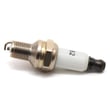
- Replace a worn or fouled spark plug: lawn & garden equipment spark plug 794-00082
Safety steps before troubleshooting
The manual directs you to stop the unit, switch the engine off, and disconnect the spark plug before maintenance or repair.
- Turn the engine OFF and let hot parts cool
- Disconnect the spark plug wire
- Work in a well-ventilated area away from fuel vapors
Symptom-to-cause guide
| What you notice | Likely cause | What to do |
|---|---|---|
| No pop or sputter at all | No spark, switch off | Check switch, plug connection, replace spark plug |
| Starts then dies | Fuel delivery or air restriction | Replace air filter, refresh fuel |
| Strong fuel smell, wet plug | Flooded engine | Dry/replace plug, wait, restart with less choke |
| Very loud, poor running | Muffler/spark arrestor issue | Clean/inspect muffler area; replace if faulty |
Why it matters
A gas trimmer needs the right mix of fuel, air, and spark. A clogged air filter can make the engine run too rich, and a weak spark plug can stop combustion entirely; fixing these first prevents unnecessary carburetor adjustments and repeat no-starts.
Last updated: February 2026