Owner’s manual



Is 4.8 cubic feet a large capacity washer?
Yes. A 4.8 cubic feet washer is considered large capacity, and it is a good fit for bigger loads and bulky items. With your GE GFW480SSK0WW front-load washer, proper loading still matters because overloading can reduce cleaning performance and can pinch items against the door gasket (boot); see the owner's manual.
What “large capacity” means in practical terms
Most washers in the 4.5 to 5.0 cubic feet range are considered large capacity. In day-to-day use, that typically means:
- Fewer loads per week for families
- Better room for towels, jeans, and mixed loads
- More space for bulky items (as long as you do not pack the drum tight)
- Less chance of out-of-balance issues when you wash full, even loads
How to load a 4.8 cu. ft. front-load washer for best results
Even with a large drum, we recommend loading for tumble space, not maximum “stuffed” volume.
- Load items loosely so they can lift and tumble
- Mix similar-weight items (avoid one heavy item by itself)
- Do not force the door closed on a packed load
- Check the door boot area for small items that can get trapped
- Use the cycle and soil level that match the fabric type
Quick guide: capacity vs. what to watch for
| Washer capacity | Common label | What to watch for |
|---|---|---|
| Under 4.5 cu. ft. | Standard | More loads; bulky items are tighter |
| 4.5 to 5.0 cu. ft. | Large | Avoid overpacking; leave tumble room |
| Over 5.0 cu. ft. | Extra-large | Bulky loads fit easier; still do not overload |
Why it matters
Capacity affects convenience, but loading technique affects results. Overloading a front-load washer can lead to poorer wash action and can trap clothing between the door glass and the gasket, which can damage fabrics and the door seal over time.
Last updated: February 2026
Where is the filter on my GE GFW480SSK0WW washing machine?
On the GE GFW480SSK0WW front-load washer, the drain pump filter is typically behind the small access door at the lower front of the cabinet. Open that panel to reach the filter cap; turn it slowly counterclockwise to drain residual water, then remove and clean the filter.
How to access and clean the drain pump filter
- Unplug the washer.
- Place a shallow pan and towels under the lower front access area.
- Open the lower access door (toe panel access).
- Turn the filter cap slowly counterclockwise to let water drain out first.
- Remove the filter, clear lint, coins, and debris, then rinse it.
- Reinstall the filter cap snugly (do not overtighten) and close the access door.
What to check while you are there
- Look for small items (coins, hair pins, screws) that can jam the pump.
- Inspect the filter O-ring for nicks or flattening.
- Check the pump cavity for broken glass or fabric strings.
- Confirm the access door seals and closes fully.
- Run a quick rinse and drain to confirm there are no leaks.
Symptoms that point to a clogged filter (and related parts)
| Symptom | What it often means | Part that is commonly involved |
|---|---|---|
| Won’t drain or drains slowly | Filter clogged or pump obstructed | Washer drain pump WH23X10051 |
| Loud buzzing during drain | Pump impeller jammed by debris | Washer drain pump WH23X10051 |
| Water left in drum after cycle | Restriction in filter, pump, or drain path | Washer drain pump WH23X10051 |
Why it matters
A clean pump filter helps your GFW480SSK0WW drain correctly, prevents standing water and odors, and reduces strain on the drain pump. If the washer still will not drain after cleaning the filter, the next step is usually checking the pump and drain path.
For model-specific safety notes and operating guidance, follow the steps and cautions in the GFW480SSK0WW owner’s manual.
Last updated: February 2026
How to force GE washer to drain and spin?
To force your GE GFW480SSK0WW washer to drain and spin, select the Drain + Spin cycle and start it; this cycle is designed to pump out water and then spin at the speed you choose. For a rinse first, use Rinse + Spin instead (cycle details are in the owner's manual).
Fast steps to drain and spin
- Press Power to wake the control.
- Turn the cycle selector to Drain + Spin.
- Choose a Spin speed (Extra High, High, Medium, Low, or No Spin).
- Press Start/Pause to begin.
- If the washer is paused because the door is open, close the door and press Start/Pause again.
If you want “drain only” (no rinse)
On this model, Drain + Spin is the correct choice when you need the washer to pump out water and extract as much water as possible from a wet load.
If the load is still wetter than normal after the cycle:
- Pause, open the door, and redistribute the load evenly.
- Run Drain + Spin again.
Common reasons it will not drain or spin
| Symptom | Most common cause | What to check first |
|---|---|---|
| Won’t drain | Pump filter clogged | Clean the pump filter per the owner's manual |
| Won’t spin up | Load out of balance | Redistribute items, then run Drain + Spin |
| Drains slowly | Kinked drain hose | Straighten hose; make sure washer is not sitting on it |
| Water returns | Drain hose pushed too far into standpipe | Leave an air gap at the drain |
Parts that often fix drain and spin problems
If troubleshooting points to a failed component, these model-matched parts are commonly involved:
- Washer drain pump WH23X10051 (no drain, loud pump, intermittent draining)
- Washer water-level pressure switch WH12X10595 (overfilling, incorrect water level sensing)
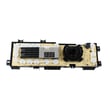
- Washer electronic control board WH12X26034 (cycle won’t advance, erratic drain/spin commands)
Why it matters
Running Drain + Spin is the quickest way to remove standing water and reduce a soaking-wet load. It also helps after an out-of-balance event, when the washer may not reach full spin speed and clothes come out wetter than usual.
Last updated: February 2026