Installation guide
 Owner’s manual











How do I know if my Whirlpool dryer thermal fuse is blown?
On a Whirlpool WED8500DW4 dryer, a blown thermal fuse commonly shows up as a dryer that will not start, or a dryer that runs but will not heat. The sure way to know is a continuity test with a multimeter; a good fuse reads closed (near 0 ohms).
Quick symptoms to look for
- Dryer will not run even though the door is closed and you press Start
- Drum turns but there is no heat (electric models can still tumble with a heat problem)
- Cycle stops unexpectedly after starting
- You recently had poor airflow (long dry times, “Check Vent” message, hot cabinet)
How to test the thermal fuse (basic steps)
- Unplug the dryer (and shut off gas if you have a gas model).
- Access the fuse location shown in the WED8500DW4 owner’s manual.
- Remove at least one wire from the fuse terminal.
- Set your multimeter to continuity or ohms.
- Test across the fuse terminals.
What the meter reading means
| Meter result | What it means | What to do next |
|---|---|---|
| Beep or ~0 ohms | Fuse is good | Keep troubleshooting heat or power issues |
| No beep or OL/infinite | Fuse is blown | Replace the fuse and correct the airflow problem |
Why the fuse blows (and why it matters)
The thermal fuse is a one-time safety device; it opens when the dryer overheats. Overheating is most often caused by restricted venting, which also causes long dry times and can trigger “Check Vent” messages.
Don’t miss these common look-alikes
The manual notes that an electric dryer can tumble but not heat if a household fuse is blown or a breaker trips (many electric dryers use two fuses/breakers). We recommend checking these before replacing parts. See the troubleshooting section in the WED8500DW4 owner’s manual.
Parts that are commonly involved
If your test shows the fuse is open, match the replacement by model. For this model page, a commonly listed fuse is the thermal fuse W10909685.
Last updated: February 2026
What's the average lifespan of a Whirlpool dryer?
A Whirlpool dryer typically lasts 10 to 13 years with normal household use. For the Whirlpool WED8500DW4, consistent airflow maintenance and avoiding chronic overheating are the biggest factors that help it reach the high end of that range; see the WED8500DW4 use and care guide for model-specific care and operating tips.
Typical lifespan ranges (what to expect)
Most electric dryers like the WED8500DW4 fall into these practical ranges:
| Usage and care level | Typical lifespan | What usually ends the dryer’s life |
|---|---|---|
| Light use, excellent venting | 13+ years | Wear parts (rollers, belt, idler), motor wear |
| Average family use | 10 to 13 years | Heat system stress, airflow restrictions, wear parts |
| Heavy use, poor venting | Under 10 years | Overheating, repeated thermal fuse trips, motor strain |
What extends the life of your WED8500DW4
- Clean the lint screen every load.
- Keep the venting efficient; long runs and too many turns increase drying time and heat stress.
- Use 4-inch venting and keep it clear of lint buildup.
- Avoid overloading; it strains the drum support system and drive components.
- Use sensor (Automatic) cycles when possible; they shut off when the selected dryness level is reached.
Parts that commonly wear before the dryer “wears out”
Replacing wear items on time often prevents bigger failures and keeps the dryer running quietly.
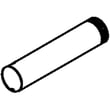
- Squealing or thumping: consider the dryer drum support roller WPW10314173
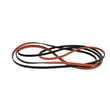
- Drum not turning or slipping: check the belt and idler system (a kit can be a good value)
- No heat or overheating symptoms: inspect the heating circuit and safety devices
Why it matters
A dryer that takes longer to dry usually runs hotter and longer than it should. That extra runtime accelerates wear on the motor, drum support rollers, belt, and heat components, which shortens overall lifespan.
Last updated: February 2026
What are the common problems with Whirlpool dryers?
Common Whirlpool dryer problems (including the Whirlpool WED8500DW4) are no-start conditions, no heat, long dry times from restricted venting, and drum or belt drive issues that stop tumbling or cause squealing. We use the troubleshooting steps in the WED8500DW4 owner's manual to narrow the cause fast.
Most common symptoms and what they usually point to
- Dryer will not start: door not fully closed, Start not pressed firmly, power supply issue (fuse/breaker), control not set to a running cycle
- No heat or weak heat: home power supply issue (often shows an L2 code), heating circuit problem
- Long dry times: vent crushed or blocked (often shows Check Vent on the airflow screen)
- Not spinning or thumping/squealing: worn belt, idler pulley, drum rollers, or blower wheel obstruction
- Stops mid-cycle: overheating from poor airflow, thermal fuse opening, or temperature sensing issues
Quick checks we recommend first (before replacing parts)
- Confirm the cycle is a Timed Dry heated cycle (not Air Only) and press Start firmly.
- Verify the dryer is plugged in and the household fuse is intact or the circuit breaker is not tripped.
- Make sure the door is fully closed.
- If the display shows L2, focus on the home power supply (heater not turning on).
- If the airflow screen shows Check Vent, inspect and clear the entire vent run.
Parts that commonly fail for these symptoms (examples for WED8500DW4)
| Symptom | Common wear item | Example part for this model |
|---|---|---|
| Squealing, rumbling, poor tumbling | Drum support roller | Dryer drum support roller WPW10314173 |
| Drum not turning | Drum belt | Belt-4 rib, W10849499 |
| No heat | Heating element | Dryer heating element WP3387747 |
| Runs but shuts down from overheating | Thermal fuse | Thermal fuse W10909685 |
Why it matters
A restricted vent can cause long dry times and overheating; that can lead to repeated shutdowns and blown safety parts. Fixing airflow and power issues first prevents unnecessary part replacement.
Last updated: February 2026