 Installation guide
 Owner’s manual
 Error Codes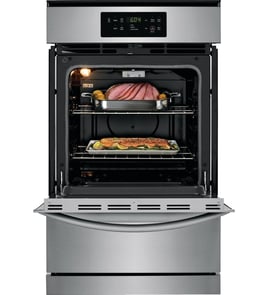






How do I know which Frigidaire oven model I have?
Your Frigidaire wall oven model number is printed on the oven’s serial plate (rating plate). On model FGB24T3EBF, the manual points you to the serial plate location so you can record the model and serial numbers for future parts lookup and service.
Where to find the model and serial plate
Check these common locations on Frigidaire wall ovens like FGB24T3EBF:
- Along the oven frame behind the door (open the oven door and look around the front frame)
- On the side trim area near the door opening
- On the lower front area behind the bottom trim or lower access area (varies by installation)
- In some installations, on the frame edge that is easiest to see with the door open
Use the plate to capture both identifiers:
| What to look for | Why it matters |
|---|---|
| Model number (example: FGB24T3EBF) | Ensures parts diagrams and replacement parts match your exact oven |
| Serial number | Helps confirm production details when ordering certain parts |
| Purchase date (if known) | Useful for maintenance records and service history |
Quick steps we recommend
- Open the oven door and scan the front frame edges for a printed label or metal plate.
- Write the model and serial number exactly as shown (letters and numbers).
- Take a clear photo of the plate for future reference.
- Use the model number when selecting parts and troubleshooting steps in the FGB24T3EBF owner’s manual.
Why it matters
Frigidaire wall ovens often share similar styling across multiple model numbers, but parts like the control board, igniter, temperature sensor, and trim pieces can differ. Using the exact model number prevents ordering the wrong part and speeds up troubleshooting.
Last updated: January 2026
Are there wall ovens that are gas?
Yes. Gas wall ovens exist, and your Frigidaire FGB24T3EBF is a gas wall oven model. Gas wall ovens still use household electricity for controls, grounding, and ignition, so proper electrical connection and grounding are part of normal installation and operation (see the FGB24T3EBF installation guide).
What “gas wall oven” means in real use
A gas wall oven uses a gas burner for heat, but it typically relies on electricity for the igniter system, oven light, and electronic controls.
Common characteristics:
- Gas supply line with a shut-off valve
- Electrical outlet for a grounded plug (often 3-prong)
- Ignition system that lights the burner when you set a temperature
- Venting through the upper trim area (do not block the vent)
What to check if you are shopping or confirming fuel type
If you are comparing models or verifying what you have, these are the quickest identifiers.
- Look for a gas shut-off valve and flexible gas connector behind or near the oven
- Confirm the oven must be plugged into a grounded receptacle
- Check the rating plate for “gas” fuel type
- Review installation requirements for gas code compliance
- Verify the oven ignites and cycles to hold temperature
| Feature | Gas wall oven | Electric wall oven |
|---|---|---|
| Primary heat source | Gas burner | Electric bake/broil elements |
| Needs electrical power | Yes (controls/ignition) | Yes (all heating and controls) |
| Typical “no heat” culprit | Igniter or gas supply | Element, relay, thermal cutout |
Why it matters
Fuel type affects installation requirements, troubleshooting, and parts. For example, a gas wall oven that will not heat often points to ignition or gas supply issues, while an electric wall oven more often points to a failed element or power supply problem.
Related help for Frigidaire wall ovens
If you see an error code on the display, use our Frigidaire manual clean wall oven error codes reference to match the code to likely causes and next steps.
Last updated: January 2026
What would cause a Frigidaire oven to stop working?
A Frigidaire gas wall oven like model FGB24T3EBF can stop working because it is not getting power, the electronic control detects a fault (often shown as an “F” code with beeping), or an ignition or temperature-sensing component fails. Start with power and error-code checks, then move to heat and ignition diagnostics using the FGB24T3EBF owner’s manual.
Quick checks we recommend first
- Press CANCEL to stop beeping and clear an “F” code; then reprogram the oven and see if the fault returns.
- Confirm the power cord is fully seated in the outlet (a gas oven still needs electricity for controls and ignition).
- Make sure the oven is not in a locked-out state after a fault.
- If the oven was recently installed or moved, verify the unit is level and properly set in the cabinet cutout.
- If you smell gas, do not operate the oven; shut off the gas supply and follow the safety steps in the FGB24T3EBF installation guide.
Most common causes (and what they look like)
| Symptom | Likely cause | What to do next |
|---|---|---|
| Display beeps and shows “F” | Electronic control fault | Clear with CANCEL; if it returns, diagnose the control circuit and wiring |
| Oven will not heat but has power | Weak/no ignition at burner | Check igniter operation; replace if not glowing/lighting reliably |
| Temperature is erratic | Sensor/bulb issue or contamination | Inspect sensor area; avoid cleaner film on the sensing bulb |
| No interior light | Bulb or socket failed | Replace bulb first, then inspect socket |
Parts that commonly fix “stopped working” symptoms
These are model-matched parts we often see involved in no-heat or no-operation complaints:
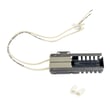
- Frigidaire range oven burner igniter 5303935066 (ignition for the oven burner)
- Kenmore range oven temperature sensor 316217005 (temperature feedback to the control)
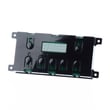
- Frigidaire wall oven control board 316455461 (manages bake/broil functions and error detection)
- Range oven light bulb 316538904 and range oven light socket 316116400 (if the issue is lighting only)
Why it matters
On FGB24T3EBF, an “F” code and beeping means the control has detected a fault; clearing it and seeing whether it returns helps separate a one-time glitch from a repeatable failure. For heating problems, ignition and temperature sensing are the two most common paths to a safe, accurate repair.
Last updated: January 2026
How to reset a Frigidaire wall oven?
To reset your Frigidaire gas wall oven model FGB24T3EBF, do a power reset: turn the oven off, shut off power at the breaker (or unplug if accessible) for 1 to 5 minutes, then restore power and reset the clock. This clears many control glitches.
Safe reset steps
- Turn the oven controls to OFF.
- Shut off power at the circuit breaker (preferred for a wall oven).
- Wait 1 to 5 minutes.
- Restore power.
- Reset the clock, then test Bake at 300°F.
If it still will not heat after the reset
A reset restores the control, but it will not fix a gas-supply or ignition failure. Check these items next:
- Confirm the house fuse is not blown and the breaker is fully engaged.
- Make sure the gas supply shut-off valve is open.
- Set Bake to 300°F with the door closed; the burner should ignite in about 60 seconds.
- If the burner does not light, inspect the igniter and its wiring.
Quick symptom guide
| What you see after reset | What it usually means | What to do next |
|---|---|---|
| No display, no response | Power supply problem | Check breaker, wiring connection, cord |
| Display works but no heat | Ignition or gas issue | Verify gas valve, watch for igniter activity |
| Error code returns | Control or sensor input issue | Follow the code-specific checks |
Parts commonly involved when heat is unreliable
- Frigidaire range oven burner igniter 5303935066 (lights the gas at the burner)
- Frigidaire wall oven control board 316455461 (controls bake and broil functions)
Why it matters
Power-cycling is the fastest way to clear a temporary electronic lockup, but a gas wall oven still needs steady electrical power, an open gas valve, and a working igniter to heat.
For model-specific control and operating details, use the FGB24T3EBF owner’s manual.
Last updated: January 2026





