Owner’s manual




How do I reset the lid lock on my whirlpool washer?
On the Whirlpool WFW9250WL00, a “lid lock” reset usually means resetting the door lock on this front-load washer. Start with a power reset (unplug 5 minutes), then restore power and try a normal cycle; if the door still will not lock or unlock, check for a drain issue or a failed door latch.
- Press Pause/Cancel once to stop the cycle.
- Unplug the washer (or switch off the breaker) for 5 minutes.
- Plug back in and wait 1 minute for the control to stabilize.
- Select Drain/Spin (or a spin-only option) and start it.
- If the door unlocks, run a quick rinse cycle to confirm normal operation.
A front-load washer often keeps the door locked when it senses water in the tub or a control fault.
- Verify the washer is actually draining (listen for the drain pump and check the standpipe flow).
- Check the drain path for restrictions; on this model, a clogged pump filter can prevent draining.
- If the lock clicks but will not engage, the latch mechanism can be worn or electrically open.
| Symptom | What it usually points to | Example part on this model |
|---|---|---|
| Door will not unlock after cycle | Not draining fully, or lock not releasing | Filter WPW10730972 |
| Door will not lock to start | Failed latch/lock assembly, wiring, or control issue | (See parts list for door lock/latch) |
Resetting power clears many temporary control glitches, but a door that will not unlock is often caused by water not draining or a failing latch. Fixing the root cause prevents repeat lockouts and protects the electronic control.
Use the troubleshooting and diagnostic information in the owner's manual for WFW9250WL00 to confirm the correct reset sequence, cycle behavior, and any model-specific error indications.
Last updated: February 2026
Is 4.5 cu ft a large washer?
Yes. A 4.5 cu. ft. washer is considered large capacity for most households; it handles bigger everyday loads and many bulky items more easily than standard 3.0 to 4.4 cu. ft. machines. For the best loading and cycle guidance on your Whirlpool WFW9250WL00, use the owner's manual.
A 4.5 cu. ft. front-load washer typically fits:
- Family-size mixed loads (fewer loads per week)
- Bulky items like blankets and many comforters (load loosely)
- More towels or jeans per cycle than mid-capacity machines
- Larger items with better tumbling action (less overpacking)
| Washer capacity | Common label | Best for |
|---|---|---|
| 2.0 to 2.9 cu. ft. | Compact | Small loads, tight spaces |
| 3.0 to 4.4 cu. ft. | Standard to mid | Most households, regular loads |
| 4.5 to 4.9 cu. ft. | Large | Families, towels, bedding |
| 5.0+ cu. ft. | Extra-large | Very bulky bedding, fewer loads |
- Load items loosely so they tumble; do not pack the drum tight.
- For bedding, wash one bulky item at a time when possible.
- Use HE detergent and measure carefully to reduce oversudsing.
- Choose the cycle that matches fabric and soil level (check cycle notes in the manual).
- If vibration increases with big loads, redistribute and re-start the spin.
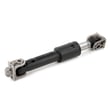
Capacity affects cleaning and wear: when the drum is overfilled, clothes cannot tumble properly, rinsing suffers, and the washer can shake more during high-speed spin. Using the right load size helps protect parts like the washer shock absorber W10822553 and keeps performance consistent.
Last updated: February 2026
What is the most common problem with whirlpool washers?
The most common Whirlpool washer problems are water not draining or spinning (clothes stay wet) and water leaks. On the Whirlpool WFW9250WL00 front-load washer, these issues are often tied to a clogged drain path, a failing door seal, or vibration from an unbalanced load; start with the basic checks in the owner's manual.
- Won’t drain or won’t spin: check for a blocked drain path and reduce oversudsing
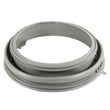
- Leaks at the door: inspect the door boot for tears, debris, or mold buildup
- Loud banging or walking: level the washer and avoid overloading
- Won’t start or won’t lock: verify the door is closing and latching fully
- Poor cleaning results: use the right cycle, water temperature, and detergent amount
- Power reset: unplug for 1 minute, then plug back in.
- Drain and spin symptoms: remove small items from the load, then run a Drain/Spin type cycle.
- Check for oversudsing: switch to HE detergent and use less; excess suds can mimic drain problems.
- Inspect the door seal area: wipe the inner lip and check for pinholes or tears.
- Stabilize the machine: confirm all feet are firmly on the floor and the cabinet is level.
| Symptom | Common cause | Example part for this model |
|---|---|---|
| Clothes still wet | Drain restriction or poor water flow out | Filter WPW10730972 |
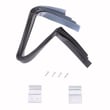
| Leaking at door | Worn or torn door boot | Washer bellow WPW10381562 |
| Excess vibration/noise | Worn suspension | Washer shock absorber W10822553 |
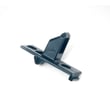
| Won’t latch/door pops open | Misaligned or broken strike | Washer door strike WP8540221 |
Drain, leak, and vibration problems can quickly lead to odors, repeated error codes, and extra wear on the tub, motor, and belt drive system. Catching the cause early helps prevent bigger repairs and keeps cycles running efficiently.
For code-based symptoms (like “F” errors), use our Whirlpool duet he front load washer error codes guide to match the code to the most likely failure and next checks.
Last updated: February 2026
Where is the drain filter on a whirlpool WFW9250WL00 washer?
On the Whirlpool WFW9250WL00 front-load washer, the drain (pump) filter is typically behind the small lower access panel along the bottom front of the cabinet. Once that panel is removed, you’ll see the filter cap and a drain path used to empty residual water before cleaning.
- Unplug the washer to prevent the unit from starting while the panel is open.
- Place towels and a shallow pan under the lower front area; some water will come out.
- Remove the lower access panel (it’s along the bottom front edge).
- Slowly open the drain filter cap to let water release in a controlled way.
- Pull out lint, coins, hair pins, and small clothing items; rinse the filter and wipe the housing.
- Reinstall the filter cap snugly, then reinstall the access panel.
| Item | What it does | What to check |
|---|---|---|
| Drain (pump) filter | Catches debris before it reaches the drain pump | Blockage, broken cap seal, heavy lint buildup |
| Drain path/housing | Routes water through the filter area | Cracks, leaks, debris stuck in the cavity |
| Door boot area nearby | Helps seal the door and prevent leaks | Tears, mold, trapped items in folds |
- Confirm the washer is level and not pressed tightly against the floor trim.
- Check for hidden fasteners along the very bottom edge.
- Use a flashlight and work left-to-right; tabs release more easily when you support the panel evenly.
A clogged drain filter is one of the most common causes of slow draining, “won’t drain/spin” symptoms, and musty odors in front-load washers. Cleaning it regularly helps protect the drain pump and keeps cycles finishing normally.
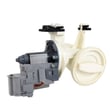
For model-specific panel removal details and maintenance intervals, follow the WFW9250WL00 owner's manual. If you need the replacement filter assembly used on this washer, use the filter WPW10730972.
Last updated: February 2026