


What are common problems with whirlpool microwaves?
Common problems we see on Whirlpool microwave/hood combos like model WMH53521HZ5 include no heat, unit not starting, sparking/arcing, loud buzzing or grinding, weak venting, and keypad or display issues. Many start with simple causes (power, door latches, filters) before any internal part failure.
Most common symptoms and what they usually point to
- Runs but does not heat: high-voltage circuit issue (diode, capacitor, transformer) or a door-interlock problem.
- Dead or won’t start: blown fuse, door switch/interlock issue, or power supply problem.
- Sparking/arcing inside cavity: damaged waveguide cover, metal in the microwave, or food splatter/carbon buildup.
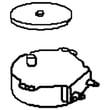
- Turntable not rotating: turntable drive/driver issue or obstruction.
- Vent fan weak or noisy: grease filter clogged, fan/hood assembly issue.
- Buttons not responding: user interface or control board problem.
Quick checks we recommend before replacing parts
- Confirm the outlet has power (try a small lamp or another appliance).
- Make sure the door closes firmly and the latch area is clean.
- If the vent is weak, remove and clean the grease filter; replace if damaged.
- If the cavity sparks, stop using it and inspect the waveguide cover for burns.
- If the turntable stops, reseat the tray and check for debris under it.
Parts that commonly solve these problems (when diagnosis matches)
| Symptom | Common part involved | Example part for WMH53521HZ5 |
|---|---|---|
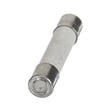
| No power / intermittent power | Fuse | Microwave fuse W11707984 |
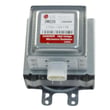
| Runs but no heat | High-voltage diode | Gaoxin-hvd c W11256462 |
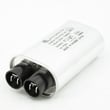
| Runs but no heat / loud hum | High-voltage capacitor | Capacitor W10850446 |
| Won’t start, door-related | Interlock/switch assembly | Assembly, interlock (includes switches) W11197766 |
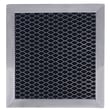
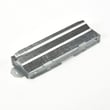
| Weak venting | Grease filter | Filter W10208631A |
Why it matters
Microwave “no heat” and “dead” complaints can involve high-voltage components that store dangerous energy even when unplugged. For safety, we treat those symptoms as a diagnosis-first repair, and we focus on simple external causes (door, power, filters) before internal electrical parts.
Last updated: February 2026
How to do a hard reset on Whirlpool microwave?
To hard reset a Whirlpool microwave like model WMH53521HZ5, unplug it (or switch off the breaker) for about 1 minute, then restore power. This clears many control glitches; if the display or keypad still acts up, the issue is usually in the user interface or control board.
Hard reset steps (power reset)
- Unplug the microwave from the outlet (or turn the kitchen circuit breaker OFF).
- Wait 60 seconds.
- Restore power.
- Set the clock.
- Test basic functions: interior light, vent fan, and a 30-second heat test with a cup of water.
If you meant a “factory reset” (settings reset)
Many Whirlpool over-the-range microwaves have a settings menu that can restore defaults, but the exact button sequence varies by series. On WMH53521HZ5, start by opening the Settings/Options menu and look for a reset/defaults choice; then confirm the selection.
If the microwave will not accept inputs or the display is scrambled, a power reset will not fix it; that points to an electronic control problem.
What to check if the reset does not help
- Dead display or no response: check house power first; then suspect a blown fuse or control issue.
- Random beeping or wrong characters: user interface board is a common cause.
- Runs but does not heat: high-voltage components are involved; stop using it and troubleshoot safely.
Common parts tied to “won’t reset” symptoms
| Symptom after reset | Most likely area | Example part for WMH53521HZ5 |
|---|---|---|
| No power, completely dead | Line fuse | Microwave fuse W11707984 |
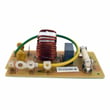
| Keypad/display acts erratic | User interface/control | Pcba, user interface W11192682 |
| Runs but no heat | High-voltage circuit | Gaoxin-hvd c W11256462 |
Why it matters
A hard reset clears temporary software lockups. If the problem returns quickly, replacing the failed component (often the fuse, user interface, or control board) prevents repeated shutdowns and helps restore safe, reliable operation.
For deeper no-heat troubleshooting, use our why is my microwave not heating guide.
Last updated: February 2026
What is the lifespan of a whirlpool microwave?
Most Whirlpool microwaves, including over-the-range models like WMH53521HZ5, typically last 7 to 10 years with normal household use. Heavy daily use, poor ventilation, and skipped cleaning shorten lifespan; replacing wear items early can keep the microwave/hood combo running reliably.
Typical lifespan and what affects it
A microwave’s life is mostly determined by heat, grease, and electrical stress on the control and door-safety system.
- Usage frequency: multiple long cook cycles per day reduces life faster
- Ventilation and grease buildup: clogged filters trap heat and strain components
- Power quality: frequent surges can damage the control board
- Door use: slamming the door can damage latches and interlock switches
- Cleaning habits: steam cleaning the cavity and wiping the door seals prevents corrosion and arcing
Signs it’s nearing end of life
If you see these symptoms repeatedly, it usually points to a failing component rather than “normal behavior.”
- Food heats unevenly or takes much longer than it used to
- Loud humming, buzzing, or burning smell during heating
- Display or keypad becomes intermittent
- Unit goes dead, then comes back on later
- Fan runs but heating stops mid-cycle
Common repair paths (what we see most)
| Symptom | Common area to check | Example part for WMH53521HZ5 |
|---|---|---|
| No power or dead display | Line fuse, wiring, control | Microwave fuse W11707984 |
| Runs but does not heat | High-voltage circuit | Gaoxin-hvd c W11256462 |
| Hood light out | Lamp and lens | Microwave/hood light bulb 8206232A |
| Poor venting or greasy airflow | Grease filter | Filter W10208631A |
Why it matters
A microwave/hood combo like Whirlpool WMH53521HZ5 does double duty: cooking plus ventilation. Keeping the vent system clean (especially the grease filter) reduces heat buildup, which is one of the biggest factors in extending overall lifespan.
Last updated: February 2026
How can I tell what size my microwave is?
For your Whirlpool WMH53521HZ5 microwave/hood combo, “size” usually means two things: the exterior dimensions (to confirm it fits the cabinet space) and the interior capacity (how much food it holds). We recommend measuring the width, height, and depth of the installed unit, then comparing those measurements to typical over-the-range sizing.
What to measure (and how)
Turn power off at the breaker before removing any trim pieces or accessing mounting areas.
- Exterior width: measure left-to-right across the front; most over-the-range units are about 30 inches wide.
- Exterior height: measure top-to-bottom of the microwave body (not the cabinet opening).
- Exterior depth: measure from the back wall to the front edge of the door.
- Clearances: note space above the unit and around the vent area so airflow is not restricted.
- Interior cavity (optional): measure inside width, height, and depth to estimate usable space.
Quick sizing guide for microwave/hood combos
These are typical ranges for Whirlpool over-the-range models like WMH53521HZ5.
| What you’re sizing | What it tells you | Typical range |
|---|---|---|
| Exterior width | Cabinet fit and mounting alignment | 29 7/8 in to 30 in |
| Exterior depth | How far it projects over the cooktop | 15 in to 17 in |
| Interior capacity | Cooking volume | 1.6 to 2.1 cu ft |
Why it matters
Getting the “size” right prevents installation headaches (mounting plate alignment, cabinet fit, venting clearance) and helps you choose correctly sized accessories like a turntable.
Related parts that affect fit and function
If you are replacing fit-related components, match them to the WMH53521HZ5 model.
- Microwave mounting plate W11025649 (critical for wall and cabinet alignment)
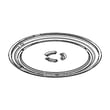
- Turntable W11402532 (must match the cavity and roller/drive system)
- Microwave vent grille (black) W10701697 (affects front fit and airflow path)
Helpful DIY guidance
If you are measuring because performance is off (for example, it runs but does not heat), use this troubleshooting resource first:
Last updated: February 2026


