Owner’s manual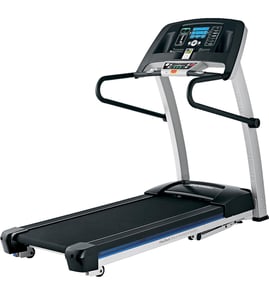




How to find serial number on treadmill?
On the Proform treadmill model 831246330, the serial number is printed on a decal attached to the treadmill frame. We typically see it on the lower frame area near the power cord and the reset/off circuit breaker; the 831246330 owner's manual points to the decal location.
Check these common spots first (use a flashlight and look for a white or silver sticker):
- Lower frame near the power cord entry
- Next to the reset/off circuit breaker on the frame
- On the base rail near the front of the walking deck
- Under the motor hood area (sometimes visible without removing parts)
Most Proform serial decals include the model number and a serial number in a block of text or a barcode.
| What you need | What it’s used for | Where it’s referenced |
|---|---|---|
| Model number: 831246330 | Identifies the correct parts list | 831246330 owner's manual |
| Serial number (from decal) | Helps match the exact production run | 831246330 owner's manual |
If the sticker is worn, you can usually still capture the serial number with a few quick steps:
- Wipe the decal gently with a damp cloth; avoid solvents that can remove ink.
- Take a close-up photo and zoom in to read faint characters.
- Look for a barcode plus printed numbers underneath.
- If the decal is missing or illegible, the manual notes that replacement decals can be ordered.
The serial number helps confirm the exact version of your Crosswalk 405E treadmill so you get the right parts (for example, a compatible safety key, walking belt, or circuit breaker) and the correct troubleshooting guidance.
Last updated: January 2026
What are common problems with ProForm treadmills?
Common problems on the Proform 831246330 (Crosswalk 405E) treadmill include no power, a walking belt that slips or slows under load, incorrect speed readings, and squeaks from moving joints. Most issues are resolved by using the correct surge suppressor, confirming the safety key is installed, and adjusting belt tension per the 831246330 owner's manual.
- Treadmill will not power on: outlet, surge suppressor, safety key, or tripped circuit breaker.
- Walking belt slows when you step on it: belt tension too tight, or power delivery issue.
- Walking belt slips: belt tension too loose.
- Speed reading is wrong: reed switch gap or magnet alignment issue.
- Squeaks during use: dry pivot points or friction in moving arm assemblies.
- Remove the key and unplug the power cord before touching the belt, rollers, or wiring.
- Plug the treadmill into a single-outlet surge suppressor that is UL 1449 listed (TVSS) and rated for 120V/15A, with 400V or less suppressed voltage and 450 joules minimum.
- Confirm the safety key is fully inserted; a missing key can look like a “dead” treadmill.
- Check the reset/off circuit breaker near the power cord; if it is tripped, reset it.
- If the belt is off-center or hard to push by foot, use a belt alignment tool such as the treadmill walking belt alignment tool 128457.
| Symptom | Typical fix | What to watch for |
|---|---|---|
| Belt slows under load | Loosen rear roller bolts evenly | Overtightening reduces performance and can damage the belt |
| Belt slips | Tighten rear roller bolts evenly | Tighten in small increments and keep belt centered |
| Speed display incorrect | Set reed switch gap to about 1/8 inch from magnet | Misalignment causes erratic or wrong speed readings |
Power protection and correct belt tension help prevent sudden speed changes, premature belt wear, and control-system damage. Keeping the belt centered and the reed switch aligned also improves workout safety and speed accuracy.
Last updated: January 2026
How old is my treadmill?
For your Proform model 831246330 (CROSSWALK 405E), the most accurate way to estimate age is to use the serial number from the ID decal on the treadmill and match it to the date-coding guidance in the 831246330 owner's manual. If you also have the original receipt, the purchase date is the simplest “age” reference.
We use the serial number because it is tied to the specific unit, not just the model.
- Look for a decal/label on the frame (commonly near the base, upright, or underside of the walking deck)
- Write down the full serial number exactly as shown
- Record the model number 831246330 from the same decal
- If the label is worn, use a flashlight and take a close-up photo to read it
Many treadmills use a date code within the serial number (often a year and month indicator). Once you locate the serial number, compare its format to the identification details shown in the manual.
Typical serial-date patterns you may see:
| Serial number clue | What it usually indicates | Example interpretation |
|---|---|---|
| First 2 digits are a year | Year of manufacture | “06xxxx…” = 2006 |
| Letter indicates month | Month code (A=Jan, B=Feb, etc.) | “…C…” = March |
| Week number included | Production week | “W12” = week 12 |
If the serial decal is missing or unreadable, we estimate age using serviceable wear items and condition.
- Check walking belt wear and tracking; a stretched belt often points to heavy use
- Listen for drive belt squeal or slipping under load
- Inspect the power cord and grommet for cracking or looseness
- Confirm the safety key fits securely and stops the belt reliably
Helpful parts commonly replaced on this model include the treadmill safety key assembly 208603 and the Proform treadmill walking belt 248059.
Knowing the approximate age helps us choose the right repair approach, especially for belt maintenance, motor load issues, and electrical safety checks (power cord, circuit breaker, wiring).
Last updated: January 2026
What is the life expectancy of a ProForm treadmill?
A Proform treadmill like model 831246330 typically lasts 7 to 10 years in a home setting with regular cleaning and proper belt lubrication; heavy daily use can shorten that to 5 to 7 years. The best predictor is total run time and belt condition, not calendar age.
- Usage hours and user weight: more hours and higher loads increase motor and deck wear.
- Walking belt lubrication: a dry belt raises friction, overheats the drive motor, and wears the deck.
- Belt alignment and tension: a drifting or over-tight belt strains rollers and the drive belt.
- Dust and pet hair: buildup around the motor and electronics traps heat.
- Power quality: repeated breaker trips or surges can damage the control board and motor.
Your 831246330 console can display total usage hours and total miles in the information mode. Use the steps in the 831246330 owner's manual to check those totals, then compare them to typical wear patterns below.
| What you see | What it usually means | What to do next |
|---|---|---|
| Belt slips at start or under load | Worn walking belt or loose tension | Inspect belt, adjust per manual, consider replacing the belt |
| Burning smell or hot motor area | High friction from dry belt or misalignment | Lubricate, re-center belt, clean motor area |
| Speed is erratic | Sensor or drive system issue | Check wiring, inspect speed sensor area |
| Frequent breaker trips | Motor overload or electrical fault | Reduce friction first, then test electrical parts |
- Vacuum around the motor hood area regularly (with power unplugged).
- Keep the walking belt centered; use a simple alignment tool such as the treadmill walking belt alignment tool 128457 when making small adjustments.
- Lubricate the walking belt with a treadmill-approved lubricant; avoid household oils.
- Check the drive belt for glazing, cracking, or slack; replace if worn.
- Remove the safety key after workouts to prevent unintended starts and reduce console wear.
Most treadmill “failures” start as friction, misalignment, or dust-related overheating. Fixing those early protects expensive components like the drive motor and keeps your Proform Crosswalk 405E running smoothly.
Last updated: January 2026