Installation guide
 Owner’s manual
 Error Codes



How to reset a JennAir ice maker?
To reset the ice maker on your Jenn-Air JS42PPDUDB20 side-by-side refrigerator, power-cycle the refrigerator for about 1 minute, then restore power and give the unit time to restart ice production. After a reset, it can take up to 24 hours to see the first full batch of ice.
Quick reset steps
- Turn the ice maker OFF (freezer door switch to the OFF/right position, if your model uses a switch).
- Unplug the refrigerator (or switch off the circuit breaker) for 1 minute.
- Restore power.
- Turn the ice maker ON (switch to ON/left position).
- Wait 24 hours for the first batch; allow up to 3 days to fully fill the ice container.
After the reset: what to expect
A reset does not make ice instantly. Normal timing and first-use steps matter.
| What you see | What it usually means | What to do |
|---|---|---|
| No ice for a few hours | Normal after restart | Wait and keep freezer at set temp |
| Small or hollow cubes | Air in water line or new filter | Flush water system; discard early ice |
| Ice tastes odd | New filter or stagnant water | Discard first batches; flush dispenser |
Important checks that prevent “no ice” after a reset
- Confirm the household water supply valve is fully open.
- Check for leaks at water line connections.
- If you replaced the water filter, flush the system (dispense about 3 gallons / 12 L using 5 seconds on, 5 seconds off).
- Discard the first three batches of ice after turning the ice maker back on.
- If your model uses a base grille filter, make sure the filter is installed correctly and the cap is horizontal.
Why it matters
Most “ice maker not working” complaints after a reset are timing, air in the water line, or a newly installed water filter that has not been flushed. Following the start-up steps in the installation guide prevents weak flow, spurting, and poor ice production.
Last updated: February 2026
What are common problems with JennAir refrigerators?
Common problems we see with Jenn-Air refrigerators like model JS42PPDUDB20 include warm temperatures from airflow or fan issues, ice maker and water dispenser troubles, water leaks from drain clogs, noisy operation from fan motors, and door sealing or alignment problems. Use the owner's manual for model-specific checks and settings.
Most common symptoms and what usually causes them
- Not cooling or uneven temps: blocked air vents, dirty condenser area, failing evaporator fan, or a bad temperature sensor
- Ice maker not making ice: low water flow, air in the water line, a clogged water filter, or a frozen fill tube
- Water leaking inside or under the unit: defrost drain restriction, loose water line fitting, or filter housing/cap issues
- Loud humming, rattling, or buzzing: condenser fan or evaporator fan problems, or vibration from panels/grilles
- Doors not sealing or not closing: cabinet not level, door out of alignment, or worn gasket
Quick checks we recommend before replacing parts
- Confirm the controls are set correctly and allow 24 hours for temperature changes to stabilize.
- Make sure food packages are not blocking return vents inside the refrigerator or freezer.
- If you have water/ice issues, replace the filter and purge air from the dispenser.
- Inspect door closure: the unit should be level and the doors should self-close smoothly.
- If noise is new, listen for whether it comes from the freezer (evaporator area) or the machine compartment (condenser area).
Parts that commonly solve these problems (when diagnosis points there)
| Symptom | Common part involved | Example part for JS42PPDUDB20 |
|---|---|---|
| Poor cooling, warm fridge | Evaporator fan motor or blade | Maytag refrigerator evaporator fan motor W11671461, refrigerator evaporator fan blade WP2169142 |
| Temps swing, frosting issues | Temperature sensor (thermistor) | Refrigerator temperature sensor WP2188820 |
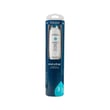
| Water tastes bad, slow dispense | Water filter | Refrigerator filter EDR3RXD1 |
| Door won’t seal well | Door gasket | Refrigerator door gasket WP2266905 |
Why it matters
Catching airflow, water supply, and door-seal problems early protects food quality, reduces frost buildup, and prevents the compressor and electronic controls from running longer than necessary.
Last updated: February 2026
What is a 422 code?
A “422 code” most commonly means HTTP 422 (Unprocessable Content), a web/server message that says the request format was understood but the instructions could not be processed. It is not a Jenn-Air JS42PPDUDB20 refrigerator fault code; for appliance codes, use the model’s documentation.
What 422 means (in plain language)
HTTP 422 is a website or app error, not a refrigerator control-board error.
- The server received your request successfully.
- The request content type and syntax were valid.
- The server still could not process the instructions in the request.
If you saw “422” while using Sears PartsDirect
This usually happens during actions like searching, signing in, adding to cart, or submitting a form.
Quick fixes that resolve most 422 errors
- Refresh the page and try again.
- Clear browser cache/cookies, then retry.
- Try a different browser or a private/incognito window.
- Disable browser extensions (especially ad blockers) temporarily.
- If you are on a VPN or corporate network, switch networks and retry.
If you meant a refrigerator error code
On the Jenn-Air JS42PPDUDB20, refrigerator diagnostics and any displayed fault codes are listed in the product documentation. Use the JS42PPDUDB20 installation guide to confirm what the display indicators mean and what checks are required before replacing parts.
Common refrigerator issues that get mistaken for “error codes”
| Symptom | What it often points to | Example part on this model page |
|---|---|---|
| Warm fridge/freezer, fan noise changes | Airflow or evaporator fan issue | Refrigerator evaporator fan blade WP2169142 |
| Temps swing up and down | Sensor/thermistor issue | Refrigerator temperature sensor WP2188820 |
| No water/ice or slow dispense | Water supply pressure or filter restriction | Refrigerator filter EDR3RXD1 |
Why it matters
Treating “422” as an appliance code can lead to unnecessary part replacement. Confirm whether the message came from a website/app or from the refrigerator display before troubleshooting components like the electronic control or temperature sensor.
Last updated: February 2026
What is the life expectancy of a JennAir refrigerator?
A Jenn-Air refrigerator like model JS42PPDUDB20 typically lasts 15 years. With steady maintenance (clean airflow, good door sealing, and timely filter changes), many units reach 15 to 20 years, while neglected airflow or cooling-system strain can shorten service life.
Typical lifespan ranges
Most built-in and premium side-by-side refrigerators fall into these real-world ranges:
- 10 to 12 years: heavy use, warm environment, poor ventilation, infrequent cleaning
- 13 to 17 years: typical household use with basic upkeep
- 18 to 20 years: consistent maintenance and stable operating conditions
For model-specific care and installation requirements that protect longevity (leveling, cabinet fit, service access), follow the installation guide.
What most often shortens refrigerator life
These are the issues we see most often when a refrigerator fails early:
- Dirty condenser area or restricted airflow (compressor runs hotter and longer)
- Door gasket leaks that let warm, moist air in (more frost, longer run times)
- Overpacked compartments blocking vents and circulation
- Skipped water filter changes that reduce flow and stress the dispenser system
- Power quality problems (surges/outages) that damage controls
Quick check table
| What you notice | What it usually means | What to do first |
|---|---|---|
| Warm fridge or freezer | Airflow or cooling problem | Verify vents are clear; listen for fans |
| Frost buildup | Door leak or defrost issue | Inspect door seal; check for gaps |
| Loud running or hot cabinet area | High run time, restricted ventilation | Clean airflow paths; confirm grille is clear |
| Slow water flow | Filter restriction | Replace the refrigerator filter EDR3RXD1 |
Why it matters
Life expectancy is mostly about compressor run time and heat. When airflow is restricted or doors do not seal tightly, the compressor and fans work harder, which accelerates wear on key components like the compressor, control boards, and fan motors.
Last updated: February 2026