Owner’s manual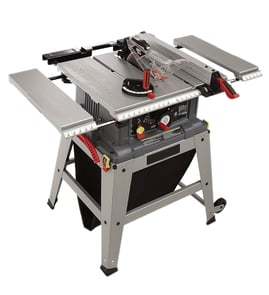

What not to do with a table saw?
For the Craftsman 351218330 table saw, do not cut freehand, reach over or behind the blade, stand in line with the blade, or leave guards off longer than necessary; these actions greatly increase kickback and contact-injury risk. Follow the safety rules and setup steps in the owner's manual.
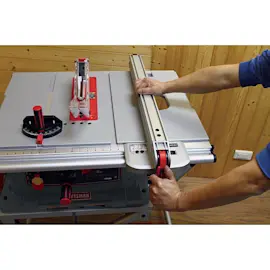
- Do not perform any operation freehand; always use the rip fence or miter gauge to guide the work.
- Do not stand directly behind the blade; stand to either side in case the workpiece kicks back.
- Do not reach behind the cutting tool to hold down/support the workpiece or to remove scraps.
- Do not pick up small cutoffs by hand while the blade is moving; push them off the table with a long stick.
- Do not turn the saw on until the table is cleared of tools, scraps, and loose pieces.
- Do not use the rip fence for crosscuts or the miter gauge for ripping.
- Keep the blade guard and spreader (riving knife/splitter) in place for through-cuts; reinstall the guard right after dadoing, rabbeting, or resawing.
- Use push sticks or push blocks for rip cuts, and keep hands out of the blade path.
- Keep table inserts flush and use the correct insert for the blade/cut.
- Use featherboards for non-through operations to help prevent binding and kickback.
| Task | Do not do this | Do this instead |
|---|---|---|
| Ripping | Freehand the cut | Use rip fence plus push stick/push block |
| Crosscutting | Use rip fence as a length stop | Use miter gauge (and proper support) |
| Cleanup | Grab cutoffs near the blade | Shut off, wait for stop, use a long stick |
| Adjustments | Change blade/insert with power connected | Disconnect power before adjustments |
Most table saw injuries happen during a moment of instability: a workpiece twists, binds, or contacts the rear of the blade and launches backward (kickback). Using the guard/spreader, correct guides (fence or miter gauge), and safe body position keeps the cut controlled.
If you need replacement parts for your Craftsman 351218330, use the parts list for this model or search by model number on Sears PartsDirect.
Last updated: February 2026
What size motor is on a 10 inch Craftsman table saw?
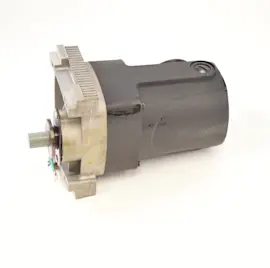
On the Craftsman 351218330 10-inch contractor table saw, the motor is designed to run on a 120-volt, 60 Hz power supply (and it can be wired for 240-volt operation by a qualified electrician). For exact motor horsepower or amp rating, we use the motor nameplate and the specifications section in the owner's manual.
The manual for this model focuses on electrical requirements and safe operation rather than listing a single “motor size” value in the excerpts we have.
- Prewired for 120V, 60 Hz power
- Can be configured for 240V single-phase with the correct plug and wiring
- Motor and power source characteristics must match the motor nameplate
- Avoid rapid ON/OFF cycling; it can overheat the motor
The most reliable “motor size” info is printed on the motor nameplate (usually on the motor housing).
- Unplug the saw.
- Locate the motor nameplate.
- Record these values:
- Amps (A)
- Horsepower (HP) or watts
- Voltage (V) and phase
- RPM
| Term people ask for | Where to find it | What it tells you |
|---|---|---|
| Amps (A) | Motor nameplate | Electrical load and circuit needs |
| Horsepower (HP) | Motor nameplate/manual specs | Cutting power under load |
| RPM | Motor nameplate | Motor speed (not blade speed) |
Matching the motor’s nameplate ratings to your power supply helps prevent nuisance breaker trips, overheating, and slow blade speed under load. It also helps you choose the right extension cord gauge and avoid voltage drop.
If you are troubleshooting performance (slow blade, stalling, or poor cut quality), these guides help narrow down the cause:
If you need replacement parts for the Craftsman 351218330, start with the parts list for this model or search by model number on Sears PartsDirect.
Last updated: February 2026
What are the parts of a table saw?
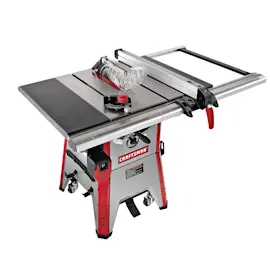
A table saw is built around a flat work surface and a spinning blade, plus guiding and safety components that control the cut. On the Craftsman 351218330, key assemblies include the cast iron table, rip fence and rails, miter gauge, blade guard, riving knife, and inserts; see the owner's manual for the full parts list and diagrams.
- Table (cast iron top): Supports the workpiece; keeping it clean and waxed helps feeding and cut quality.
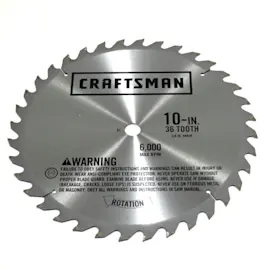
- Blade and arbor assembly: Holds and spins the 10-inch blade; the saw is designed for a 10-inch blade.
- Rip fence assembly: Guides rip cuts parallel to the blade; locks in place for repeatable widths.
- Front and rear rails: The fence rides on these; the front rail is typically the calibrated reference.
- Miter gauge assembly: Guides crosscuts and angled cuts using the miter slot.
- Table insert (throat plate): Removable plate around the blade opening for access and clearance.
- Dado insert: A wider insert used when running a dado stack (when equipped and set up correctly).
- Blade guard assembly: Clear guard that covers the blade area during cutting.
- Anti-kickback pawl assembly: Helps resist the workpiece being thrown back toward the operator.
- Handwheels (tilt and elevation): Adjust blade height and blade tilt (up to 45 degrees).
- Dust chute / dust port: Routes sawdust; this model is ported for a 4-inch vacuum hose.
| Part | What it controls | When it matters most |
|---|---|---|
| Rip fence | Cut width on rip cuts | Straight, repeatable rips |
| Miter gauge | Crosscut angle | Square and mitered crosscuts |
| Blade guard + pawls | Exposure and kickback risk | Any through-cut |
| Riving knife | Keeps kerf from closing | Ripping thicker stock |
| Table insert / dado insert | Blade opening clearance | Blade changes, dado work |
Knowing the names of the major table saw parts helps you troubleshoot symptoms faster (for example, a fence that binds, a blade that will not raise, or cuts that are not square) and order the right replacement components through the model parts list or Sears PartsDirect.
Last updated: February 2026
Where is the reset button on a Craftsman table saw?
On the Craftsman table saw model 351218330, the “reset” most people mean is the overload protector that trips when the motor overheats. This model’s operator information points you to an “Overload tripped” condition in troubleshooting; use the reset procedure and locations shown in the 351218330 owner's manual.
Most table saws have two different “reset” ideas:
- ON/OFF switch: the front control used for normal starting and stopping.
- Overload protector: a motor safety device that trips if the saw is overloaded.
- Circuit breaker/GFCI: in your shop panel or outlet, not part of the saw.
The manual also notes the switch location: it’s under the front rail on the left side, and you shut the saw off with the large red OFF paddle.
- Turn the saw OFF and unplug it.
- Let the motor cool for 15 to 30 minutes.
- Remove the workpiece; make sure the blade can spin freely by hand.
- Restore power and try starting the saw.
- If it still will not start, follow the overload reset instructions and component locations in the 351218330 owner's manual.
- Dull or incorrect blade for the material; install the right blade and keep it clean.
- Stock pinching the blade (fence/blade not parallel); realign the fence and blade.
- Feeding too fast; slow the feed rate and support long boards.
- Low voltage or long/light extension cord; use a heavier-gauge cord or plug in closer.
- Motor ventilation blocked by dust; clean the motor area and cabinet.
| Symptom | Most likely cause | Next step |
|---|---|---|
| Saw stops during a cut | Overload tripped | Cool down, then reset per manual |
| Won’t start at all | No power, switch issue, overload tripped | Check outlet/breaker, then manual troubleshooting |
| Starts then quickly stops | Binding or heavy load | Check alignment, blade condition, feed rate |
Repeated overload trips overheat the motor and shorten its life. Resetting gets you running again, but correcting binding, blade condition, and power supply prevents repeat shutdowns.
If you need replacement parts for Craftsman 351218330, use the model parts list or search by model number on Sears PartsDirect.
Last updated: February 2026