Installation guide
 Owner’s manual
 Error Codes





How do I reset my Whirlpool electric range?
To reset your Whirlpool electric range model WFE540H0ES1, we recommend a simple power reset first: press CANCEL to stop any cooking function, then turn the range’s circuit breaker OFF for 1 minute and turn it back ON. This clears many control glitches after a power surge.
- Stop a function: Press CANCEL once.
- Clear a flashing display after power loss: Press CANCEL.
- Full control reset (power cycle): Turn the breaker OFF 60 seconds, then ON.
- Wake a blank display: If Energy Save is on, press any keypad or open the oven door.
- Exit control lockout (if enabled): Press and hold START for 3 seconds to toggle lock/unlock.
For keypad behavior and special modes, follow the steps in the WFE540H0ES1 use & care manual.
- Make sure the oven is OFF (press CANCEL).
- Turn the range circuit breaker OFF.
- Wait 60 seconds.
- Turn the breaker ON.
- If the display is flashing, press CANCEL.
| What you see | What it usually means | What to do |
|---|---|---|
| Display flashing | Power was interrupted | Press CANCEL |
| Display blank | Energy Save mode | Press any key or open door |
| Error code returns | Ongoing fault | Troubleshoot the code |
If the same code reappears after the reset, the issue is usually not a “stuck” control. Use our Whirlpool freestanding range error codes guide to match the code to likely causes (wiring, sensor, control, or power supply issues).
A proper reset helps you quickly rule out a temporary control glitch before spending time on deeper troubleshooting or replacing parts like the oven control board or oven temperature sensor.
Last updated: January 2026
How do I fix the F5 E1 error code on a Whirlpool oven?
On the Whirlpool WFE540H0ES1 electric range, an F5 E1 error typically points to a problem with the oven’s electronic control system (often the keypad or control board). Start by resetting power; if the code returns, inspect wiring connections and plan for control-related diagnosis using the WFE540H0ES1 use & care manual.
- Press CANCEL/OFF to stop the beeping and clear the display.
- Turn power off at the breaker for 1 minute, then restore power.
- If the display is blank due to Energy Save, press any keypad to wake it.
- If the code returns immediately, avoid repeated resets; proceed to checks below.
For WFE540H0ES1, we focus on the control area because F5 E1 is commonly triggered by a stuck key, keypad ribbon issue, or a failing electronic oven control.
- Stuck or shorted keypad (key won’t release, moisture/grease intrusion)
- Loose or damaged ribbon connector between keypad and control
- Failing electronic oven control (EOC)
- Pinched or damaged harness at the console
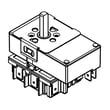
If troubleshooting points to the electronic control, the compatible control board for this model is the lcc195 blue, WPW10586737.
| Symptom pattern | Most likely direction | Typical next step |
|---|---|---|
| Code returns right after power-up | Keypad/control input fault | Inspect console connections, then test/replace control as needed |
| Code appears during baking/broiling | Heat and vibration exposing weak connection | Reseat connectors, inspect harness, then evaluate control |
| Random beeping or unresponsive keys | Keypad short or control failure | Dry/clean console area, then diagnose control circuit |
When the range thinks a key is stuck or it detects an invalid control signal, it can disable heating functions for safety and to prevent runaway temperature control. Fixing the root cause restores reliable bake and broil operation.
For code definitions and model-family guidance, we recommend Whirlpool freestanding range error codes.
Last updated: January 2026
Why is my Whirlpool oven suddenly not working?
If your Whirlpool WFE540H0ES1 oven suddenly won’t work, the most common causes are a power supply issue (breaker/outlet), the control being in Energy Save or Control lockout, or a failed heating/control component. Start with the model-specific checks in the WFE540H0ES1 use & care manual.
- If the display is blank, press any keypad; Energy Save can blank the display when the range is idle.
- If the display is flashing after a power loss, press CANCEL to clear it.
- Check the household breaker or fuse; reset the breaker if tripped.
- Confirm the range is plugged in (if cord-connected).
- Check Control lockout: when it’s on, only CLOCK, OVEN LIGHT, and TIMER work; oven cooking functions will not start.
Your WFE540H0ES1 can display fault codes that point you to the next step.
- F9 or F9 E0: the manual indicates the home electrical outlet may be miswired; contact a qualified electrician to verify the electrical supply.
- For other codes, use a code guide to match the code to the likely failure.
Helpful reference: Whirlpool freestanding range error codes
When the display works but Bake or Broil won’t heat, focus on the heating circuits.
- Look for visible damage on the bake element (blisters, cracks, burn spots).
- If Bake fails but Broil works, suspect the bake element first.
- If Bake and Broil both fail, suspect the oven control, wiring, or power supply.
| What you see on WFE540H0ES1 | What it often points to | What we check next |
|---|---|---|
| Display blank | Energy Save or power supply | Wake display; check breaker/outlet |
| Only CLOCK/LIGHT/TIMER work | Control lockout is on | Turn off lockout per manual |
| F9 or F9 E0 | Possible miswired outlet | Electrician verifies supply |
On WFE540H0ES1, a “dead” oven can be as simple as Energy Save or Control lockout, but error codes like F9/F9 E0 point to the home electrical supply. Checking in the right order helps avoid unnecessary parts replacement.
Last updated: January 2026
What are the symptoms of a bad oven control board Whirlpool?
On the Whirlpool WFE540H0ES1 electric range, a failing oven control board commonly causes a blank or flickering display, unresponsive keypad, random beeping, or oven functions that will not start or stop correctly. Use the WFE540H0ES1 use & care manual to rule out normal settings like Energy Save and control lockout first.
- Display goes blank, dims, flickers, or resets after you press a key.
- Keypad buttons do nothing, work intermittently, or select the wrong function.
- Bake or broil will not start even though the clock and lights work.
- Oven shuts off mid-cycle or temperature control seems erratic.
- Repeated fault codes return soon after clearing power.
- Reset power at the breaker for 1 minute, then retry BAKE and BROIL.
- If the display is blank, press a keypad to wake it; Energy Save can blank the display.
- Check for a tripped breaker or loose terminal block connection (partial power can mimic board failure).
- If an error code appears, identify it first using Whirlpool freestanding range error codes.
Some symptoms overlap with heating and sensing problems, so it helps to compare.
| What you notice | More likely cause | What to check next |
|---|---|---|
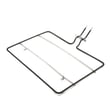
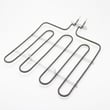
| Display and keypad are normal, but oven will not heat | Heating circuit issue | Inspect the bake element W10779716 and wiring for damage |
| Broil does not heat but bake works | Broil circuit issue | Inspect the range broil element W11321472 and connections |
| Temperature seems off but oven runs | Sensor or calibration | Try the oven temperature adjustment steps in the manual |
The control board is the “brain” for bake, broil, timing, and temperature regulation. Confirming symptoms and ruling out elements and power issues first helps prevent replacing an expensive electronic part unnecessarily.
Last updated: January 2026