 Owner’s manual










Is DLEX4000W stackable?
Yes. The LG DLEX4000W dryer is designed to be stackable when it is installed on top of a compatible LG washer using the correct stacking kit and following the stacking procedure in the DLEX4000W owner’s manual.
What “stackable” means for this model
To stack the DLEX4000W safely, we install the dryer on top of the washer (never the other way around) and secure it with a stacking kit.
- Use a stacking kit (sold separately) that matches your washer and dryer pairing
- Plan for two or more people to lift and position the dryer
- Confirm the washer is level and on a solid floor before stacking
- Keep required clearances for a stacked installation (especially in a closet)
- Stack the dryer before doing any door reversal
Quick stacking checklist
| Item | What to verify | Why it matters |
|---|---|---|
| Washer position | Washer is level and stable | Prevents vibration and shifting |
| Space | Enough height and ventilation openings | Helps performance and reduces heat buildup |
| Venting | Duct is not crushed behind the units | Reduces long dry times and airflow errors |
| Help | Two-person lift planned | Reduces injury risk and cabinet damage |
Why it matters
A properly stacked installation saves floor space, but the stacking kit and correct clearances keep the dryer stable, reduce vibration, and help maintain proper airflow for efficient drying.
Last updated: January 2026
What is the life of an LG dryer?
An LG dryer like model DLEX4000W typically lasts 10 to 15 years with normal household use. Consistent airflow (clean lint filter and venting) and avoiding overheating are the biggest factors that help this dryer reach the high end of that range; see the maintenance guidance in the DLEX4000W owner’s manual.
What affects lifespan the most
- Lint and airflow restrictions: clogged lint screen or venting makes the dryer run hotter and longer.
- Overloading: strains the drum support rollers, belt, and motor.
- Heat stress: repeated overheating can shorten the life of thermostats and thermal safety devices.
- Moisture sensor performance: dirty sensor bars can cause over-drying and extra run time.
- Installation quality: crushed or overly long ducts increase cycle time and wear.
Maintenance checklist (best ROI)
- Clean the lint screen every load; replace it if it is torn or won’t seat correctly (see LG dryer lint screen ADQ56656403).
- Inspect and clean the exhaust duct and outside vent hood regularly.
- Keep the dryer level to reduce vibration and premature roller wear.
- If cycles start taking longer, address airflow first before replacing parts.
Common wear items and what they do
| Part | What it affects | Typical symptom when worn |
|---|---|---|
| Drum belt | Drum rotation | Drum won’t turn, squealing, burning rubber smell |
| Drum support rollers | Drum support | Thumping, rumbling, vibration |
| Thermistor / thermostats | Temperature control | No heat, overheating, inconsistent drying |
| Lint screen / housing | Airflow | Long dry times, lint buildup around door |
Why it matters
A dryer that is forced to run with restricted airflow can take much longer to dry and run hotter than intended. That extra heat and run time accelerates wear on heating and safety components, and it can shorten the overall life of your DLEX4000W.
Last updated: January 2026
How do you reset the flow sensor on a LG dryer?
On the LG DLEX4000W, the Flow Sense™ indicator resets after you correct the airflow restriction and run several normal drying cycles; there is not a dedicated “flow sensor reset” button. After cleaning the lint filter and venting, power the dryer off and back on, then run cycles until the indicator clears (it can take multiple cycles).
Reset steps that work on the DLEX4000W
Use these steps in order; Flow Sense is an airflow warning, so cleaning and venting fixes come first.
- Clean the lint filter and confirm it seats fully in the housing.
- Inspect and clean the entire vent path: transition duct behind the dryer, wall duct, and outside vent hood.
- Make sure the vent run is not crushed, kinked, too long, or packed with elbows.
- Run the built-in duct check (installation test) described in the DLEX4000W manual.
- After the restriction is cleared, run consecutive cycles; the dryer may need up to 5 cycles to decide airflow has improved and turn the indicator off.
What to do if the Flow Sense light stays on
If airflow is truly good but the warning persists, focus on the parts that affect airflow measurement and drying performance.
- Recheck the outside vent hood damper for sticking or blockage.
- Confirm you are using 4-inch metal ducting (rigid or semi-rigid is best).
- Check for lint buildup inside the blower housing area (a common hidden restriction).
- If you suspect a sensing issue during Sensor Dry cycles, inspect the moisture sensor bars and wiring.
Helpful related parts for this model:
| Symptom | Part to consider | What it affects |
|---|---|---|
| Sensor Dry acts “off” or ends too soon | Dryer moisture sensor 6500EL3001A | Moisture detection used to control cycle time |
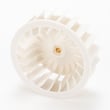
| Poor airflow even with clean venting | Dryer blower wheel 5835EL1002A | Air movement through the dryer and exhaust |
Why it matters
Flow Sense™ helps prevent long dry times and overheating caused by restricted exhaust airflow. Clearing the restriction improves drying performance and reduces nuisance error codes.
Last updated: January 2026
What is the most common problem with LG dryers?
For the LG DLEX4000W, the most common issue we see is long dry times or “no heat” complaints caused by restricted airflow (lint buildup, crushed venting, or an overly long duct run). Next most common is noise from worn drum support and drive components; see the DLEX4000W manual.
Most common symptoms (and what they usually point to)
- Clothes take too long to dry: lint filter clogged, vent hood blocked, duct run too long, or too many elbows
- Dryer runs but doesn’t heat: airflow restriction, incorrect power supply (electric), or a failed heating component
- Rumbling, thumping, squealing: worn drum support roller, idler pulley, or belt
- Flow Sense duct restriction warnings: external venting restriction that needs cleaning or repair
- Inconsistent sensor drying: mixed fabric loads, overloaded drum, or moisture sensor issues
Quick checks we recommend first (fast, no parts)
- Clean the lint filter and confirm it seats fully.
- Check for strong airflow at the outside vent hood while the dryer runs.
- Inspect the transition duct behind the dryer for crushing, kinks, or loose connections.
- Reduce load size and avoid mixing heavy towels with lightweight items.
- Run the built-in duct check procedure described in the manual.
Common parts involved when it is not airflow
If airflow is good and the problem persists on your LG DLEX4000W, these model-compatible parts are often involved:
| Symptom | Part to inspect | Example part for this model |
|---|---|---|
| No heat or weak heat (electric) | Heating circuit component | Dryer heating element 5301EL1001J |
| Overheating or heat cycling oddly | High-limit thermostat | Dryer high-limit thermostat 6931EL3003D |
| Poor sensor drying (stops too soon or leaves damp spots) | Moisture sensor | Dryer moisture sensor 6500EL3001A |
| Squeal or rumble | Idler pulley | LG dryer idler pulley 4561EL3002A |
Why it matters
Airflow problems do more than slow drying; they can trigger duct restriction warnings, increase energy use, and overheat components. Fixing venting and lint buildup first often prevents repeat failures of thermostats, fuses, and heating parts.
Last updated: January 2026










