
What are the parts of a standing fan?
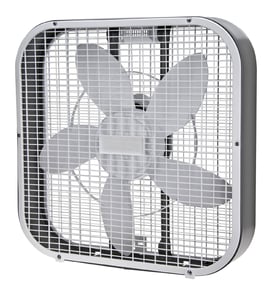
A standing (pedestal) fan like the Kenmore 453811800 is built from a base and pole assembly, a motor housing with speed controls, an oscillation mechanism, and a blade-and-guard set that moves air safely. Exact part names vary by model, but the core assemblies are consistent.
Common standing fan parts (what they do)
- Base and feet: Stabilize the fan; rubber feet help reduce vibration and protect floors.
- Height-adjustment pole and collar: Lets you raise or lower the fan head.
- Motor (stator/rotor) and bearings/bushings: Spins the shaft that drives the blade.
- Capacitor (on many AC fans): Helps start the motor and keep it running smoothly.
- Speed control (switch, regulator, or control board): Selects low, medium, high.
- Oscillation gearbox and knob: Turns the fan head side-to-side; the knob typically engages/disengages oscillation.
- Blade, blade hub, and retaining nut/screw: The blade moves air; the hub fastens it to the motor shaft.
- Front and rear safety guards (grilles) and clips: Keep fingers and objects away from the blade.
Quick “parts map” by fan section
| Fan section | What you’ll see | Common issues when it fails |
|---|---|---|
| Base/pole | Base, feet, pole, tilt/height knobs | Wobble, slipping height, rattling |
| Fan head | Motor housing, switch, wiring | No power, only one speed, overheating smell |
| Air-moving | Blade, hub, guard set | Vibration, scraping, weak airflow |
| Oscillation | Oscillation knob, gearbox/linkage | Won’t oscillate, clicking while turning |
Why it matters
Knowing the assembly names helps you troubleshoot faster. For example, weak airflow often points to the blade/hub or a slowing motor (bearings or capacitor), while “won’t turn side-to-side” is usually in the oscillation gearbox or knob.
Finding the right parts for your exact fan
Because part naming can differ even among 16-inch pedestal fans, match parts by the full model number 453811800. Our guide, how to find your appliance model number (and what it means for parts), shows where to look on the fan and how to use the number to identify compatible replacements.
Last updated: February 2026
How do I find the model number on my 453811800?
The model number for your Kenmore 16" pedestal fan is printed on a rating label, usually on the fan’s base, the rear of the motor housing, or along the pole. Match the full number on the label to ensure you’re using the correct parts list for model 453811800.
Where to look on a Kenmore pedestal fan
Check these common label locations:
- Underside of the base (flip the base carefully)
- Back of the motor housing near the cord entry
- Along the pole/tube between the base and motor
- Near the speed control switch housing
- On a small sticker close to the oscillation knob
What to write down (so parts match)
Record the details exactly as shown on the label:
- Full model number (for this fan: 453811800)
- Any revision or suffix characters (if shown)
- Electrical rating (volts/amps) for reference
- Serial number (helpful for age and version)
Quick ID checklist
Use this table to avoid mix-ups when ordering parts.
| Label item | What it does | Example for this fan |
|---|---|---|
| Model number | Identifies the exact fan design | 453811800 |
| Serial number | Identifies production run | Varies |
| Electrical rating | Confirms power requirements | Varies |
Why it matters
Kenmore fans often look similar across model families, but blade, grille, switch, and motor parts can differ by model. Using the exact model number prevents ordering the wrong household fan parts.
For more help identifying labels and what they mean, use [how to find your appliance model number (and what it means for parts)].
Last updated: March 2026
What is the average lifespan of 453811800?
The average lifespan of a Kenmore 16" pedestal fan like model 453811800 is about 5 to 10 years with normal seasonal use and basic maintenance. Heavy daily use, dust buildup, and worn bearings or switches can shorten that lifespan.
What affects lifespan most
These factors make the biggest difference for pedestal fan longevity:
- Dust and lint buildup on the motor and grille (heat and drag increase)
- Running the fan 24/7 versus occasional use
- Frequent speed changes (wear on the switch)
- Dry or worn motor bearings (noise, slow start, overheating)
- Cord damage or loose internal wiring from repeated moving
Signs the fan is near end of life
If you see these issues repeatedly, repair or replacement becomes more likely:
- Hums but blades do not start without a push
- Burning smell or motor housing gets unusually hot
- Excessive vibration even after tightening the base and grille
- Intermittent speeds or switch feels loose
- Loud squeal or grinding that returns after cleaning
Maintenance that helps it last longer
We recommend these basics a few times per season:
- Unplug, then vacuum dust from the grille and motor vents
- Tighten grille clips/screws and base fasteners
- Keep the fan on a flat surface to reduce wobble
- Avoid using extension cords that run hot
| Maintenance step | Typical frequency | Benefit |
|---|---|---|
| Clean grille and blades | Every 1 to 3 months in-use | Better airflow, less motor strain |
| Check fasteners | Monthly | Less vibration and noise |
| Inspect cord/plug | Each season | Prevents electrical failures |
Why it matters
A pedestal fan is a simple appliance, but airflow restriction and electrical wear are what usually end it. Catching dust buildup and wiring issues early helps you get the full 5 to 10 years.
For safe electrical troubleshooting basics, use [how to use a multimeter to test electrical parts video].
Last updated: March 2026