 Owner’s manual
 Error Codes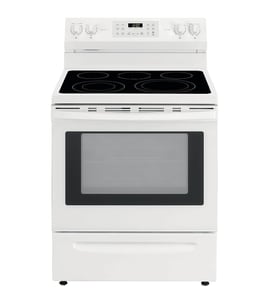
Does a Kenmore Elite have a reset button?
No. The Kenmore Elite range model 79046812992 does not use a single dedicated “reset” button; most resets are done by restoring power (breaker off then on) or by canceling a feature from the control panel as described in the 79046812992 owner's manual.
- Turn the range off.
- Switch the range circuit breaker OFF for 1 to 5 minutes.
- Switch the breaker ON.
- Re-set the clock and test a basic function (oven light, bake, or a surface burner).
- Use the breaker (preferred) instead of unplugging if the cord is not easily accessible.
- If the display is frozen, a power cycle usually restores normal keypad response.
- If an error returns immediately after power is restored, troubleshooting the specific circuit is the next step.
Some functions clear by holding a key rather than power cycling. For example, the manual describes canceling the minute timer by pressing and holding the appropriate ON/OFF key for several seconds.
Common “clear” actions you can try:
- Cancel the active cooking mode (Bake, Broil, Convection) using the cancel/off key
- Cancel the minute timer (hold the timer ON/OFF key as directed)
- Turn off Child Safety Lockout if it is enabled
| What you see | What to try first | What it points to |
|---|---|---|
| Blank display | Check breaker, then power cycle | Power supply issue or tripped breaker |
| Keypad won’t respond | Power cycle | Control lockout or control glitch |
| Beeping with “END” | Cancel the timer/alarm | Timer completion alert |
| Oven heats wrong | Verify temperature settings, then test sensor | Possible temperature sensor issue |
A “reset” is really a way to clear a stuck control state. If the problem comes back right away, the range usually needs a targeted fix (for example, checking wiring connections at the terminal block 5304409888 or testing the sensor probe 316217002).
Last updated: February 2026
How to unlock oven door on Kenmore Elite gas range?
On the Kenmore Elite 79046812992 dual-fuel slide-in range, the oven door typically stays locked during Self-Clean and unlocks only after the oven cools; once the display no longer shows LOCK (about 1 hour after cooling starts), the door opens normally. Follow the Self-Clean stop steps in the 79046812992 owner's manual.
- Look at the control display for LOCK or a Self-Clean indicator.
- Wait for the oven to cool; the lock is heat-sensitive and will not release while hot.
- Press STOP/CLEAR once to cancel an active cycle (if running).
- Do not pull on the handle or force the door; that can damage the lock mechanism.
- If the oven is still hot to the touch, keep children away from the range front.
The manual procedure is:
- Press STOP/CLEAR to stop or interrupt Self-Clean.
- Keep the door closed.
- Wait until the oven cools for about 1 hour and LOCK disappears from the display.
- Open the door.
These steps fix most “won’t open” complaints after the lock releases:
- Confirm LOCK is not showing on the display.
- Give the door a gentle push inward, then try opening; this relieves tension on the latch.
- Restore power by turning the range breaker off for 1 minute, then back on (this can reset the control).
- If the door was recently removed or serviced, verify the hinges are seated correctly per the 79046812992 owner's manual.
| Situation | What you’ll see | What to do |
|---|---|---|
| Self-Clean active | LOCK shown; door won’t open | Press STOP/CLEAR, then wait to cool |
| Self-Clean finished | LOCK stays on at first | Wait about 1 hour for cool-down |
| Cool-down complete | LOCK disappears | Door should open normally |
The lock is designed to prevent the door from opening at Self-Clean temperatures. Waiting for the cool-down protects the door latch, hinges, and the automatic locking system.
Last updated: February 2026
Where is the model number on the Kenmore Elite stove?
On the Kenmore Elite range model 79046812992, the model and serial number are printed on an identification plate that’s typically visible with the oven door open on the left side of the range, or inside the drawer along the side of the frame. See the 79046812992 owner's manual for the exact label location.
- Open the oven door and look along the left side frame (front edge of the range opening)
- Pull out the warming/storage drawer and check the inside side panel along the frame
- Look for a sticker/plate that lists Model No. and Serial No.
- Use a flashlight; the plate can be low and easy to miss
- Write the numbers down exactly as shown (letters, numbers, and dashes)
The identification plate usually includes:
| Label item | What it’s used for |
|---|---|
| Model number (example: 79046812992) | Matching the correct parts and diagrams |
| Serial number | Determining production details for service |
| Electrical ratings | Confirming power requirements |
We use the full model number to match the correct Kenmore Elite dual-fuel slide-in range parts (for example, an oven temperature sensor, igniter, or control board). Even one missing digit can pull up the wrong burner, oven, or wiring configuration.
Last updated: February 2026
Why is my Kenmore Elite oven not heating but runs?
If your Kenmore Elite range model 79046812992 powers on and the display works but the oven will not heat, the most common causes are a failed heating circuit (bake element or gas ignition), a temperature sensing problem, or a control fault. Start with the quick checks in the 79046812992 owner's manual.
- Confirm you are using Bake (not Delay Start, Timer, or Warm).
- Make sure the oven door is fully closed and the rack is not blocking the door.
- Try Broil: if broil heats but bake does not, the bake heat source or its circuit is the likely issue.
- Look for an error code or beeping; the manual notes faults such as F1, F3, or F9 that can stop normal heating.
- If the range recently had a power interruption, press CLEAR/OFF, then set Bake again.
Because the 79046812992 is a dual-fuel slide-in range, the cooktop uses gas and the oven uses electric heat. These checks cover the most common “runs but no heat” situations.
- Bake element not heating: if the bottom element never glows red during preheat, it is likely failed.
- Temperature sensor out of range: a bad sensor can prevent the control from driving heat correctly; the sensor probe 316217002 is the oven temperature sensor for this model.
- Control or wiring issue: loose or burned connections can interrupt power to the heating circuit.
| Symptom | Most likely cause | Best next step |
|---|---|---|
| Display works, no bake heat, broil works | Bake element circuit | Inspect element and wiring; replace if damaged |
| Oven heats erratically or overheats/underheats | Sensor problem | Test/replace sensor probe |
| Beeping with F1/F3/F9 | Control fault condition | Clear code; if it returns, service is needed |
An oven that “runs” without heating usually still has power, so focusing on the heat source, sensor feedback, and control faults gets you to the fix faster and prevents repeated no-heat cycles.
- Turn off power at the breaker before removing panels or testing wiring.
- Do not operate the oven during a power failure; the manual warns the oven can restart when power returns.
Last updated: February 2026







