 Installation guide
 Owner’s manual




How do I clear the error code on my Frigidaire dishwasher?
On the Frigidaire FFCD2413UW3A dishwasher, clearing an error code usually means canceling the current cycle and letting the unit drain. Press and hold START/CANCEL for 3 seconds; the dishwasher runs about a 90-second drain, then you can select a new cycle (details in the FFCD2413UW3A owner's manual).
Quick reset steps (most common)
- Make sure the door is fully closed and latched.
- Press and hold START/CANCEL for 3 seconds.
- Wait for the dishwasher to complete the 90-second drain.
- Select the next desired cycle and press START/CANCEL to start.
- If you opened the door mid-cycle, press START/CANCEL and close the door right away so it can resume (do this within 10 minutes).
If the code comes back right away
Many “error code” situations are caused by a condition the control detects (drain issue, fill issue, or a safety condition). Check these common items before replacing parts:
- Clean the filter area and remove debris that can restrict water flow (see dishwasher filter 5304532206).
- Confirm the drain hose is not kinked, crushed, or blocked (see dishwasher drain hose 807117001).
- Verify the sink drain or garbage disposer inlet is clear (a clogged connection can mimic a drain fault).
- Check that the dishwasher is level and not overfilled with suds (use only dishwasher detergent).
What the cancel/drain reset actually does
| Action | What you do | What to expect |
|---|---|---|
| Cancel cycle | Hold START/CANCEL 3 seconds | Cycle/option lights go out; unit drains |
| Drain period | Wait | About 90 seconds of draining |
| Restart | Choose cycle, press START/CANCEL | New cycle begins normally |
Why it matters
Clearing the code without fixing the underlying cause often leads to the same code returning. A quick filter and drain-path check solves many “won’t drain” and “won’t complete cycle” complaints without replacing the electronic control board or pump.
Last updated: January 2026
How long does a dishwasher run a Frigidaire?
On the Frigidaire dishwasher model FFCD2413UW3A, cycle time depends on the cycle you choose: Heavy Wash typically runs about 2 to 3 hours, while shorter cycles (such as a 1-hour cycle) are designed for lightly soiled loads. For your exact cycle options, check the FFCD2413UW3A owner's manual.
Typical cycle times for FFCD2413UW3A
Cycle times vary because the dishwasher may run multiple fill, wash, drain, and rinse stages.
- Heavy Wash: about 2 to 3 hours
- Normal Wash: varies by soil level and options selected
- 1 Hour Wash: designed for lightly soiled loads
- Adding options like Heat Dry can increase total time
| Cycle/option | Best for | Typical time impact |
|---|---|---|
| Heavy Wash | Pots, pans, heavier soil | Longest (about 2 to 3 hours) |
| Normal Wash | Everyday mixed loads | Medium (varies) |
| 1 Hour Wash | Light soil, quick turnaround | Shortest |
| Heat Dry option | Better drying | Adds time and energy use |
What makes a dishwasher cycle take longer
These are the most common reasons a Frigidaire dishwasher cycle runs longer than expected:
- Heavier soil triggers longer wash action
- Incoming water is cool, so heating takes longer
- Heat Dry is selected
- Door opened mid-cycle, then restarted (must be resumed within the allowed window)
- Drain and refill stages repeat as the cycle progresses
Why it matters
Knowing the expected run time helps you choose the right cycle for your load, avoid interrupting the wash, and improve results (cleaning and drying) without overusing Heavy Wash when a shorter cycle will do.
Last updated: January 2026
What is the most common problem with the Frigidaire dishwasher?
On the Frigidaire FFCD2413UW3A dishwasher, the most common customer-reported issue is a draining problem that leaves water in the bottom of the tub after the cycle. The Use & Care guidance also points to door not fully closed and latched as a frequent reason the dishwasher will not run.
What we check first (fast, high-impact)
- Confirm the door closes fully and latches; a dishwasher that is not latched will not start.
- Look for standing water after a completed cycle; that points to a drain restriction or drain system issue.
- Clean and reseat the filter area; buildup can slow or block water flow.
- Verify the unit is level; leveling affects door sealing and can contribute to leaks and fill/drain complaints.
- Make sure the water supply is turned on; a no-fill condition can look like a “won’t run” complaint.
Common symptoms and the most likely causes
| Symptom | What it usually means | Parts often involved |
|---|---|---|
| Water left in bottom of tub | Not draining properly | Filter, drain hose, drain pump |
| Won’t start or stops quickly | Door not closed/latched, cycle not started correctly | Door latch area, user interface |
| Leaks at the door | Door gasket not seated, unit not level, oversudsing | Door gasket area, leveling |
| Poor cleaning | Loading issues, low water temp/pressure, filter area dirty | Filter, wash system |
If water is left in the bottom (most common)
We focus on the drain path from the tub to the sink connection. A clog, kink, or restriction is the usual culprit.
- Check for a kinked or restricted dishwasher drain hose 807117001.
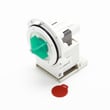
- If the hose is clear, the drain pump can be the next suspect; a weak or jammed pump may not evacuate water consistently. Consider the drain pump a A00126401 when symptoms match.
- Clean the filter area regularly; a dirty filter can contribute to drainage and cleaning complaints.
Why it matters
Drain problems can cause odors, poor cleaning, and water remaining in the tub, while a door that does not latch can prevent the FFCD2413UW3A from running at all. Addressing these early helps avoid repeat cycle failures and leaks.
For model-specific operating checks and “before you call” troubleshooting, follow the FFCD2413UW3A owner’s manual.
Last updated: January 2026





