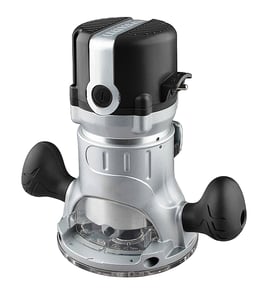

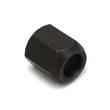
How to replace router bits sears Craftsman router?
To replace a router bit on your Craftsman router model 31517492, you loosen the collet nut, remove the old bit, insert the new bit to the correct depth, then tighten the collet securely. Always unplug the router first so the motor cannot start.
Steps to change a router bit (collet-style)
- Unplug the router (or remove the battery if it is cordless).
- Lock the spindle (if your router has a spindle lock). If it does not, hold the spindle with the correct wrench.
- Loosen the collet nut by turning it counterclockwise.
- Remove the old bit; if it is stuck, loosen the nut a little more and gently twist the bit out.
- Insert the new bit shank fully, then pull it back out about 1/8 to 1/4 inch so it is not bottomed out.
- Tighten the collet nut firmly (snug plus a little more). Do not overtighten.
- Test for security: tug the bit lightly to confirm it is clamped before powering on.
Quick checks that prevent slipping and chatter
- Clean dust and resin from the collet and bit shank.
- Match the shank size (commonly 1/4 inch or 1/2 inch) to the collet.
- Replace a worn collet if the bit keeps loosening.
- Use sharp bits; dull bits increase vibration and heat.
Common symptoms and what they usually mean
| Symptom | Most common cause | What to do |
|---|---|---|
| Bit slips downward while routing | Bit bottomed out or collet dirty | Re-seat bit (pull back 1/8 to 1/4 inch), clean collet |
| Bit won’t tighten | Worn collet or wrong shank size | Verify shank size, replace collet if needed |
| Bit stuck in collet | Resin buildup or overtightened | Loosen further, twist out, clean parts |
Why it matters
A properly seated and tightened bit keeps your Craftsman 31517492 router cutting smoothly, reduces kickback risk, and helps protect the collet, bearings, and motor from vibration.
For general DIY safety practices before working on power tools, use our guide: are diy appliance repairs safe.
Last updated: February 2026
What is a collet size router?
A “collet size” router is simply a router (including the Craftsman 31517492) described by the bit shank diameter its collet can clamp, most commonly 1/4 inch or 1/2 inch. The collet is the chuck-like sleeve and nut that grips the router bit.
What “collet size” means in real use
The collet size must match the bit shank size. If the shank and collet do not match, the bit will not clamp correctly and can slip.
Common collet sizes you’ll see:
- 1/4 inch collet: most common for lighter-duty bits and trim work
- 1/2 inch collet: used for larger, heavier bits and deeper cuts
- Some routers accept both by swapping collets (or using a sleeve adapter when designed for it)
Quick comparison: 1/4 inch vs 1/2 inch
| Collet size | Best for | Typical benefits | Typical tradeoffs |
|---|---|---|---|
| 1/4 inch | edge profiles, light dadoes, small round-overs | wide bit availability, lighter bits | more vibration with large bits, less grip area |
| 1/2 inch | panel-raising, large round-overs, heavier cuts | stronger grip, smoother cuts with big bits | larger bits cost more, needs a router that accepts 1/2 inch |
Why it matters
Choosing the right collet size helps prevent bit slippage, reduces vibration, and improves cut quality. For bigger diameter bits, a 1/2 inch shank is the standard because it resists flexing better under load.
Safe, practical tips when selecting bits
- Match the bit shank exactly to the collet (no “close enough” fit)
- Insert the bit fully, then pull it back slightly before tightening (helps proper clamping)
- Tighten the collet nut firmly with the correct wrenches
- Avoid using oversized bits for the router’s power and base size
- If cuts chatter or burn, reduce depth of cut and feed rate
Finding the right parts and specs for your router
For Craftsman 31517492, use the model number to match the correct collet, collet nut, and related hardware when available through our catalog. A model-number match prevents ordering a similar-looking collet with the wrong taper or thread.
Helpful reference: how to find your appliance model number (and what it means for parts)
Last updated: February 2026
What size shank is a Craftsman router?
Most Craftsman routers, including model 31517492, are set up to use 1/4-inch shank router bits; some Craftsman routers can also run 1/2-inch shank bits, but only if the router has a 1/2-inch collet installed. The quickest way to confirm is to check the collet opening size on your router.
How to confirm the shank size on your Craftsman 31517492
- Unplug the router before checking anything.
- Remove the bit (if installed) and look at the collet opening.
- Measure the opening with a ruler or caliper:
- About 1/4 inch (6.35 mm) means it takes 1/4-inch shank bits.
- About 1/2 inch (12.7 mm) means it takes 1/2-inch shank bits.
- Check whether your router came with multiple collets (some kits include both sizes).
- If the collet is worn, cracked, or won’t tighten evenly, replace it before using the router.
1/4-inch vs 1/2-inch shank: what changes
| Shank size | Typical use | Why you’d choose it |
|---|---|---|
| 1/4-inch | Light to medium routing, trim work | Fits most common bits; good for smaller profiles |
| 1/2-inch | Heavier cuts, larger bits, deeper passes | More rigidity; smoother cuts with less chatter |
Why it matters
Using the correct shank size helps the bit clamp securely in the collet. A loose or mismatched shank can cause vibration, poor cut quality, and bit slippage, especially during deeper passes in hardwood.
Helpful DIY reference
If you’re troubleshooting a router that won’t start or seems to lose power under load, use a meter to check the cord, switch, and internal connections: how to use a multimeter to test electrical parts video.
Last updated: February 2026
What is the most common router size?
The most common router bit shank sizes used with a Craftsman router like model 31517492 are 1/4-inch and 1/2-inch. For most DIY routing tasks, 1/4-inch shank bits are the most commonly used; 1/2-inch shank bits are preferred when you want maximum stability.
Common router “sizes” people mean
When customers ask about router size, they usually mean one of these:
- Bit shank size (1/4-inch or 1/2-inch): what fits the collet
- Router horsepower/amp rating: how much cutting power you have
- Collet capacity: whether the router accepts both shank sizes
1/4-inch vs 1/2-inch shank: quick comparison
| Feature | 1/4-inch shank bits | 1/2-inch shank bits |
|---|---|---|
| Most common for DIY | Yes | Less common |
| Best for | Light profiles, trim, smaller bits | Larger bits, deeper cuts, smoother routing |
| Stability | Good | Better |
| Vibration/chatter | More likely | Less likely |
How we recommend choosing the right size
- Use 1/4-inch shank for edge profiles, round-overs, and lighter passes.
- Use 1/2-inch shank for larger diameter bits, panel-raising style cuts, and cleaner results.
- Match the bit to your router’s collet size; never force a 1/2-inch bit into a 1/4-inch collet.
- Take multiple shallow passes instead of one deep cut to reduce burning and kickback.
- Tighten the collet firmly and keep the bit shank fully seated, then back it out slightly (about 1/16 inch) before tightening.
Why it matters
Using the correct shank size helps your Craftsman 31517492 router cut more smoothly and safely. A larger 1/2-inch shank generally reduces vibration and improves control, especially with bigger bits and heavier cuts.
For help confirming your exact model number before ordering accessories or repair parts, use our guide: how to find your appliance model number (and what it means for parts).
Last updated: February 2026
What is the difference between a compact router and a regular router?
A compact router is a smaller, lighter trim-style router that typically uses a 1/4-inch collet and is best for edge profiles and light routing. A regular (full-size) router is heavier, often supports 1/2-inch bits, and handles deeper cuts with more power and stability.
Key differences that affect what you can do
- Bit shank size (collet): Compact routers commonly accept 1/4-inch shank bits only; many full-size routers accept 1/4-inch and 1/2-inch shanks.
- Power and torque: Full-size routers usually have more horsepower/amps for larger bits and heavier cuts.
- Cut capacity: Regular routers handle deeper passes and wider profiles more comfortably.
- Control and feel: Compact routers are easier one-handed for trimming and roundovers; full-size routers feel steadier for big bits.
- Use cases: Compact for laminate/edge work; regular for joinery, panel raising, and larger profiles.
Quick comparison
| Feature | Compact router | Regular (full-size) router |
|---|---|---|
| Typical collet | 1/4 in | 1/4 in and often 1/2 in |
| Best for | Edge profiling, flush trim, light dados | Joinery, larger profiles, heavier routing |
| Handling | Light, very maneuverable | Heavier, more stable under load |
| Bit options | Smaller bit selection | Wider bit selection, including large bits |
What this means for your Craftsman 31517492 router
For a Craftsman 31517492 router, the most important practical check is the collet size you have installed and the bit shank size you plan to use. If your work is mostly trim and edge details, a compact router style is usually the easiest to control. If you expect to run larger diameter bits or do more demanding routing, a full-size router is the better long-term fit.
Why it matters
Choosing the right router size helps prevent chatter, burning, and bit slippage. Matching the collet to the bit shank and using multiple shallow passes improves cut quality and reduces strain on the motor.
For help identifying the exact model number before ordering parts or accessories, use how to find your appliance model number (and what it means for parts).
Last updated: February 2026