Owner’s manual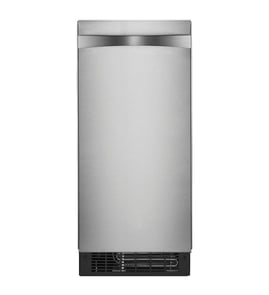



Is it worth repairing a GE ice maker?
Yes, repairing a GE ice maker is worth it when the unit is relatively new, the problem is isolated (like a valve, sensor, or drain issue), and the repair cost is well below the price of replacement. For the GE UCC15NJCII, we also factor in warranty coverage and maintenance history; check the UCC15NJCII owner's manual for model-specific care and service guidance.
Quick decision checklist
- Repair if the unit is under about 5 years old and has been reliable.
- Repair if the issue is maintenance-related (scale buildup, cleaning overdue, minor leaks).
- Repair if the estimate is under ~50% of the cost of a comparable new freestanding icemaker.
- Replace if it has repeated failures (cooling problems plus electrical issues).
- Replace if the sealed refrigeration system is failing and the unit is out of coverage.
What your manual tells us about cost-saving maintenance
This model is designed for periodic cleaning. The manual notes the “TIME TO CLEAN” light comes on after about 6 months of use and stays on until the ice-making system is cleaned. Keeping up with descaling often prevents “no ice” complaints that look like expensive failures.
Common symptoms and what they usually mean
| Symptom | Often caused by | Typical fix path |
|---|---|---|
| Slow ice production | Scale buildup, restricted water flow | Clean/descale; verify water supply |
| “Time to clean” light on | Normal maintenance interval | Run cleaning cycle per manual |
| No ice at all | Water supply issue, control not set, component failure | Check basics, then diagnose electrical |
| Leaking/drain issues | Drain restriction, drain pump issue (if equipped) | Clear drain; inspect pump and tubing |
Why it matters
A freestanding icemaker like the UCC15NJCII is a mix of refrigeration, water, and controls. When the problem is maintenance or a single replaceable component, repair restores performance quickly. When multiple systems are failing, replacement avoids repeat service costs.
Last updated: February 2026
How to find GE appliance parts?
To find the right parts for your GE appliance, we match parts by model number. For this freestanding ice maker, use model UCC15NJCII to pull up the correct diagrams and part list, then choose the part by name and reference number shown in the breakdown.
Step-by-step: find the correct part fast
- Locate the model number tag on the appliance (often inside the cabinet or on a side wall for ice makers).
- Confirm the model reads UCC15NJCII (letters and numbers must match exactly).
- Use the model-based parts list to identify the section you need (water system, cabinet, controls, etc.).
- Match the part using the diagram reference number, not just a description.
- Double-check any notes in the parts list for color, finish, or revision changes.
- Use the exploded view to confirm mounting location and any related hardware.
What you typically need to identify before ordering
| What to match | Why it matters | Example for an ice maker |
|---|---|---|
| Model number | Ensures fit and compatibility | UCC15NJCII |
| Diagram location | Prevents ordering a similar-looking part | Water inlet vs. drain parts |
| Electrical vs. plumbing | Avoids wrong component type | Switch vs. valve |
| Finish/kit compatibility | Prevents cosmetic mismatch | Door/handle kits on some models |
Why it matters
Ice makers often have multiple versions that look alike but use different valves, sensors, wiring, or drain components. Using the exact model number and the diagram reference keeps the repair accurate and avoids repeat downtime.
Helpful reference
For model-specific identification details and safety notes (including avoiding contact with moving ejector parts), use the UCC15NJCII Owner's manual.
Last updated: February 2026
What is the life expectancy of an ice maker?
Most freestanding ice makers like the GE UCC15NJCII last 7 to 10 years with normal home use. Lifespan depends most on water quality and cleaning frequency; the manual notes the machine lasts longer when it is cleaned regularly (at least yearly, preferably twice per year). See the owner's manual for the recommended cleaning routine and operating limits.
What affects ice maker lifespan the most
- Scale and mineral buildup from hard water (a top cause of early failure)
- Cleaning frequency of the ice-making section and condenser
- Water filtration on the inlet line (helps reduce taste, odors, and particles)
- Operating environment (heat and poor airflow make the system work harder)
- Water pressure and temperature staying within the unit’s limits
Maintenance schedule we recommend
Regular care is what keeps the ice-making system efficient and protects the sealed refrigeration system.
| Task | Typical frequency | Why it matters |
|---|---|---|
| Clean and descale the ice-making section | 1 to 2 times per year (more with hard water) | Prevents scale that can shorten machine life |
| Clean condenser area (as applicable) | At least 1 to 2 times per year | Helps cooling performance and reduces strain |
| Check drain and bin for clogs | Monthly | Prevents backups and melting-water issues |
| Replace/maintain water filtration | Per filter schedule | Reduces sediment and off-tastes |
Signs your ice maker is nearing end of life
- Ice cubes are consistently malformed or hollow even after cleaning
- Production drops and does not recover after descaling
- Unit runs longer than normal or struggles in normal room temperatures
- Repeated leaks, drain issues, or frequent service needs
Why it matters
A freestanding ice maker is a continuous-flow system that starts and stops based on bin level. When scale builds up, it can cause poor cube formation and extra wear on components, which shortens overall life. Keeping the unit clean and within its temperature and water limits is the most reliable way to reach the full 7 to 10 years.
Last updated: February 2026
What is the most common problem with GE refrigerators ice maker?
The most common ice-maker problem we see across GE units is a water-supply issue (low water flow, a restricted line, or a valve problem), which stops ice production or creates small, incomplete cubes. For the GE UCC15NJCII freestanding ice maker specifically, the owner's manual highlights low water supply, the unit being switched OFF, and scale buildup as top causes of “no ice” and poor cube formation.
Most common causes (and what to check first)
- Power or control is OFF: Confirm the ON/OFF light is on; if not, turn the unit on.
- Tripped breaker: Reset the home circuit breaker if it tripped.
- Low water supply: If the “Check Water” light flashes red, restore water supply; the control checks for water about every 20 minutes and resets automatically when water returns.
- Scale buildup: Scale can cause incompletely formed cubes and reduced capacity; follow the cleaning procedure.
- Restricted drain or standing water: Kinked drain line or standing water in the bin can reduce capacity.
Quick symptom-to-cause guide
| Symptom | Most likely cause | Best next step |
|---|---|---|
| No ice | Switch OFF, breaker tripped, low water | Turn ON, reset breaker, restore water supply |
| Small or incomplete cubes | Scale on ice-making system | Run the scale-removal cleaning cycle |
| Low capacity | Restricted drain, dirty condenser fins, scale | Check drain line, clean fins, clean system |
Cleaning and maintenance that prevents repeat issues
Scale is a frequent root cause because it affects water flow and freezing performance.
- Scoop out and discard ice
- Turn the unit OFF (press and hold ON/OFF for 3 seconds)
- Start the clean cycle (press and hold CLEAN-RESET and ON/OFF together for 5 seconds)
- Add the recommended amount of scale remover and let the unit run per the procedure
- Keep condenser fins clean and make sure the drain line is not kinked
Why it matters
Water flow and cleanliness directly control cube size, harvest reliability, and daily ice capacity. Fixing low water supply, drain restrictions, and scale buildup prevents “no ice” complaints and reduces wear on components like the inlet valve and refrigeration system.
Last updated: February 2026