Installation guide
 Owner’s manual
 Error Codes









How do you reset a Frigidaire oven door lock?
On the Frigidaire FFEF3054TWG range, we reset the oven door lock by canceling the lockout or self-clean cycle and then allowing the lock motor to fully release. In most cases, pressing and holding OFF for 3 seconds unlocks the door once the range is safe to unlock.
Quick reset steps (most common)
- Press OFF to stop any active cooking or self-clean cycle.
- If the control is in Oven Lockout, press and hold OFF for 3 seconds to cancel lockout.
- Watch the Door Locked indicator; the motor-driven latch needs time to move.
- If the door locked light stays on after self-clean, wait for the oven to cool; it typically takes about 1 hour after cleaning ends or is canceled.
- Once the Door Locked light goes out, open the door normally.
For the exact key names and indicator behavior on this model, follow the steps in the FFEF3054TWG owner's manual.
If the door is locked after self-clean
During self-clean, the door stays locked until the oven temperature drops to a safe level.
| Situation | What to do | What to expect |
|---|---|---|
| Self-clean is running | Press OFF | Cleaning stops, door remains locked while hot |
| Self-clean was canceled/finished | Wait for cool-down | Door typically unlocks after about 1 hour |
| Door locked light is off | Open door | Normal operation resumes |
If the lock will not release (common causes)
These issues can keep the latch from resetting even when you press OFF:
- Oven is still too hot (cool-down not complete)
- Control is still in lockout mode
- Door lock motor is sticking or failing
- Wiring issue to the lock motor or switch
- Control not sending power to the lock circuit
If the latch motor is not moving or the lock keeps re-engaging, a failed lock assembly is a common fix; the FFEF3054TWG uses a motorized lock system similar to the range oven door lock motor and switch assembly 5304528973.
Why it matters
Forcing the door can bend hinges, damage the latch, or misalign the door seal. Resetting the lock the right way protects the door hardware and helps the oven return to normal bake and broil operation.
Last updated: January 2026
How to stop beeping on a Frigidaire stove?
On the Frigidaire FFEF3054TWG electric range, most beeping comes from the kitchen timer, a preheat notification, or an error code. To stop it fast, press TIMER ON-OFF for timer beeps, or press OFF to clear an F or E error code (then reset power if it returns). See the FFEF3054TWG owner's manual for the exact key names on your control panel.
Quick fixes (most common causes)
- Timer beeping every minute: Press TIMER ON-OFF once to silence it and end the timer.
- Preheat beeps (often 3 beeps): This is normal; it indicates the oven reached set temperature.
- Control lock beeps with “LOC” showing: Unlock the control (the display shows LOC when lockout is active and you press a key).
- F or E code beeping: Press OFF to clear the code; if it repeats, reset power.
- Random beeping with no cooking: Check that no keys are stuck and the timer is not running.
If the display shows an F or E code
The manual’s “Before You Call” guidance is:
- Press OFF to clear the error.
- Try Bake or Broil again.
- If the code returns, turn off power to the range for 5 minutes, then restore power and set the clock.
If the beeping continues after a power reset, a failing sensor or control can be involved. A common part to check for temperature-related faults is the range oven temperature sensor 316490000.
What the beeps usually mean
| What you notice | Most likely cause | What to do |
|---|---|---|
| Beeps 3 times, then repeats every minute | Minute timer ended | Press TIMER ON-OFF |
| Beeps 3 times once | Oven finished preheating | Start cooking (normal) |
| Beeping with “F” or “E” code | Control detected a fault | Press OFF, then reset power if needed |
Why it matters
Stopping the beeping is helpful, but identifying the source prevents repeat alarms and helps you avoid missed preheat signals, locked controls, or an oven fault that can interrupt baking or broiling.
Last updated: January 2026
Why is my Frigidaire oven beeping and flashing F1?
On the Frigidaire FFEF3054TWG electric range, an F1 code with beeping typically points to a control problem, most often a stuck or shorted keypad (touch panel) or an issue in the oven control. Clear the code with OFF, then reset power and retest.
What to do first (quick reset)
- Press OFF to clear the fault.
- Turn power off at the breaker for 5 minutes, then restore power.
- Set the clock (some ovens will not run correctly until time of day is set).
- Try Bake or Broil again.
- If F1 returns quickly, stop using the oven until the control issue is corrected.
For the exact key sequence and control layout, follow the FFEF3054TWG owner's manual.
What usually causes F1 on this model
Most F1 events come from the oven control detecting an input or internal fault. Common causes include:
- Stuck key or moisture/grease contamination on the keypad area
- Ribbon connector between keypad and control not seated well
- Failing electronic oven control (clock/control board)
- Power surge or unstable power causing a false fault
Parts that are commonly involved
If the reset does not hold, the repair typically centers on the control system.
| Symptom pattern | Most likely area | What we check next |
|---|---|---|
| F1 returns immediately after power-up | Keypad/control input | Inspect keypad area and connections |
| F1 appears during cooking, then beeps | Control sensing fault | Verify wiring, then evaluate control |
| Random beeping with any F or E code | Control fault detected | Clear with OFF, power reset, retest |
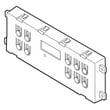
If testing points to a failed control, the model uses an electronic control board such as the range oven control board 5304532117 (match by model and wiring layout before ordering).
Why it matters
An F1 fault can disable heating or cause unpredictable beeping. Fixing it restores reliable temperature control and helps prevent interrupted baking or broiling.
Last updated: January 2026