Owner’s manual

Can DeWALT DWE7480 use dado blades?
No. For the Dewalt DWE7480 table saw, we do not recommend using dado blades; use a standard saw blade and make multiple passes (or use an alternate tool) when you need a wider groove.
Why dado blades are a problem on this saw
A dado stack is wider and heavier than a standard blade. On compact jobsite table saws like the DWE7480, that can create issues such as:
- Not enough arbor length or thread engagement for a dado stack and washer/nut
- Guard and riving knife incompatibility (you cannot use the normal safety setup)
- Higher load on the motor, belt/drive, and bearings
- Increased kickback risk if the setup is not fully supported
Safer ways to cut dados and grooves
If you need a dado-like cut, these options work well on a jobsite table saw:
- Use a standard blade and make repeated passes, moving the fence slightly each time
- Use a router with a straight bit and edge guide for clean, consistent dados
- Use a circular saw plus a guide for wider rabbets (then clean up with a chisel)
- Use plywood-specific joinery methods (like a router bit sized for undersized plywood)
Quick comparison
| Method | Best for | Tradeoff |
|---|---|---|
| Multiple passes with standard blade | Occasional dados | Slower setup and more passes |
| Router and straight bit | Clean dados, shelves | Requires router and bit |
| Hand tools cleanup | Fine fitting | More time and skill |
Setup checks that improve cut quality
Even when you are not cutting dados, these checks help prevent burning, wandering cuts, and rough edges:
- Confirm the blade is sharp and installed correctly
- Verify blade-to-miter-slot alignment and fence parallelism
- Set blade height correctly for the cut (typically just above the workpiece)
- Use the correct blade type for rip cuts vs crosscuts
For alignment and adjustment steps specific to your saw, use the DWE7480 owner's manual. You can also follow our how to adjust a table saw blade guide for the common adjustment process.
Why it matters
Using the wrong blade setup can reduce cut accuracy and increase the chance of binding and kickback. Keeping the DWE7480 configured for standard blades helps protect the motor and keeps the guard and riving knife system usable.
Last updated: February 2026
Is the DeWALT DWE7480 discontinued?
Yes. The Dewalt DWE7480 table saw is no longer in current production, so you typically will not see it sold as a new, regularly stocked model. For model-specific identification details and supported configurations, use the DWE7480 owner's manual.
How to confirm you have the right model
We recommend verifying the exact model and type before you shop for parts or compare replacement saws.
- Check the model label on the saw body (often near the base or motor housing)
- Confirm the model number reads DWE7480
- Match the “Type” on the label to your saw (for example, Type 20)
- Compare your fence, guard, and riving knife style to the diagrams in the manual
- Record the serial number for your own records
What “discontinued” means for repairs and parts
A discontinued power tool can still be serviceable; it just means the manufacturer is not actively producing that model as a current lineup item.
| What you need | What to expect | Best next step |
|---|---|---|
| Replacement parts | Availability varies by component | Use the parts list for DWE7480 and match by description |
| Consumables (blade, hardware) | Usually easy to source by size/spec | Confirm blade diameter, arbor size, and kerf requirements in the manual |
| Safety components (guard, riving knife) | Must match the exact design | Verify fitment using the manual diagrams |
Why it matters
Discontinued status mainly affects parts availability and exact fit. With table saws, correct fit is especially important for the blade guard, riving knife, fence alignment, and bevel or height adjustment components.
Helpful DIY guidance
If you are troubleshooting performance or cut quality, these guides help narrow down common causes:
Last updated: February 2026
What is the rip capacity of the DWE7480?
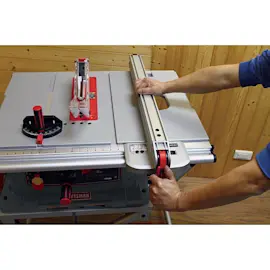
The Dewalt DWE7480 table saw has a 24-inch rip capacity, meaning it can rip-cut material up to about 24 inches wide when the fence is set to its maximum position. For the exact setup and fence scale use details, follow the DWE7480 owner's manual.
What “rip capacity” means
Rip capacity is the maximum distance from the blade to the rip fence. It determines the widest board or sheet you can cut lengthwise (rip) in a single pass.
Common examples:
- 12-inch rip: narrow shelving and trim work
- 24-inch rip: wider panels and jobsite sheet goods
- 30+ inch rip: larger cabinet-style saw capability
Quick check: confirm you are getting the full 24 inches
Use these steps to verify the fence is traveling and reading correctly:
- Unplug the saw before checking alignment or moving parts.
- Slide the rip fence fully outward and lock it.
- Measure from the fence face to the blade tooth closest to the fence.
- Confirm the fence locks parallel to the blade (no toe-in or toe-out).
- Clean the front rail and fence pads so the fence slides smoothly.
Troubleshooting if cuts are not sizing correctly
If your cut width does not match the fence scale, these are the most common causes:
| Symptom | Most likely cause | What to do |
|---|---|---|
| Cut is consistently off by the same amount | Fence scale pointer misaligned | Recalibrate the pointer per the manual |
| Cut varies along the length | Fence not parallel to blade | Adjust fence alignment |
| Cut is angled or drifting | Blade not square or blade is dull | Square the blade; replace/clean blade |
For angle-related accuracy issues, use our guide: table saw bad angle cuts.
Why it matters
Knowing the rip capacity helps you plan safer, cleaner cuts. When you push material wider than the saw is set up to handle, you increase the chance of binding, kickback, and inaccurate cuts.
Last updated: February 2026