 Installation guide
 Owner’s manual
 Error Codes







How long does a Frigidaire FGET3066UFB oven last?
A Frigidaire FGET3066UFB electric wall oven typically lasts 10 to 15 years with normal household use. Regular cleaning, avoiding overheating during self-clean, and replacing wear parts (like sensors or door-lock components) helps you reach the upper end of that lifespan; see the care guidance in the owner's manual.
Typical lifespan and what affects it
Most electric wall ovens land in the 10 to 15 year range. The biggest factors are heat exposure, cleaning habits, and how quickly small problems get fixed.
- Heavy daily baking and frequent high-temp broiling can shorten life
- Self-clean use adds extreme heat stress to wiring and controls
- Power issues (loose connections) can damage electronic boards
- Poor door sealing makes the oven run hotter and longer than necessary
- Replacing failing parts early prevents secondary damage
Parts that commonly impact longevity
When an oven starts heating unevenly, takes too long to preheat, or throws temperature-related symptoms, these parts are often involved:
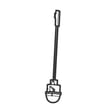
- Oven temperature sensing: cooking appliance oven temperature sensor 5304504897
- Overheat protection: range thermal cut-off 5304494446
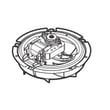
- Airflow for even baking: wall oven convection fan motor 139008504 and range convection fan blade 318398302
- Door lock operation during self-clean: range oven door lock motor 5304528925
Quick symptom-to-part guide
| Symptom | What it often points to | Example part on this model |
|---|---|---|
| Oven temp swings, under/over-bakes | Temperature sensing issue | 5304504897 |
| Oven shuts down or goes dead when hot | Overheat protection opened | 5304494446 |
| Convection bakes unevenly or noisy | Fan motor or blade issue | 139008504 or 318398302 |
| Door stays locked after clean | Door lock motor/latch issue | 5304528925 |
Why it matters
A wall oven that is running hot, cycling incorrectly, or struggling to cool can stress the control system and wiring. Fixing heat-management issues early often extends the service life and improves baking results.
Maintenance habits that extend life
Use these habits to keep your Frigidaire wall oven running longer:
- Run self-clean only when needed; allow full cool-down time before opening the door
- Keep the door gasket area clean so the door seals tightly
- Avoid lining the oven with foil (it disrupts heat flow and can damage surfaces)
- Keep vents clear so cooling airflow is not restricted
- If performance changes, troubleshoot promptly using the owner's manual
Last updated: February 2026
How to reset a Frigidaire wall oven?
To reset your Frigidaire FGET3066UFB wall oven, we use either a power reset at the breaker (quickest) or a factory-default reset from the keypad (deepest). The exact keypad steps and what gets reset are listed in the owner's manual.
Reset options (quick to deep)
- Power reset (soft reset): Turn the oven circuit breaker OFF for 1 to 5 minutes, then turn it ON.
- Cancel control lockout: With the door closed, press and hold the Lock key for about 3 seconds to toggle lockout off.
- Restore factory defaults (deep reset): Use the factory-default procedure in the owner's manual (it resets user-changed control settings).
Factory-default reset for FGET3066UFB (keypad steps)
The FGET3066UFB control restores factory defaults using this sequence:
- Make sure the oven is idle (not cooking and not in self-clean).
- Press and hold 7 on the numeric keypad until the acceptance tone sounds (about 6 seconds).
- Press OK/START to confirm.
What a factory-default reset changes
| Category | Examples of settings restored to default |
|---|---|
| Display and tones | 12/24-hour mode, silent or audible beeps |
| Temperature options | Fahrenheit or Celsius display, temperature offset (UPO) |
| Cooking preferences | Continuous bake vs. energy-savings mode |
If the oven still acts up after a reset
A reset clears a control glitch, but it does not correct a failed part. Use these next checks:
- If heating is erratic or you get temperature-related faults, test the sensor circuit; replace the cooking appliance oven temperature sensor 5304504897 if it is out of spec.
- If the oven is dead or resets randomly, inspect the power supply connections; a damaged terminal block 5304409888 can cause intermittent power.
- If problems happen during self-clean (door will not lock or unlock), inspect the door lock mechanism and wiring.
Why it matters
Resetting is the fastest way to recover from a power interruption, clear a temporary control error, or undo accidental setting changes. A factory-default reset is especially useful after changing tones, clock format, temperature units, or calibration.
Last updated: February 2026
What does code 306 mean?
On a Frigidaire FGET3066UFB electric wall oven, a “306” code is not a standard oven fault code by itself; it is most often a partial display (for example, an “F” code that is being truncated) or a control/display glitch. Start by resetting power and then checking for a full error code in the display using the owner's manual.
What to do first (fast checks)
- Turn the oven off, then reset power at the breaker for 1 minute.
- Restore power and watch the display for a complete code (often starts with “F”).
- If the code returns, note when it happens (preheat, bake, convection, self-clean).
- Confirm the oven door is fully closed and the latch is not binding.
- If the oven is newly installed or recently moved, make sure it was at room temperature before powering on (cold storage power-up can damage controls).
Common causes when the display shows an incomplete or odd code
These are the most frequent issues we see on electronic wall ovens when the display is confusing or intermittent:
- Loose or overheated power connection at the junction box or terminal block
- Control board or relay board communication issue
- Temperature sensing problem (sensor out of range or wiring issue)
- Over-temperature event that trips a safety device
Parts that commonly relate to “mystery codes”
| Symptom you notice | Most likely area | Example part for this model |
|---|---|---|
| Code appears during preheat; temps seem wrong | Temperature sensing circuit | Cooking appliance oven temperature sensor 5304504897 |
| Oven goes dead or resets when heating | Power connection or safety cutout | Range thermal cut-off 5304494446 |
| Convection acts erratic; fan noise changes | Convection airflow | Wall oven convection fan motor 139008504 |
Why it matters
An incomplete code can point to an electrical supply problem or a failing sensor/control. Catching it early helps prevent no-heat, runaway temperature, or repeated shutdowns during baking.
Safety and installation notes
- Electrical ground is required; do not energize the oven until it is properly grounded.
- Use copper-to-aluminum approved connectors if your home wiring is aluminum.
- Follow the wiring and grounding method shown in the installation guide.
Last updated: February 2026
Why won't my Frigidaire wall oven turn on?
If your Frigidaire FGET3066UFB wall oven will not turn on, the most common causes are a power supply problem (tripped breaker or loose wiring), a control lockout mode (like Sabbath), or a failed control component such as the control board. Use the owner's manual to confirm which mode or message is active.
Quick checks to do first (no tools)
- Make sure the oven is not in a power interruption state; reset the household breaker fully OFF then ON.
- Look at the display for messages such as SF (Sabbath failure) after a power interruption.
- If the control panel beeps three times when you press keys, the oven may be in lockout.
- Confirm the oven door is fully closed; some functions will not start if the door is not sensed correctly.
- Try pressing OFF once, then set Bake and press OK/START.
Control lockout and Sabbath mode (common “it won’t start” causes)
Your FGET3066UFB can appear “dead” or unresponsive when a special mode is active.
- Cancel lockout: press and hold the lock key for 3 seconds; wait about 15 seconds for the door latch motor to finish unlocking.
- Turn off Sabbath mode: press and hold Self Clean and Delay Start together for at least 3 seconds.
- If you see SF: that indicates a Sabbath failure after a power interruption; turn off Sabbath mode using the steps above.
When it’s likely a part failure
If the breaker is good and no special mode is active, a failed component is a strong possibility.
| Symptom | Most likely area | What to check next |
|---|---|---|
| Display is blank, no lights, no response | Power supply or wiring | Check breaker, then inspect connections at the terminal block |
| Display works but oven will not heat/start | Sensor or control system | Run a bake test; check for error codes and temperature issues |
| Works sometimes, then shuts off | Overheat protection | Check for cooling/airflow issues; thermal cut-off may be opening |
Relevant parts often involved in “no heat/no start” situations include the cooking appliance oven temperature sensor 5304504897, the terminal block 5304409888, and the range thermal cut-off 5304494446.
Why it matters
A wall oven that will not power up can be as simple as a tripped breaker, but it can also indicate loose high-voltage connections or an overheating safety shutdown. Addressing the root cause helps prevent repeat failures and protects the control board.
Last updated: February 2026





