 Installation guide
 Owner’s manual
 Error Codes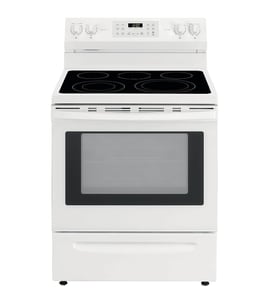




How to reset JennAir oven?
To reset the Jenn-Air JDS9860CDS02 oven control, we recommend power-cycling the range at the breaker, then clearing any “POWER LOSS” message by pressing CANCEL and starting a short Bake cycle to confirm normal operation. Use the steps in the JDS9860CDS02 owner's manual for control behavior after outages.
Quick reset steps (power cycle)
- Turn OFF the range circuit breaker(s) for 1 minute.
- Turn the breaker(s) ON.
- If the display shows “12:00” and “POWER LOSS”, press CANCEL to clear it.
- Start a Bake cycle and let it run for about 1 minute.
- Watch for the same error code or message to return.
If the controls seem “stuck” (control lock)
This model has a control lock feature that disables the keypad and locks the oven door.
- To lock: press and hold BACK and ENTER for 3 seconds until “CONTROL LOCKED” appears.
- To unlock: press and hold BACK and ENTER for 3 seconds; “UNLOCKING DOOR” may appear while it releases.
- If the oven is currently running, the control and door typically cannot be locked.
What you should see after a reset
| What you see on the display | What it means | What to do |
|---|---|---|
| “12:00” and “POWER LOSS” | Power was interrupted | Press CANCEL, then reset the clock if needed |
| Normal time of day | Control is powered and idle | Start Bake to confirm heating |
| “CONTROL LOCKED” | Keypad is locked | Hold BACK + ENTER 3 seconds |
Why it matters
A proper reset clears temporary control glitches after a power interruption and confirms the electronic oven control can accept commands (Bake, Broil, Convect) without immediately re-displaying an error.
Last updated: January 2026
How long does a JennAir oven last?
A Jenn-Air oven typically lasts 15 to 20 years with normal household use and basic maintenance. For the Jenn-Air JDS9860CDS02 slide-in range, keeping the oven clean, protecting door seals, and fixing heating issues early helps you reach the full expected lifespan; see the JDS9860CDS02 use and care guide for care and troubleshooting details.
Typical lifespan and what affects it
Most ranges in this class land in the 15 to 20 year range; the biggest differences come down to heat stress, cleaning habits, and how quickly worn parts are replaced.
- Heavy daily cooking and frequent high-heat baking can shorten life
- Skipping cleaning can trap grease and heat, stressing wiring and controls
- A leaking door gasket makes the oven run longer and hotter than necessary
- Power surges and repeated overheating can damage the control board
- Promptly replacing failed heating parts prevents secondary damage
Parts that commonly determine “end of life”
When an oven feels “worn out,” it is usually one or two service parts, not the whole range.
| Symptom | Common wear item | Example part for this model |
|---|---|---|
| Oven not heating or heats unevenly | Bake element | Range bake element WPW10310274 |
| Heat leaking, long preheat times | Door gasket | Range oven door gasket WPW10162384 |
| Door won’t seal or close correctly | Door hardware or latch | (varies by symptom) |
Maintenance that helps you get the full 15 to 20 years
Use these habits to reduce heat stress on the oven cavity, wiring, and controls.
- Wipe spills after the oven cools; avoid baked-on carbon buildup
- Keep the door sealing surfaces clean and free of crumbs
- Do not slam the oven door; it can damage hinges and the seal
- Use self-clean only as recommended; high heat is hard on components
- If you notice weak heating, address it early instead of “cooking around it”
Why it matters
A range that is losing heat (bad gasket) or struggling to maintain temperature (weak element) runs longer to reach setpoint. That extra runtime increases energy use and accelerates wear on the control system and wiring.
Last updated: January 2026
Is JennAir considered high end?
Yes. Jenn-Air is widely considered a high-end (luxury) kitchen appliance brand, and the JENN-AIR JDS9860CDS02 slide-in range is built and supported as a premium product with factory-specified parts, dedicated service channels, and higher-end design and performance expectations.
What “high end” means for this range
High end typically shows up in a few practical ways for owners of the JDS9860CDS02:
- Premium styling and finishes, with a focus on built-in or slide-in kitchen design
- Feature-forward cooking performance (bake, broil, cooktop controls, and ventilation options)
- Higher-cost components and assemblies compared with many mid-tier ranges
- Strong emphasis on using factory-specified replacement parts for proper fit and function
- Brand-supported service network and documentation
How to confirm what your model includes
The fastest way to verify the exact features and operating details for your specific range is to use the model documentation.
| What you want to confirm | Best place to check | Why it matters |
|---|---|---|
| Cooking modes and control functions | JDS9860CDS02 use and care guide | Prevents misuse and helps you get consistent results |
| Installation requirements and clearances | JDS9860CDS02 installation guide | Helps ensure safe operation and proper venting |
| Correct replacement parts | Parts list for JDS9860CDS02 | Avoids fit issues and repeat repairs |
Why it matters
With a high-end range like the JDS9860CDS02, using the correct parts and following the documented operating and installation requirements protects performance. For example, choosing the correct heating component (such as a range bake element WPW10310274) helps maintain even baking and reliable temperature control.
Last updated: January 2026
What does F1 mean on a JennAir oven?
On the Jenn-Air JDS9860CDS02 range, an F1 error typically points to a problem in the electronic oven control system, most often a failing touch pad (keypad) or control board/clock. Clearing power may reset it briefly, but recurring F1 usually requires diagnosis and repair.
What to do first (safe, quick checks)
- Press Cancel to see if the code clears.
- Turn off power at the breaker for 1 minute, then restore power.
- If F1 returns immediately or during use, stop using the oven until it’s checked.
- If the control panel is unresponsive or beeping continuously, disconnect power and schedule service.
- Review the control and display behavior in the JDS9860CDS02 use and care guide.
What usually causes an F1 code
F1 is commonly triggered when the control senses an invalid input or internal fault. Typical causes include:
- Stuck or shorted touch pad (keypad sending signals when you are not pressing anything)
- Failed electronic oven control (EOC) or clock/control board
- Moisture, heat damage, or contamination behind the control panel
- Loose or damaged wiring at the control (less common, but possible)
Common symptoms and what they suggest
| Symptom | Most likely issue | What we recommend |
|---|---|---|
| F1 beeps constantly, even when idle | Touch pad shorted | Inspect/replace keypad or control panel assembly |
| F1 appears after preheat or during long bakes | Control board heat-related failure | Test/replace control board |
| Random F1 after cleaning or spillover | Moisture/contamination | Let area dry fully; if it returns, service is needed |
Why it matters
An F1 fault can prevent accurate temperature control and can cause nuisance beeping or shutdowns. Addressing it quickly helps protect the oven control system and restores reliable baking performance.
Last updated: January 2026






