 Installation guide
 Owner’s manual
 Error Codes






Can I look up Frigidaire parts by model number?
Yes. Looking up parts by your Frigidaire model number is the most accurate way to get compatible replacement parts for your FFEW2425QSB electric built-in oven because the parts list is tied to the exact configuration and wiring used in that model.
For the FFEW2425QSB wall oven, the serial plate is located with the oven door open on the left side of the oven frame. Confirm the full model number before ordering.
- Open the oven door fully
- Look along the left side of the oven frame for the serial plate
- Write down the model number and serial number exactly as shown
- Use that exact model number when searching parts
Once you have the model number, match parts by description and function (bake, broil, temperature sensing, controls), then confirm the part fits your exact model.
- Start with the model-based parts list for FFEW2425QSB
- Compare the part name to your symptom (no heat, overheating, uneven baking, dead display)
- Verify you are replacing the correct system (heating, sensor, control, door)
- Use the wiring diagram and troubleshooting section in the FFEW2425QSB owner's manual when diagnosing
These are examples of model-linked parts that are commonly replaced when symptoms match:
| Symptom | Part type to check | Example part for this model |
|---|---|---|
| Oven temperature is inaccurate | Temperature sensor | Cooking appliance oven temperature sensor 5304504897 |
| Bake does not heat | Bake element | Frigidaire wall oven bake element 139086600 |
| Broil does not heat | Broil element | Wall oven broil element 139203500 |
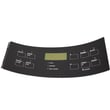
| Display or functions act erratically | Control board | Frigidaire wall oven control board 5304513048 |
Wall ovens can share similar-looking parts across different Frigidaire models, but connectors, mounting, and control logic can vary. Using the exact model number helps prevent ordering a part that does not fit or does not resolve the problem.
Last updated: February 2026
How to reset a Frigidaire wall oven?
To reset your Frigidaire FFEW2425QSB electric wall oven, turn the power off at the breaker (or unplug it if accessible) for about 1 minute, then restore power and reset the clock. This clears many control glitches and is the most reliable “hard reset” for the electronic oven control.
- Press CLEAR/OFF to stop any active cooking cycle.
- Turn power OFF at the household circuit breaker (preferred for built-in ovens).
- Wait 60 seconds.
- Turn power ON.
- Set the time of day again (the clock typically resets after power loss).
- Test BAKE and BROIL to confirm normal operation.
If the door is locked, the control may be in lockout mode or cooling down after self-clean.
- Control lockout: Press and hold CLEAR/OFF for 3 seconds to toggle lockout (look for “LOC”).
- After self-clean: Allow about 1 hour for the oven to cool; the door unlocks when the door locked light goes out.
- Do not force the door open; the motorized latch can be damaged.
A reset helps when the display is frozen, keys do not respond, or the oven behaves oddly after a power flicker. If an error code returns immediately after restoring power, the issue is usually a failed sensor, wiring problem, or a control problem.
| Symptom after reset | Most common cause | What we check next |
|---|---|---|
| Oven heats inaccurately | Temperature sensing issue | Test/replace cooking appliance oven temperature sensor 5304504897 |
| Oven shuts down or overheats | Safety limit opening | Check Frigidaire range high-limit thermostat 318578506 |
| Display/keys still act up | Control or keypad issue | Inspect connections; consider Frigidaire wall oven control board 5304513048 |
Resetting the FFEW2425QSB restores the electronic oven control to a clean startup state. That helps you separate a one-time control glitch from a real part failure (sensor, thermostat, wiring harness, or control board) before you order parts or start deeper troubleshooting.
For model-specific control features and operating steps, use the FFEW2425QSB owner's manual.
Last updated: February 2026
How to replace thermostat in Frigidaire wall oven?
On the Frigidaire FFEW2425QSB electric built-in oven, replacing the thermostat typically means replacing the high-limit thermostat that protects the oven from overheating. We shut off power, access the rear of the oven, move the wires one at a time to the new thermostat, then reinstall and test for normal heating.
- Turn off power at the breaker (built-in ovens are hardwired in most homes).
- Let the oven cool completely.
- Pull the oven forward enough to reach the rear panel (use a helper to avoid cabinet damage).
- Take a quick photo of the wire positions before disconnecting anything.
- Use a 1/4-inch nut driver or screwdriver for rear-panel screws (varies by installation).
For model-specific safety and handling guidance, follow the FFEW2425QSB owner's manual.
- Disconnect power at the breaker.
- Remove the rear access panel to expose wiring and safety components.
- Locate the high-limit thermostat (usually a small round or oval thermostat with two wires and mounting screws).
- Move wires one at a time from the old thermostat to the same terminals on the new one.
- Remove mounting screws, swap in the new thermostat, and tighten screws snugly.
- Reinstall the rear panel, restore power, and run a short bake test.
- If the thermostat has two identical terminals, wire order usually does not matter.
- If terminals are labeled, match the labels exactly.
For this model, the high-limit thermostat listed for the oven is the range high-limit thermostat 318578506.
| Symptom | Most likely related part | What you may notice |
|---|---|---|
| Oven shuts off mid-cycle or won’t heat after overheating event | High-limit thermostat | Heat stops, may reset after cooling |
| Oven temperature is inaccurate | Oven temperature sensor | Overbakes or underbakes |
| Oven won’t reach set temp and element looks damaged | Bake element | No glow, visible blistering or breaks |
The high-limit thermostat is a safety device. If it is weak or open, it can interrupt power to heating circuits and cause no-heat or intermittent-heat problems even when the control settings are correct.
Last updated: February 2026
What is the life expectancy of a Frigidaire oven?
A Frigidaire electric wall oven like model FFEW2425QSB typically lasts 10 to 15 years. With consistent care and quick repairs to common wear items (heating elements, sensors, door hardware), many ovens reach 15 to 20 years of service.
- Heat stress and ventilation: blocked airflow can overheat controls and wiring.
- Cleaning habits: heavy soil and spills can damage finishes and affect performance.
- Door seal and hinges: heat loss makes the oven work harder and can shorten component life.
- Electrical health: loose connections at the power supply can cause intermittent failures.
- How often you bake/broil: frequent high-heat use wears elements and sensors faster.
If the oven still powers on but bakes unevenly, won’t hold temperature, or overheats, these parts are frequent culprits:
| Symptom | Likely part | What it impacts |
|---|---|---|
| Temperature swings, underbaking | Cooking appliance oven temperature sensor 5304504897 | Temperature feedback to the control |
| Oven shuts down or overheats | Frigidaire range high-limit thermostat 318578506 | Safety cutoff for overheating |
| No/weak bake heat | Frigidaire wall oven bake element 139086600 | Primary baking heat source |
| No/weak broil heat | Wall oven broil element 139203500 | Top heat for broiling and browning |
- Wipe spills after the oven cools; avoid letting grease bake on repeatedly.
- Keep the door closing tightly; replace worn hinges or seals if the door sags.
- Avoid slamming the door; it stresses hinges, glass brackets, and the latch.
- If you notice slow preheat or uneven baking, address it early (often an element or sensor).
- Use the care and cleaning steps and operating guidance in the owner's manual.
Most “end of life” oven problems are really a few high-wear components failing. Replacing a bake element, temperature sensor, or thermostat at the right time can restore normal baking performance and help your FFEW2425QSB reach the full 10 to 15 year lifespan (or longer).
Last updated: February 2026
What would cause a Frigidaire oven to stop working?
If your Frigidaire FFEW2425QSB electric wall oven stops working, the most common causes are loss of power at the breaker or terminal block, a control issue after a power failure, or a failed heating or safety component (bake element, temperature sensor, high-limit thermostat, or control board).
- Reset the double breaker (wall ovens typically use a 240V circuit).
- If power was interrupted, turn the oven off, restore power, then reset the clock and reselect Bake or Broil (the manual notes the oven can resume when power returns).
- If the display is on but there is no heat, test both Bake and Broil to narrow the failure.
- If self-clean was used, wait for cooldown; the door lock can stay engaged for about 1 hour.
- If the oven is completely dead (no display), focus on wiring connections at the terminal block.
- Frigidaire wall oven bake element 139086600 (no bake heat, slow preheat)
- Wall oven broil element 139203500 (no broil heat)
- Cooking appliance oven temperature sensor 5304504897 (incorrect temperature readings)
- Frigidaire range high-limit thermostat 318578506 (opens if overheating is detected)
- Frigidaire wall oven control board 5304513048 (no heat commands, dead functions)
| Symptom | Most likely area | Best next step |
|---|---|---|
| No display | Power, wiring | Check breaker, then inspect terminal block connections |
| Display on, no Bake heat | Bake circuit | Inspect and meter-test bake element and sensor |
| Stops mid-cycle | Overheat protection | Check airflow, then test high-limit thermostat |
| Door locked after self-clean | Lock cooldown | Cancel, allow cooldown, then retry |
“Oven stopped working” can mean “no power” or “no heat.” Separating those symptoms prevents replacing the wrong part and speeds up diagnosis.
For control reset steps, self-clean lock behavior, and “Before You Call” checks, use the FFEW2425QSB owner’s manual.
Last updated: February 2026





