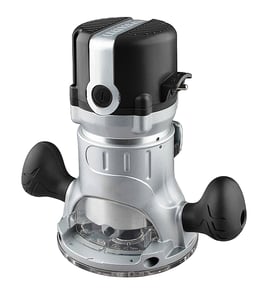

Does Craftsman make a router table?
Yes. Craftsman has made router tables and router table accessories that can be used with many Craftsman routers, including the Craftsman 31517361, as long as the router’s base pattern, mounting plate, and bit clearance match the table.
How to tell if a router table will work with your Craftsman 31517361
A “Craftsman router table” is not automatically universal. Before buying or mounting your router, we match fit using these checks:
- Mounting pattern: Confirm the screw-hole pattern on the router base matches the table insert plate.
- Base diameter and opening: Make sure the router base and bit opening clear the insert ring.
- Collet size: Many setups are 1/4-inch; some tables support 1/2-inch capable routers as well.
- Above-table adjustments: Check whether the table supports above-table height changes or a lift.
- Switch access: Ensure you can safely reach the router power switch or use a table safety switch.
Quick compatibility checklist (what we look for)
| Item to verify | What “good” looks like | Why it matters |
|---|---|---|
| Insert plate holes | Matches your router base | Prevents unsafe mounting |
| Bit clearance | Bit fits through insert ring | Avoids rubbing and kickback |
| Fence and dust port | Adjustable fence, dust collection | Improves cut quality and cleanup |
| Table flatness | Rigid, flat top | Keeps edges straight |
Why it matters
A router table setup that does not match the router’s mounting pattern or clearance can cause vibration, poor cut quality, and unsafe operation. Taking a few minutes to confirm fit helps protect the tool, the workpiece, and you.
Helpful related reading
If you are shopping by model number or trying to confirm you have the right Craftsman router model, use our guide: how to find your appliance model number (and what it means for parts).
Last updated: February 2026
How to replace router bits sears Craftsman router?
To replace a router bit on your Craftsman router model 31517361, unplug the router, loosen the collet nut, remove the old bit, insert the new bit to the correct depth, then tighten the collet securely before testing at low speed.
Safe, correct steps to change a router bit
- Unplug the router (never change bits with power connected).
- If you have a spindle lock, engage the lock; if not, use two wrenches (one on the shaft, one on the collet nut).
- Turn the collet nut counterclockwise to loosen.
- Remove the old bit; if it is stuck, loosen a little more and gently wiggle the bit out.
- Insert the new bit, then pull it back out slightly before tightening (so it is not bottomed out in the collet).
- Tighten the collet nut firmly; then recheck that the bit is secure.
Bit insertion depth (what “correct” looks like)
Most 1/4-inch and 1/2-inch shank router bits hold best when the shank is inserted deep into the collet but not bottomed out.
| What to do | Why it matters |
|---|---|
| Insert the bit fully, then pull it back out about 1/16 to 1/8 inch | Prevents bottoming out, which can reduce clamping force |
| Keep most of the shank inside the collet | Improves grip and reduces vibration |
| Avoid clamping on the fluted cutting area | Prevents slippage and bit damage |
Troubleshooting: collet will not loosen or bit slips
- Bit will not come out: loosen the collet nut a bit more, then tap the wrench lightly to break the collet free.
- Bit slips during use: clean dust/resin from the collet and bit shank; retighten firmly.
- Excess vibration: confirm the bit is straight, fully supported in the collet, and not damaged.
- Collet feels rough or won’t tighten: the collet may be worn and should be replaced.
Why it matters
A properly tightened collet on a Craftsman router keeps the bit from creeping downward, reduces chatter, and helps you get cleaner cuts in wood and laminate.
For more DIY safety basics before working on power tool wiring or switches, use our guide: are diy appliance repairs safe.
Last updated: February 2026
What is the average lifespan of 31517361?
A Craftsman router like model 31517361 typically lasts 10 to 15 years with normal DIY use and basic maintenance. Heavy jobsite use, frequent bit changes under load, and poor dust control shorten life; good cleaning and brush care extend it.
What most affects router lifespan
- Motor brush wear (common end-of-life item on many corded routers)
- Bearing wear from high RPM use and side loading
- Dust buildup in vents and switch area
- Collet condition (slipping bits increase heat and wear)
- Cord strain near the handle and plug
Quick maintenance that adds years
- Blow out vents with dry air after dusty cuts (keep the tool unplugged).
- Check the collet and nut for resin buildup; clean so bits clamp evenly.
- Inspect the power cord for nicks, soft spots, or loose strain relief.
- Avoid starting cuts with the bit already buried in the workpiece.
- Let the router reach full speed before loading it, and do not force feed rate.
Typical lifespan expectations (rule of thumb)
| Usage pattern | Typical lifespan | What usually fails first |
|---|---|---|
| Occasional DIY | 12 to 15 years | Brushes, switch |
| Regular weekend projects | 10 to 12 years | Brushes, bearings |
| Heavy jobsite use | 5 to 8 years | Bearings, armature, cord |
Why it matters
Knowing the expected lifespan helps you decide whether to troubleshoot a no-start, sparking, or overheating issue (often brushes, cord, or switch) versus replacing the router. For safe electrical checks, use a meter and follow proven steps like in [how to use a multimeter to test electrical parts video].
Last updated: March 2026