 Installation guide
 Owner’s manual




How long do GE Profile ovens last?
GE Profile ovens last 15 years. If you are comparing that to your GE JVM7195EK6ES microwave/hood combo, most over-the-range microwaves last 10 years. Use the JVM7195EK6ES owner’s manual for model-specific care that helps you reach full service life.
Typical lifespan by appliance type
These are the standard service-life expectations most homeowners see with normal use.
| Appliance type | Typical lifespan |
|---|---|
| GE Profile wall oven or range oven | 15 years |
| Over-the-range microwave/hood combo (like JVM7195EK6ES) | 10 years |
What shortens an oven’s life (and what shortens a microwave’s)
A few habits drive most early failures in heating appliances.
- Heavy daily high-heat use (baking, broiling, air fry modes)
- Poor ventilation around the unit (especially for built-in installs)
- Skipping basic cleaning, leading to heat stress and corrosion
- Power surges affecting control boards and displays
- Delaying small repairs until they become larger failures
Practical steps to get the full 15 years from a GE Profile oven
These actions reduce wear on common failure points like igniters, bake elements, sensors, and electronic controls.
- Keep vents clear and avoid blocking airflow with foil
- Clean spills after the oven cools to prevent baked-on residue
- Use self-clean only when needed; run the shortest effective cycle
- Confirm the door seals tightly; replace worn gaskets promptly
- Address temperature problems early (verify with an oven thermometer)
Why it matters
Knowing the expected lifespan helps you decide whether a repair is worth it. At or near 15 years, major electronic or heating repairs often signal it is time to plan for replacement instead of repeated fixes.
If you need parts for your GE JVM7195EK6ES microwave/hood combo, order from the parts list for this model or search by model number on Sears PartsDirect.
Last updated: February 2026
How to read GE microwave model number?
On your GE JVM7195EK6ES microwave/hood combo, the model number is printed on the rating label inside the oven cavity (open the door and look along the inside frame). Write down both the model and serial number exactly as shown; we use that full model number to match the correct parts and instructions in the owner's manual.
Where to find the model number label
Look for a printed label inside the microwave when the door is open. Common spots include:
- The inside door frame area
- The front edge of the oven cavity opening
- Near the rating plate label inside the unit
How to read it correctly (so parts match)
When you copy the model number, use these checks:
- Copy every letter and number in order (for example, JVM7195EK6ES)
- Keep letters in uppercase
- Include the full suffix at the end (it often identifies a specific version)
- Record the serial number too (helpful for service and production date)
What the model number tells us
Your model number is the key to getting the right GE microwave/hood combo parts and diagrams.
| What you’re looking at | Example for this unit | Why it matters |
|---|---|---|
| Model number | JVM7195EK6ES | Identifies the exact product version for parts fit |
| Serial number | (varies) | Helps narrow production details when needed |
Why it matters
Many GE over-the-range microwaves share similar names, but small model-number differences can change door latch parts, switches, filters, and control components. Using the exact model number helps ensure parts like a door switch or fuse match your JVM7195EK6ES.
Parts that commonly depend on the exact model
If you are ordering or troubleshooting, these are examples of parts that must match the model:
- Microwave door interlock switch WB24X25397
- Microwave fuse WB27X25389
- Microwave grease filter WB02X35491
You can order replacement parts for your JVM7195EK6ES from the parts list for this model, or search by model number on Sears PartsDirect.
Last updated: February 2026
How to reset a GE microwave after power failure?
After a power failure, your GE JVM7195EK6ES microwave/hood combo typically resets by restoring power, then re-setting the clock. If the controls act odd after a surge, unplug the microwave briefly and plug it back in, then confirm normal operation using the steps in the JVM7195EK6ES owner's manual.
Quick reset steps (power failure or power surge)
- Press Cancel/Off once to clear the display.
- Unplug the microwave (or switch the breaker off) for 60 seconds.
- Restore power.
- Set the clock: press Set Clock, enter the time, then press Start or Set Clock.
- Test a simple cook cycle (for example, heat a cup of water for 30 seconds).
If the microwave will not start after power is restored
These checks address the most common post-outage issues listed for this model.
- Make sure the plug is fully seated in the outlet.
- Reset the house breaker or replace the house fuse if it tripped/blown.
- Open and close the door firmly; the door must latch completely.
- If LOCKED shows, press and hold Set Clock for about 3 seconds to unlock.
- If the unit is still dead, a blown internal fuse is a common cause; the microwave fuse WB27X25389 is one of the service parts used on this model.
What “reset” does (and does not) change
| Item | What to expect after a reset | What you may need to do |
|---|---|---|
| Control board state | Clears many temporary glitches | Run a quick test cook cycle |
| Clock | Often clears or flashes | Re-enter time of day |
| Child lock | May remain as set | Hold Set Clock 3 seconds to toggle |
| Vent fan and light | Returns to off unless turned on | Re-select your preferred setting |
Why it matters
Power interruptions can leave the control in an incomplete state. Power-cycling and re-setting the clock restores normal keypad logic so features like Start/Pause, the turntable setting, and cooking reminders work correctly.
Ordering parts
If you determine a part failed (for example, an internal fuse or door switch), you can order replacement parts for GE JVM7195EK6ES from the parts list for this model, or search by model number on Sears PartsDirect.
Last updated: February 2026
What are common problems with GE profile microwaves?
Common problems we see on GE over-the-range microwaves like model JVM7195EK6ES include not heating, not starting, running with the door open or stopping when the door moves, loud humming/buzzing, a dead display or unresponsive keypad, and vent fan or cooktop light issues. Use the JVM7195EK6ES owner's manual troubleshooting section to match symptoms to the most likely cause.
Most common symptoms and what they usually mean
- Microwave runs but does not heat: often a high-voltage component issue (service-level repair)
- Microwave will not start: door not closing fully, a blown internal fuse, or a tripped house breaker
- Starts then stops when you touch the door: worn door latch or failing interlock switch
- Dead display or buttons not working: control panel or main control board problem
- Loud buzzing/humming: failing internal electrical component or fan-related issue
- Turntable not turning: tray support/shaft problem or a drive issue
Quick checks you can do first (safe, no disassembly)
- Confirm the door closes firmly and the latch feels solid (no sagging or “springy” feel).
- Reset power: unplug for 1 minute, then plug back in (the manual notes power surges can cause a no-start condition).
- Check your home breaker/fuse if the unit is completely dead.
- If “LOCKED” shows, press and hold SET CLOCK for about 3 seconds to unlock (listed in the manual).
- Clean and reinstall filters as needed; greasy buildup can affect venting performance.
Parts that commonly fix door and no-start problems
Door and no-start complaints on over-the-range microwaves frequently trace back to the latch and interlock system. These model-specific parts are commonly involved:
| Symptom | Common suspect part | Example part for JVM7195EK6ES |
|---|---|---|
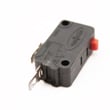
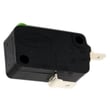
| Won’t start, intermittent start | Door interlock switch | Microwave door interlock switch WB24X25397 |
| Starts only when door is pressed | Primary interlock switch | Microwave primary interlock switch WB24X10047 |
| Door won’t latch consistently | Latch mechanism | Body latch asm WB10X35573 |
| Completely dead (no lights) | Internal fuse | Microwave fuse WB27X25389 |
Why it matters
Microwave/hood combos use door interlock switches as a primary safety system. If the door is misaligned or an interlock switch is failing, you can get symptoms like no heat, no start, or intermittent operation. Fixing the latch or switch early also helps prevent repeat fuse failures.
For installation-related issues that can affect venting and clearances (and sometimes vibration/noise), follow the cabinet depth and venting guidance in the JVM7195EK6ES installation guide.
Last updated: February 2026


