Owner’s manual
 Error Codes





How do I reset my gas oven?
To reset the oven on your LG LDG4313ST gas range, we recommend doing a simple power reset: turn the range’s circuit breaker OFF for 1 minute, then turn it back ON. This reboots the electronic control and ignition system that the oven relies on.
Quick reset steps (safe first)
- Turn the oven OFF at the control panel.
- Switch the range circuit breaker OFF (or unplug the cord if accessible).
- Wait 60 seconds.
- Restore power.
- Set the clock if needed, then try Bake.
- If the control is locked, disable the control lock (see LDG4313ST manual).
If it still will not heat after a reset
A reset fixes many “frozen control” issues, but it will not correct a no-ignition or no-gas condition. Check these common causes:
- Confirm the gas shutoff valve behind the range is fully open.
- Try a surface burner; if no burners light, the issue is likely gas supply.
- If burners work but the oven will not light, the oven igniter is a common failure point.
- If the oven heats but temperatures are inaccurate, the sensor circuit is a common suspect.
- If the display is erratic or unresponsive, the control board or keypad circuit may be involved.
Parts that commonly relate to “won’t heat” symptoms
| Symptom | What it often points to | Example compatible part for this model |
|---|---|---|
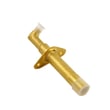
| Oven will not ignite, no flame | Weak or failed igniter | LG range oven burner igniter MEE61841401 |
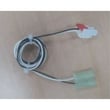
| Oven heats but temp is off | Temperature sensor issue | LG range oven temperature sensor EBG61305805 |
Why it matters
Gas ovens still need electricity for the control board, safety circuits, and hot-surface ignition. A quick power reset can clear a control glitch, but consistent ignition or temperature problems usually indicate a component or supply issue.
Last updated: January 2026
Why is my LG gas oven not getting hot?
If your LG gas range model LDG4313ST oven won’t get hot, the most common causes are a weak bake igniter, a failed oven temperature sensor, or a gas supply issue that prevents the bake burner from lighting and staying lit. Use the LDG4313ST manual to confirm normal bake operation and safety steps.
Quick checks we recommend first
- Confirm the range is set to Bake (not Delay Bake, Sabbath, or a timed setting).
- Verify the gas shutoff valve is fully open.
- Make sure other gas appliances in the home are working normally.
- Watch the bake cycle: you should typically hear a click and see the igniter glow before flame.
- If the igniter glows but there’s no flame, stop and proceed to part checks.
Parts that most often cause “no heat” in bake
On the LDG4313ST, these model-matched parts are common fixes when the oven won’t heat:
| Symptom | Most likely cause | Model-matched part to check |
|---|---|---|
| No glow from igniter, no flame | Failed igniter or wiring issue | LG range oven burner igniter MEE61841401 |
| Oven heats poorly or cycles off early | Sensor reading wrong temperature | LG range oven temperature sensor EBG61305805 |
| Broil works but bake won’t light | Bake ignition or bake burner issue | Igniter first, then burner/valve diagnostics |
How to tell if the igniter is weak
A weak igniter can glow but still not pull enough current to open the gas valve reliably.
- Igniter glows dim or takes a long time to light
- Burner lights sometimes, then fails on the next cycle
- You smell gas briefly but ignition is delayed
Why it matters
When the oven can’t reach temperature, cooking times become unpredictable and the control may keep calling for heat, which can stress components like the igniter, sensor, and wiring.
Last updated: January 2026
What is the life expectancy of a LG oven?
LG ovens typically last 12 to 15 years. For your LG LDG4313ST gas range, that same 12 to 15-year expectation applies; gas ranges often reach the upper end of the range when they’re kept clean, properly leveled, and repaired promptly when performance changes.
What affects lifespan the most
- Heat stress and heavy use (daily high-temp baking, frequent broiling)
- Cleaning habits (spills left to bake on can damage finishes and components)
- Self-clean frequency (high heat can be hard on door locks, wiring, and sensors)
- Ventilation and airflow (blocked vents can overheat controls)
- Timely part replacement when symptoms start (ignition delays, temp swings)
For model-specific operating and care guidance, follow the maintenance and cleaning recommendations in the LDG4313ST manual.
Signs your oven is nearing end-of-life (or needs a repair)
- Oven takes much longer to preheat than it used to
- Temperature is inconsistent (hot spots, underbaking)
- Burner ignition is slow, clicking continues, or you smell unburned gas briefly
- Control panel issues (random beeping, unresponsive keys)
- Door won’t seal well, causing heat loss and longer cook times
Common repairs that can extend life
Many “aging oven” symptoms are caused by a few serviceable components.
| Symptom | Often related to | Example compatible part for LDG4313ST |
|---|---|---|
| Slow or failed bake ignition | Igniter | LG range oven burner igniter MEE61841401 |
| Oven temp swings | Temperature sensor | LG range oven temperature sensor EBG61305805 |
| Convection not circulating | Fan motor | Range convection fan motor EAU62343001 |
Why it matters
A well-maintained gas range can deliver reliable baking temperatures for years. Catching early symptoms and replacing the right LG parts helps prevent secondary damage (like overheated wiring or control issues) and keeps cooking performance consistent.
Last updated: January 2026