Owner’s manual



How do I reset a Frigidaire dehumidifier?
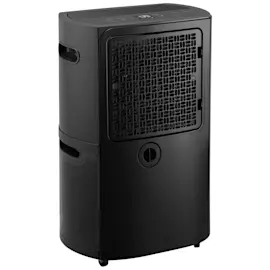
To reset your Frigidaire FFAD7000T1 dehumidifier, unplug the unit from the outlet, wait about 1 minute, then plug it back in. This power reset clears many control glitches and is also the recommended first step for certain sensor error codes.
Quick reset steps (recommended)
- Turn the unit off.
- Unplug the power cord from the wall outlet.
- Wait 60 seconds.
- Plug the unit back in.
- Press Power to restart and reselect your humidity setting.
If you are resetting because of an error code
The FFAD7000T1 manual calls out unplugging and plugging back in as the reset action for these codes:
| Code | What it points to | What to do first |
|---|---|---|
| AS | Humidity sensor issue | Unplug, then plug back in |
| ES | Temperature sensor issue | Unplug, then plug back in |
| P2 | Bucket full or bucket not seated | Empty bucket; reinstall correctly |
| EC | Unit malfunction or unsuitable room temp | Confirm room temp is in the operating range; then reset |
For code meanings, control pad behavior, and operating limits, use the owner's manual.
Why it matters
A simple power reset restores normal operation after a brief power interruption, a control lockup, or a false sensor reading. It is also the safest first step before checking items like the bucket position, air filter, or drain setup.
If it still will not run after the reset
- Make sure the plug is fully seated in the outlet.
- Check the home fuse or circuit breaker.
- Confirm the bucket is empty and fully seated (a mispositioned bucket can stop operation).
- Clean the air filter and make sure airflow is not blocked.
- Allow the built-in restart delay; many dehumidifiers wait a few minutes before the compressor restarts.
Last updated: February 2026
Where can I find my Frigidaire dehumidifier model number?
Your Frigidaire dehumidifier model number is typically on a rating label on the cabinet, most often on the side or back of the unit near the water bucket area. For model-specific diagrams and identification details, use the owner's manual.
Where to look on a Frigidaire FFAD7000T1
Check these common label locations first:
- Side panel of the cabinet (near the bucket opening)
- Back panel of the cabinet
- Near the water bucket compartment or bucket rails
- Lower rear area close to the power cord entry
- Along the edge of the air intake grille area
What the label usually shows
The rating label normally includes more than just the model number. Use these fields when ordering parts or troubleshooting:
| Label item | What it’s used for |
|---|---|
| Model number (example: FFAD7000T1) | Matching the correct parts list and manual |
| Serial number | Identifying production run details |
| Electrical ratings | Confirming outlet and circuit requirements |
Tips to read it accurately
- Write the model number exactly as printed (letters and numbers matter).
- If the label is worn, take a clear photo and zoom in.
- Keep the model number handy when using troubleshooting charts and error code lists.
Why it matters
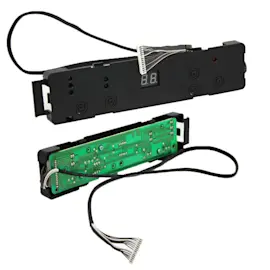
Frigidaire dehumidifiers can look similar across multiple model series, but parts like the humidity sensor, user interface, bucket switch, and control board can vary by model. Using the exact model number helps us match the right dehumidifier parts and repair information the first time.
Last updated: February 2026
How long is the Frigidaire dehumidifier warranty?
For the Frigidaire FFAD7000T1 dehumidifier, the warranty coverage is a limited 1-year warranty on the appliance plus a limited 2 to 5-year warranty on the sealed refrigeration system (compressor, condenser, evaporator, and tubing). Details and exclusions are listed in the owner's manual.
Warranty coverage at a glance
- Year 1 (from original purchase date): repair or replacement of defective parts due to materials or workmanship
- Years 2 to 5: sealed system parts only (compressor, condenser, evaporator, tubing)
- Proof of purchase matters: keep your receipt or delivery slip to establish the warranty period
- Use and care matters: coverage assumes the unit is installed, used, and maintained per instructions
- Costs in years 2 to 5: you typically pay diagnostic, labor, and other non-sealed-system related costs
What “sealed system” means
The sealed refrigeration system is the closed-loop cooling circuit that removes moisture from air. It includes the compressor and coils; it does not include items like the bucket, fan, controls, or sensors.
| Coverage period | What’s covered | Typical customer responsibility |
|---|---|---|
| 0 to 1 year | Most dehumidifier components | Usually none for covered defects (varies by situation) |
| 2 to 5 years | Sealed system parts only | Diagnostic, labor, and other related expenses |
Why it matters
Knowing the difference between the 1-year full appliance coverage and the 2 to 5-year sealed system coverage helps you decide whether a moisture-removal problem is likely a warranty issue (sealed system) or a repair/maintenance issue (airflow, filter, sensor, controls).
Last updated: February 2026
Why did my Frigidaire dehumidifier stop working?
If your Frigidaire FFAD7000T1 dehumidifier stopped working, the most common causes are a full or mis-seated bucket (P2), a power issue, a 3-minute restart delay, or airflow problems from a dirty filter. Use the troubleshooting steps below and confirm indicator lights and error codes in the owner's manual.
Quick checks that fix most “won’t run” problems
- Push the plug fully into the outlet and verify the outlet has power.
- Check your home fuse or circuit breaker.
- Remove the bucket, empty it, then reinstall it fully seated (the unit will not run if the bucket is not positioned correctly).
- If the unit just shut off, wait 3 minutes before expecting it to restart (built-in compressor protection delay).
- If the “clean filter” light is on or flashing, clean the air filter and reset the filter indicator.
What the lights and codes usually mean
The control panel indicators help narrow the cause quickly.
| What you see | What it usually means | What to do |
|---|---|---|
| P2 / bucket full light | Bucket is full or not in the correct position | Empty bucket; reinstall securely and squarely |
| Auto defrost light | Frost detected on evaporator coil | Let it run; compressor may pause while fan continues until frost clears |
| AS | Humidity sensor error | Unplug, plug back in; if it repeats, service is needed |
| ES | Temperature sensor error | Unplug, plug back in; if it repeats, service is needed |
| EC | Unit malfunction or unsuitable room conditions | Confirm room temperature is within the operating range listed in the manual |
Airflow and room conditions that stop moisture removal
Even if the FFAD7000T1 powers on, it can seem “dead” if it is not removing moisture.
- Make sure curtains, blinds, or furniture are not blocking the front or back grilles.
- Set the humidity control lower so the unit has a clear demand to run.
- Close doors and windows so you are not constantly pulling in humid outdoor air.
- Avoid operating in very cold spaces; low room temperature can reduce performance and trigger frost/defrost behavior.
Why it matters
A dehumidifier depends on correct bucket seating, steady airflow through the air filter and grilles, and normal operating conditions. Fixing those basics prevents nuisance shutoffs, reduces frost on the coil, and protects the compressor from short-cycling.
Related DIY help
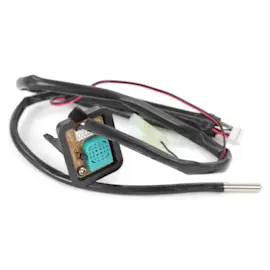
If you suspect a sensor problem after resets, follow our steps in how to replace a dehumidifier sensor assembly.
Last updated: February 2026
Why do most dehumidifiers stop working?
Most dehumidifiers (including the Frigidaire FFAD7000T1) stop working because a safety or control condition is triggered: the bucket is full or not seated (P2), the unit has reached the set humidity and shuts off normally, airflow is restricted by a clogged filter, or the unit is in auto-defrost. Sensor errors (AS/ES) and an EC malfunction code can also stop operation.
Quick checks that fix most “stopped working” complaints
- Empty the bucket and reinstall it fully; the unit will not run unless the bucket is seated correctly (P2).
- Confirm the humidity setpoint is lower than the room humidity; if the set humidity is reached, the unit shuts off automatically.
- Clean the air filter and reset the filter reminder (press the Filter pad after cleaning).
- Wait out the built-in restart delay; after stopping, the unit protects itself and may not restart for about 3 minutes.
- Check for frost on the coil; auto-defrost can pause the compressor while the fan keeps running.
What the display codes usually mean
| Code | What it indicates | What to do first |
|---|---|---|
| P2 | Bucket full or bucket not in correct position | Empty bucket; reseat bucket firmly |
| AS | Humidity sensor error | Unplug, then plug back in |
| ES | Temperature sensor error | Unplug, then plug back in |
| EC | Unit malfunction (often operating conditions) | Verify room temperature is within the operating range in the manual |
For code details and control pad behavior, use the owner's manual.
Why it matters
A dehumidifier is designed to stop the compressor to prevent overflow (bucket switch), protect the compressor (restart delay), and prevent ice buildup (auto-defrost). Fixing airflow, bucket seating, and settings prevents repeat shutdowns and helps the unit remove moisture efficiently.
When it is more than a simple stop condition
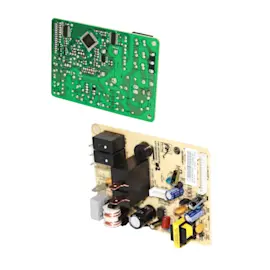
If the bucket is seated, the filter is clean, the set humidity is low, and AS/ES/EC keeps returning after a power reset, the problem is typically in a sensor circuit, control board, fan motor, or sealed refrigeration system. At that point, follow the service guidance in the manual.
Related help: dehumidifier not running, dehumidifier error codes landing page.
Last updated: February 2026