 Installation guide
 Owner’s manual
 Error Codes



How do I tell what model my Frigidaire stove is?
For your Frigidaire LFEH3054UFC free standing electric range, the model number is printed on the serial plate. On this style of range, you’ll typically find that plate on the lower right front frame near the storage or warmer drawer area (and on some units it may be under the cooktop).
Where to look on model LFEH3054UFC
Check these common serial plate locations first:
- Open the storage drawer or lower oven drawer and look at the right-hand oven front frame
- Look along the lower right front frame of the range (near the drawer opening)
- If you don’t see it there, check the alternate location under the cooktop
- Use a flashlight and wipe grease or dust off the label so the characters are readable
- Write the model number exactly as shown (letters and numbers can look similar)
What to record (and why)
When you find the serial plate, record these items:
- Model number
- Serial number
- Lot number or letter (if shown)
- Voltage rating
- Kilowatt rating
Why it matters
We use the exact model number to match the correct Frigidaire parts and diagrams for your range. Even small model-number differences can change which bake element, oven temperature sensor, or control board fits.
Quick reference
| What you need | Where it’s found | What it’s used for |
|---|---|---|
| Model number | Serial plate label | Correct parts lookup and diagrams |
| Serial number | Serial plate label | Identifying the production run |
| Voltage/kW rating | Serial plate label | Verifying electrical requirements |
For a visual guide and additional location notes, follow the serial plate section in the LFEH3054UFC installation guide and the product record section in the LFEH3054UFC owner’s manual.
Last updated: February 2026
Can I look up Frigidaire parts by model number?
Yes. For your Frigidaire LFEH3054UFC free standing electric range, looking up parts by the exact model number is the most reliable way to match compatible components, diagrams, and revisions, so you order the right replacement the first time.
Where to find the model number on LFEH3054UFC
Your range’s serial plate is typically on the right-hand oven front frame near the storage or warmer drawer area; some versions also list an alternate location under the cooktop. The plate also includes electrical ratings that help confirm you are referencing the correct unit.
- Open the storage drawer (or lower drawer) and look at the right front frame
- Check under the cooktop if you do not see the plate at the drawer opening
- Write down the model number, serial number, and any lot number/letter
- Use the full model number exactly as shown (including all letters)
- Keep the information with your paperwork for future repairs
Reference: LFEH3054UFC owner’s manual
How model-number lookup helps you get the right part
Model-number search narrows parts to what fits your exact configuration (burner style, control layout, wiring harness version), which is especially important for electrical parts like switches, sensors, and control boards.
| What you’re replacing | Why model lookup matters | Example part for this model |
|---|---|---|
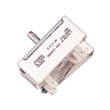
| Surface element control | Correct burner size and terminal layout | Range surface element control switch 316436001 |
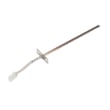
| Oven temperature sensing | Correct sensor type and connector | Range oven temperature sensor 316490000 |
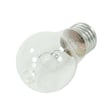
| Oven lighting | Correct bulb base and heat rating | Range oven light bulb 316538904 |
Why it matters
Ordering by model number reduces returns and downtime because many Frigidaire ranges use similar-looking parts that are not interchangeable once you factor in wiring, mounting, and control compatibility.
Pro tip for faster, more accurate ordering
- Match the model number character-for-character
- Use the serial plate details when a part has multiple revisions
- If you are unsure which diagram section to use, confirm the part location in the LFEH3054UFC installation guide
Last updated: February 2026
How to replace broil element in a Frigidaire oven?
On the Frigidaire LFEH3054UFC electric range, replacing the broil element typically means removing the mounting screws inside the oven, carefully pulling the element forward to access the wires, transferring the wires to the new element, then reinstalling and test-broiling with the door closed per the LFEH3054UFC owner’s manual.
Before you start (safety and prep)
- Turn off power at the breaker (240V range circuit), not just the control panel.
- Let the oven cool completely; broil components stay hot longer than expected.
- Protect the oven liner with a towel or cardboard while you work.
- Have a nut driver/screwdriver ready (common sizes are 1/4-inch or Phillips).
- Use gloves; sheet metal edges can be sharp.
Step-by-step: replace the broil element
- Remove oven racks so you can reach the broil element comfortably.
- Remove the broil element mounting screws at the rear/top of the oven cavity.
- Pull the element toward you slowly a few inches until the wire terminals are accessible.
- Transfer wires one at a time to the new element (this prevents mixing up connections).
- Secure the terminals and tuck wires back so they cannot touch the hot element.
- Reinstall the element with the original mounting screws.
- Restore power and test: run Broil briefly and confirm the element heats.
Quick check: what you should see
| What you observe | What it usually means | What to do next |
|---|---|---|
| Element heats evenly | Repair successful | Reinstall racks and use normally |
| No heat, no glow | Power issue or wiring/controls issue | Recheck breaker, then inspect wiring connections |
| Heats briefly then stops | Door not closed or control safety behavior | Broil with door closed; reset Broil if needed |
Why it matters
A loose terminal, pinched wire, or misrouted harness can cause intermittent broil, error beeps, or overheating near the back panel. Correct routing and tight connections help the new element last and keep broiling performance consistent.
Parts that commonly apply
If you are replacing the broil element for this model, use the correct part for fit and wattage: broil element 316203301.
Last updated: February 2026
How do I reset my Frigidaire electric range?
To reset your Frigidaire LFEH3054UFC electric range, turn the range off and cycle power at the breaker (or unplug it) for about 30 seconds, then restore power. This clears many control glitches; if the oven and all burners still do not heat, focus next on the home power supply and wiring.
Reset steps (safe, quick)
- Set all surface controls to OFF.
- If the range is plugged in, unplug it; if it is hardwired, switch the range breaker OFF.
- Wait 30 seconds.
- Restore power.
- Re-set the clock and test one surface element and the oven.
For model-specific operating details and control behavior, follow the LFEH3054UFC owner’s manual.
If nothing heats after the reset
When all burners and the oven stop heating, the most common cause is a power supply issue (for example, a tripped breaker, a loose connection, or only one leg of 240V reaching the range). The installation instructions also call out proper electrical connection practices and wire sizing; use the LFEH3054UFC installation guide as your reference.
- Check that the double-pole range breaker is fully reset (OFF, then ON).
- Confirm the cord is fully seated (if corded) and the outlet is not damaged.
- If recently installed or moved, re-check the terminal connections and strain relief.
- If you smell burning or see discoloration at the cord/terminal area, shut power off and service the connection.
Quick symptom guide
| What you see | Most likely cause | Best next step |
|---|---|---|
| Display works, no heat anywhere | Missing one leg of 240V | Reset breaker; verify supply wiring |
| Some burners work, oven doesn’t | Failed oven heating circuit component | Test bake/broil circuits and sensor |
| Oven heats poorly or erratically | Temperature sensing/control issue | Check sensor and calibration |
Parts that commonly relate to “no heat” or poor heating
If power supply checks out, these model-compatible parts are common suspects:
- Range oven temperature sensor 316490000 (can cause inaccurate temps or heating issues)
- Range high-limit thermostat 318578506 (can open if overheating is detected)
- Range oven control board and clock 5304514108 (can fail to send power to heating circuits)
Why it matters
A reset fixes software-style lockups, but it does not correct a 240V supply problem or a failed component. Confirming power first prevents unnecessary parts replacement and helps you restore safe, reliable heating faster.
Last updated: February 2026




