Owner’s manual
 Error Codes




How do I reset my LG electric stove?
To reset your LG electric range model LDE4411ST, we recommend doing a hard power reset: turn the range off, cut power at the breaker for a few minutes, then restore power and retest. If a burner or the oven still will not heat, a failed heating circuit part is likely.
How to reset (hard power reset)
- Turn all surface element knobs to OFF.
- Switch the range circuit breaker OFF (or unplug the range if accessible).
- Wait 3 to 5 minutes to fully discharge the control.
- Restore power (breaker ON or plug back in).
- Set the clock and test one surface element and the oven.
For model-specific control and clock steps, follow the LDE4411ST owner's manual.
If the reset does not fix it
A reset clears a temporary control glitch; it will not fix an open heater, bad sensor, or failed switch. These are common next checks:
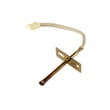
- Oven not heating or heats erratically: test the oven temperature sensor and wiring; replace the LG range oven temperature sensor EBG61305805 if out of spec.
- One surface element not heating: the element or its control switch can fail; inspect the element and connections, and consider the LG range surface element control switch EBF62174907.
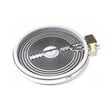
- Dual element not working correctly: the dual radiant element itself can fail; check the LG range dual radiant element MEE62385201.
- Trips breaker or smells hot: stop using the range and check for damaged wiring or a shorted element.
Quick symptom guide
| Symptom | Most likely area | Good next step |
|---|---|---|
| Display is blank, then returns after reset | Power interruption/control glitch | Reset and verify breaker is not weak |
| Oven temperature is inaccurate | Sensor or control | Check sensor first |
| One burner dead, others OK | Element or infinite switch | Inspect element, then switch |
| Hot surface light stays on | Element circuit/sensor logic | Use quick tips and fixes range hot surface light troubleshooting video |
Why it matters
Resetting is the fastest way to rule out a temporary electronic control issue on an electric range. If heat problems remain after a reset, focusing on the heating element circuit (sensor, switch, element, wiring) prevents repeat shutdowns and uneven cooking.
Last updated: January 2026
What other error codes are common on LG ovens?
On LG electric ranges like model LDE4411ST, the most common oven error codes point to temperature sensing problems, runaway heat, door lock issues during self-clean, or a control/keypad fault. For the exact code definitions and reset steps for your range, use the LDE4411ST manual.
Common LG oven error codes you will see most often
These are widely seen across LG ovens and electric ranges; the same code can have slightly different checks by model:
- F3 / F4: oven temperature sensor circuit problem (open or shorted sensor, wiring, or connector)
- F9: oven not reaching temperature or heating too slowly (often bake/broil circuit, relay, or power supply issue)
- F10: runaway temperature or overheating condition (sensor reading, control relay stuck, airflow issues)
- F31: temperature sensor out of range (commonly tied to sensor circuit or control interpretation)
- Door lock related codes (varies by series): latch motor or lock switch feedback not changing state during self-clean
What to do when an error code appears
- Record the full code and which oven was used (upper or lower)
- Power reset: turn the range breaker off for 1 to 2 minutes, then restore power
- Check for obvious heat symptoms: no heat, overheating, long preheat, or uneven baking
- Inspect sensor wiring connections (power off): loose or damaged connectors can trigger sensor codes
- Avoid self-clean until resolved if the code involves overheating or door lock behavior
Parts that commonly relate to these codes on LDE4411ST
| Code theme | What it usually involves | Model-matched part |
|---|---|---|
| F3/F4/F31 sensor circuit | Sensor probe, harness, connector | LG range oven temperature sensor EBG61305805 |
| Overheat protection | High-limit safety device opening | Range safety thermostat 6930W1A003X |
Why it matters
Error codes are the range’s way of narrowing the failure to a system (sensor, heating circuit, door lock, or control). Matching the code to the correct diagnostic steps helps prevent replacing the wrong part and restores accurate baking.
Related help: troubleshooting an f10 error code on a range video
Last updated: January 2026
What are the common problems with LDE4411ST?
Common problems on the LG LDE4411ST electric range include the oven not heating or heating unevenly, surface elements not heating, the range not powering on, and the oven door staying locked after self-clean. These symptoms usually trace to power supply, heating, sensing, or control issues.
Most common symptoms and what they usually point to
- Little to no bake heat: heating circuit problem, sensor issue, or control problem
- Oven heats unevenly: convection airflow issue, sensor drift, or cookware placement
- Oven too hot: temperature sensor out of range or control not regulating heat
- Surface element will not heat: failed element, failed infinite switch, or wiring connection
- Won’t turn on / will not start: tripped breaker, loose terminal block connection, or control/power issue
- Door won’t open after self-clean: lock/latch stuck or oven still too hot
For model-specific operation and error-code details, use the LDE4411ST owner's manual.
Parts that commonly solve these problems (when testing confirms failure)
- Temperature regulation: LG range oven temperature sensor EBG61305805
- Surface element control: LG range surface element control switch EBF62174907
- Dual burner performance: LG range dual radiant element MEE62385201
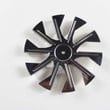
- Convection fan not running/noisy: range convection fan motor EAU62343001
Quick checks we recommend before replacing parts
- Confirm full 240V power; a partially tripped double breaker can leave lights on but no heat
- Reset power: turn the breaker off for 1 minute, then back on
- Inspect for obvious damage: burned wiring, loose terminals, cracked radiant element
- Verify settings: Bake vs. Broil, and convection on only when intended
Troubleshooting guide by symptom
| Symptom | Best first check | Common next step |
|---|---|---|
| Oven won’t heat | Breaker and power supply | Test sensor and heating circuit |
| Oven too hot | Sensor connection | Replace sensor if out of spec |
| Surface element won’t heat | Element and wiring | Test/replace infinite switch |
Why it matters
Heating and temperature-control problems cause long preheat times, undercooked food, and overheating that stresses wiring and controls. Diagnosing early helps prevent bigger repairs.
Last updated: January 2026