Installation guide
 Owner’s manual
 Error Codes





How to reset a GE wall oven?
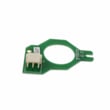
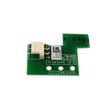
To reset your GE JTD5000SN1SS electric wall oven, turn the oven’s circuit breaker OFF (or remove the fuse) for about 1 minute, then restore power. This power-cycle resets the electronic control and clears many temporary control glitches.
Reset steps (safe, standard method)
- Turn the oven OFF at the control panel.
- Switch the dedicated oven circuit breaker to OFF (or remove the fuse).
- Wait 60 seconds.
- Turn the breaker back ON (or reinstall the fuse).
- Set the clock if needed, then test Bake or Broil.
If the reset does not fix the problem
A reset helps with temporary software or control lockups. If the issue returns right away, focus on the symptom:
- No power or display stays blank: confirm the breaker is fully reset and not tripping again.
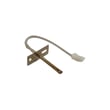
- Oven heats incorrectly or shows temperature issues: test the temperature sensor circuit; a failed sensor can cause erratic heating.
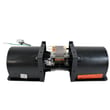
- Fan-related noise or overheating messages: check the cooling fan operation and airflow around the oven.
- Self-clean problems or door won’t unlock: let the oven cool completely, then reset power and try again.
Parts that commonly relate to “won’t heat” or temperature problems
If your JTD5000SN1SS powers on but bakes poorly or throws temperature-related errors, these model-matched parts are common suspects.
| Symptom | Common check | Model-matched part |
|---|---|---|
| Oven temperature inaccurate | Sensor resistance and wiring | Wall oven temperature sensor WB21X10165 |
| Cooling fan runs oddly or not at all | Fan operation and airflow | Wall oven cooling fan assembly WB26X31060 |
Why it matters
A proper reset restores stable power to the control board and can clear false faults after a power surge or brief outage. If the breaker trips again after resetting, that points to an electrical or component issue that needs troubleshooting before continued use.
For control features and any model-specific settings, follow the steps in the JTD5000SN1SS owner’s manual.
Last updated: January 2026
Why does GE oven need wifi for air fryer?
On the GE JTD5000SN1SS electric wall oven, Wi-Fi is used to enable connected features (including remote functions) and to support app-based setup and updates; the Air Fry cooking mode itself is still a normal oven cooking mode once it is available on your control. For exact Wi-Fi and feature behavior, follow the steps in the JTD5000SN1SS owner's manual.
What Wi-Fi does (and does not do) on this oven
Wi-Fi Connect is designed for two-way communication between the oven and a smart device so you can use the GE Appliances app for connected features.
- Enables app-based connection and communication with your oven
- Supports Remote Enable and remote control of essential operations (temperature, timers, cooking modes)
- Requires a compatible Apple or Android device and a home Wi-Fi network
- Uses your home network credentials during setup (router password)
- Lets the app confirm when the oven is connected (connection light stays solid)
When you actually need Wi-Fi
You typically only need Wi-Fi when you want connected features to work (especially Remote Enable). If you are cooking directly at the control panel and not using remote features, Wi-Fi is not part of the heating process.
Quick check: Wi-Fi required vs not required
| Task | Wi-Fi needed? | Where you control it |
|---|---|---|
| Pair oven to the app | Yes | Settings, then WiFi + app |
| Use Remote Enable / remote control | Yes | App + oven Remote Enable |
| Start and run a cook cycle at the keypad | No | Oven control panel |
| Troubleshoot a no-heat issue | No | Power, wiring, components |
If Air Fry is missing or not working
If the Air Fry option is not showing, not selecting, or the oven will not start a cycle, focus on basic operation and temperature sensing first.
- Confirm you are selecting a valid cooking mode and temperature
- Power-cycle the oven at the breaker for 1 minute, then retry
- Check for error codes or a locked control
- If temperatures are inaccurate or the oven shuts off early, test the sensor circuit
- Consider the wall oven temperature sensor WB21X10165 if you have heating or temperature regulation symptoms
Why it matters
Wi-Fi is about features and communication, not about generating heat. Separating “connected features” from “cooking hardware” helps you troubleshoot faster and avoid replacing parts that are not related to the symptom.
Last updated: January 2026
How long do GE wall ovens last?
GE wall ovens typically last 12 years. With normal use, good ventilation, and basic care, many units run 15 years. For your GE JTD5000SN1SS electric wall oven, long life depends most on keeping airflow clear and avoiding repeated overheating events (especially around the cooling fan area). See the maintenance and use guidance in the JTD5000SN1SS owner's manual.
What affects lifespan the most
- Heat management: blocked vents or a failing cooling fan can overheat controls.
- Door seal condition: a worn gasket leaks heat, increasing run time and stress.
- Sensor accuracy: a drifting temperature sensor can cause temperature swings and longer bake cycles.
- Self-clean frequency: high-heat cycles add wear to door locks, wiring, and electronics.
- Electrical supply quality: loose connections or incorrect wiring can damage components.
Quick signs your oven is nearing end-of-life (or needs key parts)
- Preheats much slower than it used to
- Temperature is inconsistent (burning edges, undercooked centers)
- Cooling fan runs loudly, runs too long, or does not run when the oven is hot
- Door does not seal well, or you feel heat escaping around the frame
- Error codes or intermittent control panel behavior
Common wear items that can extend service life
| Symptom | Likely area | Example part for JTD5000SN1SS |
|---|---|---|
| Oven temperature off | Temperature sensing | Wall oven temperature sensor WB21X10165 |
| Overheating or noisy cooling | Cooling airflow | Wall oven cooling fan assembly WB26X31060 |
| Heat leaking at door | Door sealing | Gasket WB35X32825 |
Why it matters
A wall oven that holds temperature and cools itself properly puts less stress on the control board, wiring harness, and door components. Addressing small issues early often prevents a bigger, more expensive failure later.
Last updated: January 2026
What is the best brand for electric wall ovens?
For electric wall ovens, GE is a strong, dependable choice, and it is a great fit if you already own the GE JTD5000SN1SS. The “best” brand comes down to your priorities (reliability, features, service access, and budget) and how well the oven matches your cabinet cutout and electrical setup.
How we recommend choosing the “best” brand
We focus on practical ownership factors that matter more than a nameplate:
- Fit and installation requirements: confirm cutout size, support, and hard-wiring needs in the JTD5000SN1SS installation guide.
- Cooking performance: look for convection performance, preheat behavior, and temperature stability.
- Controls and features: decide if you want smart features, probe cooking, or simpler controls.
- Serviceability: brands with widely available parts and technicians are easier to keep running.
- Total cost: include installation, trim kits (if needed), and long-term parts costs.
Quick brand comparison (what typically separates them)
| Brand | Typical strengths | Best for |
|---|---|---|
| GE | Broad service network, strong feature set, good parts availability | Most households and long-term ownership |
| Bosch | Quiet operation, refined build, strong baking consistency | Premium feel and fit-and-finish |
| Café | Design-forward styling, upgraded features | High-end kitchens and aesthetics |
| Thermador | Pro-style features, premium ecosystem | Luxury builds and advanced cooking options |
Model-specific notes for GE JTD5000SN1SS owners
If you already have a GE JTD5000SN1SS, staying with GE often simplifies ownership because you can reference the same operating features and care guidance in the JTD5000SN1SS owner’s manual. Also, common service items (like sensors, fans, and door components) are typically straightforward to source.
Here are examples of parts that support long-term repairability:
- Wall oven temperature sensor WB21X10165 (helps regulate oven temperature)
- Wall oven cooling fan assembly WB26X31060 (helps manage heat around controls)
- Wall oven door lock assembly WB10X28391 (used during self-clean on many designs)
Why it matters
A wall oven is a built-in appliance; the “best” brand is the one that installs correctly in your cabinet, meets your cooking expectations, and can be serviced easily over time. Choosing based on fit, features, and parts support prevents expensive rework later.
Last updated: January 2026