



Where is the reset button on the Kenmore vacuum?
Most Kenmore vacuums, including the Kenmore Elite upright vacuum model 12510440710, do not use a single external “reset button” for power loss. When it shuts off, it is usually the motor overheat protector or a brush roll jam protection feature; clearing airflow restrictions and letting it cool restores operation.
What to check first (fast reset steps)
- Unplug the vacuum for safety.
- Let it cool for 30 to 60 minutes if it shut off while running (typical overheat protector behavior).
- Empty the dust cup or replace the bag (depending on your configuration).
- Remove clogs from the hose, wand, and floor nozzle air path.
- Clean or replace filters; a restricted filter is a common cause of overheating.
- Check the brush roll area for hair, string, or carpet fringe wrapped around moving parts.
Common “reset” locations on Kenmore uprights
Even when there is no dedicated reset button, these are the most common places to look for a small breaker-style reset on similar Kenmore designs:
| What you are looking for | Typical location | What it means |
|---|---|---|
| Thermal protector (no button) | Inside motor housing | Vacuum restarts after cooling and clearing restrictions |
| Brush roll overload reset (sometimes a button) | Near the nozzle or underside | Trips when the brush roll jams or belt stalls |
| Power interruption from blockage | Anywhere in airflow path | Restores after removing clog and restoring airflow |
Parts that often relate to “shut off” or “no suction” symptoms
If airflow restriction keeps coming back, inspect and service the filtration and covers so they seal correctly.
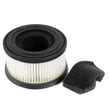
- Vacuum filter set 561025105
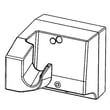
- Kenmore elite filter cover assembly 561026102
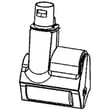
- Kenmore elite pre-filter basket 561026103
Why it matters
A Kenmore upright that repeatedly “needs a reset” is usually protecting the motor from overheating. Restoring airflow (filters, clogs, brush roll area) prevents repeated shutdowns and helps maintain suction and carpet cleaning performance.
Last updated: January 2026
What model is my Kenmore vacuum?
Your Kenmore Elite upright vacuum’s model number is printed on the model and serial number plate on the vacuum body. For this parts list, the model number is 12510440710; matching that number exactly helps ensure the parts you order fit and function correctly.
Where to find the model number on the vacuum
Look for a label or plate that includes both model and serial information. Common locations include:
- On the back of the main vacuum body near the power cord wrap
- On the underside of the vacuum base (tilt the vacuum back and look underneath)
- Near the dust cup or filter cover area
- On the lower rear housing behind the brush area
- On the original box or purchase paperwork (if you still have it)
How to confirm you have the right model for parts
Use these quick checks before ordering parts for a Kenmore vacuum:
- Match the full model number exactly (for example, 12510440710, not a shortened version)
- Compare the vacuum’s configuration (upright vs. canister, corded vs. cordless)
- If your vacuum uses attachments, confirm the connection style matches
- When replacing maintenance items, confirm the filter and cover style match what you have
Common part types that depend on the exact model
| Part type | What it affects | Example for model 12510440710 |
|---|---|---|
| Filters and covers | Airflow, suction, sealing | Vacuum filter set 561025105 |
| Pre-filter components | Dust separation, motor protection | Kenmore elite pre-filter basket 561026103 |
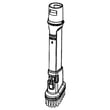
| Tools and attachments | Cleaning performance on floors and upholstery | Vacuum pet powermate 561025103 |
Why it matters
Kenmore model numbers often look similar, but small differences can change the filter fit, tool connections, and how the vacuum seals. Using the exact model number helps prevent ordering a part that will not mount correctly or restore suction.
Last updated: January 2026
Why did my Kenmore vacuum stop working?
If your Kenmore Elite upright vacuum model 12510440710 stopped working, the most common causes are a power problem (outlet, cord, switch), an airflow blockage, or restricted filtration. Start with power checks, then inspect the brush path, hose, and filters to restore normal suction and operation.
Step 1: Rule out a power or control issue
- Try a different working outlet (avoid switched outlets).
- Check the cord for cuts, kinks, or a loose connection at the handle.
- If the vacuum is completely dead, a failed switch or internal wiring issue is likely.
- If it runs but has weak or no suction, focus on clogs and filters.
Step 2: Check for clogs and airflow restrictions
Blockages are the top reason an upright vacuum “runs but doesn’t clean.”
- Remove the floor tool and look for debris in the intake.
- Inspect the wand and hose for a packed clog.
- Check the dust cup or bag area (depending on your configuration) for overfill.
- Make sure the filter cover is seated and sealed; a loose cover can reduce airflow.
Step 3: Inspect and service the filters
Dirty filters can make the vacuum overheat and shut off, or cause a big suction drop.
- Remove and clean the pre-filter area; replace cracked or warped filter supports.
- Replace the filter set on a regular schedule (typical: every 3 to 6 months in average homes; more often with pets).
Helpful model-matched parts:
- Vacuum filter set 561025105
- Kenmore elite pre-filter basket 561026103
- Kenmore elite filter cover assembly 561026102
Quick symptom-to-cause guide
| What you notice | Most likely cause | What to do first |
|---|---|---|
| No lights, no sound | No power, bad cord/switch | Try outlet, inspect cord, then test switch/wiring |
| Runs but no suction | Clog or filter restriction | Clear hose/intake, replace filters |
| Shuts off after a few minutes | Overheating from blockage/filters | Let cool, clear clogs, service filters |
| Poor pickup on carpet | Tool/brush path issue | Clear floor head, check for debris in nozzle |
Why it matters
Running a vacuum with restricted airflow can overheat the motor and shorten the vacuum’s lifespan. Keeping the airflow path clear and filters fresh is the fastest way to prevent sudden shutdowns and weak suction.
Last updated: January 2026
How to change the belt on a Kenmore vacuum?
The Kenmore Elite upright vacuum model 12510440710 uses a beltless, direct-drive brush system, so there is no traditional vacuum belt to replace. When the brush stops spinning or cleaning drops, we troubleshoot the brush roll, clogs, and filters instead of installing a belt.
What to check first (beltless brush problems)
- Unplug the vacuum before servicing the nozzle.
- Remove hair and string from the brush roll and end areas.
- Check for a clog in the nozzle, wand, or hose that can reduce airflow.
- Make sure the brush is set to the correct floor type (carpet vs hard floor).
- Clean or replace filters if suction is weak.
Filter service that often restores performance
Restricted airflow can make a vacuum seem like the brush is not working well. For this model, service the filters on schedule.
- Replace or clean the filters as directed for your usage.
- Reinstall filters fully seated so the cover seals.
- If the filter cover will not latch or leaks, inspect the cover and tabs.
Helpful parts to reference:
- Vacuum filter set 561025105
- Kenmore elite filter cover assembly 561026102
- Kenmore elite pre-filter basket 561026103
Quick symptom guide
| Symptom | Most common cause on beltless uprights | What we do |
|---|---|---|
| Brush not spinning | Brush roll jam, brush motor issue, or wiring issue | Clear debris; inspect brush roll; check connections |
| Burning smell | Debris jammed in brush roll or nozzle restriction | Remove obstruction; clean brush area |
| Poor pickup | Clogged filters or airflow blockage | Service filters; clear clogs |
Why it matters
On a beltless direct-drive design, the brush roll is powered without a rubber belt. That means “belt replacement” symptoms usually point to a jam, blockage, or a brush roll or motor-related failure, plus dirty filters that reduce cleaning performance.
Last updated: January 2026


