Owner’s manual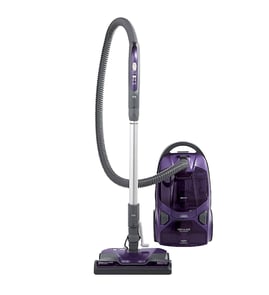



What model is my Kenmore vacuum?
Your Kenmore vacuum’s model number is printed on the Model and Serial Number Plate on the vacuum. For Kenmore model 11628015700, you can also confirm the exact model by checking the identification section in the owner's manual.
Where to look on the vacuum
We typically see the Model and Serial Number Plate in one of these spots on a Kenmore canister vacuum:
- On the underside of the canister body
- Near the rear of the canister, close to the cord rewind area
- Behind or near the bag cover (inside the bag compartment)
- On the bottom of the PowerMate nozzle (some versions list a separate nozzle model)
What to write down (and why)
Record both numbers so you can match the correct parts list and diagrams.
- Model number: identifies the vacuum family and configuration
- Serial number: identifies the production run (helpful for part variations)
- Date of purchase: useful for maintenance tracking and warranty paperwork
Quick ID checklist
| Item | What it helps with | Example format |
|---|---|---|
| Model number | Finding the correct parts breakdown | 116.28015700 or 11628015700 |
| Serial number | Confirming production details | Letters and numbers |
| PowerMate model (if listed) | Ordering nozzle-specific parts | Separate label on nozzle |
Why it matters
Kenmore vacuums can look similar across model series, but parts like the hose, wand, filters, belt, and PowerMate components can vary by model. Using the exact model number helps ensure the replacement part fits and performs correctly.
Last updated: February 2026
Who makes Kenmore canister vacuums now?
Kenmore is a brand name, so the company that builds a Kenmore canister vacuum depends on the model and when it was made. For your Kenmore canister vacuum model 11628015700, the most reliable way to confirm the manufacturer and exact configuration is to match the model and serial information to the documentation in the 11628015700 owner's manual.
How to identify who built your specific Kenmore model
We recommend using these quick checks on the vacuum and in the manual:
- Find the model and serial number plate on the canister (the manual notes this is where the model and serial are located).
- Confirm the model number is 11628015700 (character-for-character).
- Check the parts and features section for component names (for example, wand, PowerMate, filters).
- Look for any manufacturer markings on the rating label (often near electrical specs).
- Use the model number when ordering parts so you get the correct fit.
Why the “maker” can vary for Kenmore vacuums
Kenmore vacuums have been produced by different manufacturers over the years under contract. That means two Kenmore canister vacuums can look similar but use different:
- Motor and wiring layouts
- Power nozzle (PowerMate) designs
- Filter and bag styles
- Wand and hose connections
- Internal safety components
What you can confirm from the 11628015700 documentation
The 11628015700 owner's manual shows this is a Kenmore canister vacuum with features and service procedures such as bag changing, motor safety filter changing, exhaust filter changing, and PowerMate care.
| What you’re trying to confirm | Best place to check | What you’ll typically find |
|---|---|---|
| Who built it | Rating label and manual | Manufacturer or production identifiers |
| Correct parts fit | Model number plate | Exact model and serial info |
| Service procedures | Manual sections | Filter changes, belt/agitator care, troubleshooting |
Why it matters
Knowing the exact builder is less important than matching the exact model number (11628015700) because parts, filters, and PowerMate components are model-specific. Using the manual and model plate prevents ordering the wrong bag, belt, or filter.
Last updated: February 2026
How to tell if a vacuum motor is bad?
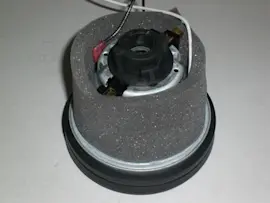
On the Kenmore 11628015700 canister vacuum, a “bad motor” usually shows up as the vacuum not starting, starting then shutting off, a hot or burning smell, or loud abnormal noise. Before condemning the motor, rule out airflow clogs and filter issues that can trip the thermal protector.
Quick checks before you blame the motor
We see many “dead motor” symptoms caused by restricted airflow or protection devices doing their job.
- Unplug the vacuum and check for a full/clogged dust bag.
- Check for blocked airflow passages (hose, wand, nozzle, and canister inlet).
- Inspect the motor safety filter; replace it if dirty (it is not washable).
- Let the vacuum cool about 30 minutes if it shut off while running; the thermal protector can reset after cooling.
- Confirm the canister hood is fully closed and latched.
For the model-specific maintenance and troubleshooting table, use the owner's manual.
Signs the motor itself is failing
After airflow and filter issues are corrected, these symptoms point to motor wear or damage:
- Motor will not start even with good power and solid connections
- Strong electrical or burning odor that returns quickly
- Repeated shutoffs even with clean airflow and a new bag/filter
- Grinding, screeching, or high-pitched whining from the canister (bearing wear)
- Visible sparking through vents (more than a brief, faint brush sparkle)
What “starts then shuts off” usually means on this model
The manual calls out two common protection-related shutoff causes:
| Symptom | Most common cause | What to do first |
|---|---|---|
| Starts then shuts off | Thermal protector tripped in canister | Unplug, clear clogs, replace dirty filters, cool 30 minutes |
| Won’t start | House power issue or loose connections | Check outlet/breaker, reconnect hose ends |
| Poor pickup | Full bag, clogged passages, dirty filters | Change bag, clear clogs, replace filters |
Why it matters
Running with a clogged bag, blocked hose, or missing/dirty motor safety filter can overheat the vacuum and lead to motor failure. Keeping airflow clear and replacing the motor safety filter regularly protects suction and the motor.
Last updated: February 2026
How long do Kenmore canister vacuums last?
A Kenmore canister vacuum like model 11628015700 typically lasts 10 to 15 years with normal home use and consistent maintenance. Lifespan is driven less by the motor itself and more by routine care items like bags, filters, and keeping airflow clear (all covered in the owner's manual).
Typical lifespan and what changes it
Most canister vacuums fall into a predictable range when they are used weekly on typical household floors.
- 10 to 15 years: common for a well-maintained, bagged canister vacuum
- 15+ years: achievable with light-to-moderate use and timely filter and belt care
- 5 to 8 years: more likely with heavy use, frequent clogs, or neglected filters/bags
Maintenance that extends life (most important)
The 11628015700 manual emphasizes routine care such as bag changes, filter changes, and PowerMate care. These items prevent overheating, loss of suction, and premature wear.
- Change the vacuum bag before it overfills (overfilled bags restrict airflow)
- Replace the motor safety filter on schedule
- Replace the exhaust (HEPA) filter when the surface is evenly covered with dirt (do not wash it)
- Clear clogs from the hose, wand, and nozzle as soon as suction drops
- Keep the PowerMate brush roll free of hair and string; replace the belt when needed
Quick guide: what to service and how often
| Item | What it affects | Typical interval |
|---|---|---|
| Bag | Airflow, suction, motor cooling | When 1/2 to 2/3 full |
| Motor safety filter | Motor protection | Every 3 to 6 months |
| Exhaust (HEPA) filter | Fine dust control, airflow | Every 6 to 12 months |
| PowerMate belt/brush roll | Carpet cleaning performance | Inspect every 3 to 6 months |
Signs your vacuum is near end of life
These symptoms usually mean a worn motor, failing electrical connection, or repeated overheating events.
- Burning smell or repeated thermal shutoffs
- Loud grinding/whining that persists after clearing clogs
- Suction stays weak even with a new bag and clean filters
- Power nozzle stops spinning even after belt and brush roll service
- Power cord rewind issues or intermittent power
Why it matters
A canister vacuum motor relies on moving air for cooling. When bags, filters, or air paths clog, the vacuum runs hotter and wears faster. Staying ahead of airflow restrictions is the single best way to get a full 10 to 15 years (or more) from a Kenmore canister.
Last updated: February 2026