 Installation guide
 Owner’s manual
 Error Codes





How do you reset a Whirlpool gas oven?
To reset a Whirlpool gas oven like model WFG114SVQ0, we recommend a simple power reset: turn the oven off, then disconnect power for about 1 minute and restore power. This clears many control glitches and restores normal keypad operation; then re-set the clock if needed.
Quick reset steps (safe and effective)
- Press OFF/CANCEL to stop any bake or broil cycle.
- Unplug the range, or switch OFF the circuit breaker.
- Wait 60 seconds.
- Restore power.
- Set the clock and try BAKE again (use the normal start sequence in the WFG114SVQ0 owner's manual).
If it still will not start after a reset
A reset fixes control lockups, but it will not fix a failed ignition or a gas supply issue. Check these common causes next:
- Make sure the gas shutoff valve is fully open.
- Confirm the range is plugged into a grounded outlet and has power.
- If the oven is not heating after about 5 minutes, turn it off and recheck the gas supply valve position.
- If the control is unresponsive or the oven will not ignite, inspect the oven igniter circuit and wiring.
Parts that commonly relate to “won’t heat” symptoms
| Symptom after reset | Most common cause | Example part for WFG114SVQ0 |
|---|---|---|
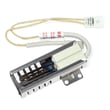
| No ignition, no heat | Weak or failed igniter | Range oven igniter W10918546 |
| Heats but temperature is inaccurate | Sensor out of range | Range oven temperature sensor WPW10181986 |
Why it matters
Resetting the control is the fastest way to clear a temporary electronic fault without changing settings or parts. If the oven still will not heat, the next steps focus on the two things the oven needs to bake: reliable power to the controls and ignition, plus an open gas supply.
Related setup check
If the oven lights but the flame looks wrong (yellow tips, lifting, or blowing), follow the burner flame adjustment procedure in the WFG114SVQ0 installation guide.
Last updated: February 2026
Why is my Whirlpool gas oven not turning on?
If your Whirlpool WFG114SVQ0 gas range oven will not turn on, the most common causes are no power to the range, the gas shutoff being closed, air in the gas line (first-time use), or a failed hot-surface igniter that will not open the gas valve. Start with the checks in the WFG114SVQ0 owner's manual.
Quick checks we recommend first
- Confirm the range is plugged into a grounded 3-prong outlet and the outlet has power.
- Make sure the main or regulator gas shutoff valve is in the open position.
- If this is the first time using the oven (or gas was recently shut off), turn a surface burner to LITE briefly to help purge air from the gas line.
- Verify the electronic oven control is set correctly (Bake temperature and Start, if applicable).
- If the control is unresponsive after a power event, press CANCEL/OFF to clear the display.
What to look for when you set the oven to Bake
On this Whirlpool design, the oven uses a hot-surface igniter (glow bar). When you call for heat, the igniter should glow bright orange and light the gas; you typically will not see sparking in the oven.
| What you observe | What it usually means | What to do next |
|---|---|---|
| No glow from igniter | No power to igniter, failed igniter, or control/wiring issue | Check power first; then inspect wiring and igniter condition |
| Igniter glows but no flame | Weak igniter not drawing enough current to open valve, or gas supply issue | Confirm gas shutoff is open; consider igniter replacement |
| Flame lights but looks yellow/noisy | Air/gas mixture needs adjustment | Follow the air shutter guidance in the WFG114SVQ0 installation guide |
Parts that commonly fix “oven won’t turn on”
If power and gas supply are good, these are the most common repair parts for this symptom on gas ranges:
- Range oven igniter W10918546 (most common)
- Range oven temperature sensor WPW10181986 (if temperature control is erratic)
- Range spark module W11590249 (more related to surface burner ignition than oven glow ignition)
Why it matters
A gas oven that will not ignite is often caused by a weak igniter; the igniter can glow but still fail to open the gas valve. Checking power, gas shutoff position, and igniter operation prevents unnecessary part replacement and gets heat restored faster.
Last updated: February 2026
How do I find the model number on my WFG114SVQ0?
On the Whirlpool WFG114SVQ0 gas range, the model and serial number plate is on the oven frame behind the left side of the broiler door. Open the broiler door and look along the left side of the oven frame for the rating plate; use the full model number when ordering parts.
Where to look (quick steps)
- Make sure the range is cool and all burners are off.
- Open the broiler door.
- Look behind the left side of the broiler door.
- Find the model/serial rating plate on the oven frame.
- Write down both the model number and serial number.
- Keep the information with your paperwork for future service and parts matching.
What the label looks like and what to record
| Label item | What to copy | Why we need it |
|---|---|---|
| Model number | WFG114SVQ0 | Ensures diagrams and parts match your exact range |
| Serial number | The full serial code | Helps identify production details when needed |
Why it matters
Whirlpool ranges can share similar designs across multiple models; using the exact model number (WFG114SVQ0) prevents ordering the wrong igniter, oven control board, or burner parts and helps us match the correct diagrams.
Helpful reference
The label location is shown in the installation guide and also referenced in the owner's manual.
Last updated: March 2026






