 Error Codes




Why is my Kenmore oven not heating up?
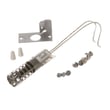
If your Kenmore 9113218891 wall oven is not heating, the most common causes are a failed igniter, a bad temperature sensor, or a power or control issue that prevents the bake or broil burner from lighting. Start with the igniter and sensor because they directly control heat.
- Confirm the oven is set to Bake (not Delay Start or Sabbath mode, if equipped).
- Verify the display and oven light work; if the unit is completely dead, check the breaker.
- Listen and watch during a heat call: you should typically hear a relay click and see ignition activity.
- If you smell gas but no ignition occurs, stop and ventilate; then focus on the ignition system.
- If the oven heats but never reaches temperature, suspect the sensor or weak ignition.
For this model page, these parts are commonly involved in “no heat” or “not heating enough” symptoms:
| Symptom | Most likely cause | What to do |
|---|---|---|
| No heat, no ignition | Igniter not glowing/weak | Replace the igniter WB2X9154 |
| Heats inconsistently or wrong temp | Temperature sensor out of range | Test/replace the sensor WB21X5301 |
| Oven works but light is out | Burned-out bulb | Replace the lamp bulb 40A15 |
- Cut power at the breaker before accessing wiring or components.
- Inspect the igniter: cracks, white spots, or a weak/no glow during a bake call point to failure.
- Check the sensor circuit: a sensor that is open, shorted, or has damaged wiring can stop heating or cause poor temperature control.
- Look for loose or burned wire connections at the igniter, sensor, and control area.
- If both igniter and sensor check out, the issue is commonly a control or wiring problem that needs deeper electrical diagnosis.
An oven that will not heat is usually failing at the point where heat is created (ignition) or where temperature is measured (sensor). Fixing the correct part restores safe, consistent baking and prevents repeated shutdowns.
Last updated: February 2026
How do I reset my Kenmore oven control board?
For Kenmore model 9113218891, the reliable “reset” for the oven control board is a power reset: turn the oven circuit breaker OFF for 5 minutes, then turn it ON. This clears many display glitches and false error beeps without replacing parts.
- Set the oven to OFF at the control (if the keypad responds).
- Turn the circuit breaker OFF (or remove the fuse) for 5 minutes.
- Restore power and wait 60 to 90 seconds for the control to reboot.
- Reset the clock, then test Bake at 350°F.
- If the display is blank, confirm the breaker is fully seated by switching OFF then ON again.
A reset fixes software-style lockups; it does not fix failed heating or sensing components. These checks pinpoint the next likely cause:
- No heat and no ignition glow on a gas oven: suspect the igniter WB2X9154.
- Heats poorly or temperature swings: suspect the sensor WB21X5301.
- Light out only: replace the lamp bulb 40A15.
- Intermittent operation: inspect wiring and terminals for heat damage.
| Symptom | What it usually means | Common next step |
|---|---|---|
| Control frozen, random beeping | Control needs reboot | Power reset at breaker |
| Oven will not ignite | Ignition system issue | Check/replace igniter |
| Oven temperature inaccurate | Sensing/control feedback issue | Check/replace sensor |
| Only oven light fails | Bulb burned out | Replace lamp bulb |
Power-cycling the control board restores normal operation after a surge or glitch and helps you avoid replacing parts unnecessarily. If the problem returns quickly, testing the igniter, sensor, and wiring gives a clear path to a lasting repair.
Last updated: February 2026
Why is my Kenmore oven fan not spinning?
If the fan in your Kenmore 9113218891 wall oven is not spinning, the most common causes are a jammed fan blade, a failing fan motor, or a power/control problem that keeps the motor from getting voltage. Start with obstruction checks, then confirm power to the motor.
- Turn off power at the breaker; the fan can start unexpectedly.
- Check for foil, insulation, grease buildup, or wiring contacting the blade.
- Spin the blade by hand (through the vent if accessible); it should turn smoothly.
- Run Bake and listen: a hum with no airflow points to a stuck blade or weak motor.
- Note when it fails: stopping only when hot often indicates motor windings breaking down.
| Symptom | Most likely cause | Next step |
|---|---|---|
| Blade will not turn by hand | Obstruction or seized bearings | Clear debris; replace motor if still stuck |
| Motor hums but blade does not move | Stiff bearings or failing motor | Verify blade is free; replace motor |
| Fan never runs in any mode | No power to motor, bad wiring, or control issue | Check harness and test for voltage |
| Fan starts then stops as oven heats | Heat-related motor failure | Replace motor |
- With power off, inspect connectors for heat damage, loose terminals, or broken wires.
- If you use a meter, test for voltage at the fan motor when the fan should be on.
- Voltage present but no operation means the motor is the failure.
For tool basics, use how to use a multimeter to test electrical parts video.
A fan issue is often mechanical or motor-related, but temperature feedback problems can also cause abnormal cycling. If the oven overheats or temperature is erratic, check the sensor WB21X5301.
A non-spinning oven fan can cause uneven cooking and overheating that stresses wiring and electronic controls.
Last updated: February 2026
What are the parts of an electric oven?
Kenmore model 9113218891 uses a gas heating system (burners plus ignition), not electric bake and broil elements. The main oven parts still include temperature sensing, controls, lighting, door hardware, and the gas ignition components that light the burner.
- Bake burner (provides heat for baking)
- Broil burner (top heat for broiling)
- Ignition system (hot-surface igniter and related wiring)
- Oven temperature sensor (reports oven temperature to the control)
- Control system (control board or thermostat, plus wiring harness)
- Door system (hinges, gasket, handle, glass)
- Lighting (bulb and lens/cover)
These are common service parts that relate to heat, temperature accuracy, and visibility:
| Part on this model | What it does | When it commonly fails |
|---|---|---|
| Igniter WB2X9154 | Lights the gas burner | No heat, delayed ignition, weak ignition |
| Sensor WB21X5301 | Helps regulate oven temperature | Overheats, underheats, temp swings |
| Lamp bulb 40A15 | Lights the oven cavity | Light out, dim light |
- Oven will not heat: igniter not glowing or not drawing enough current, wiring issue
- Oven heats but temperature is off: sensor out of range, poor sensor connection
- Gas smell before ignition: weak igniter causing delayed lighting (stop using and have it serviced)
- Oven light not working: bulb burned out, socket or wiring problem
Gas and electric ovens share many components, but the heat source is different. Knowing that 9113218891 uses a burner and igniter helps you troubleshoot correctly and choose the right replacement part the first time.
Last updated: February 2026
How do you fix the F1 code on a Kenmore oven?
On Kenmore model 9113218891, an F1 code is a control fault that’s commonly triggered by a stuck key on the touchpad/keypad circuit or a problem the control detects while monitoring oven temperature. Start with a power reset; if F1 returns, troubleshoot the control inputs and sensor circuit.
This fixes temporary glitches and confirms whether the fault is persistent.
- Turn the oven off.
- Shut off power at the circuit breaker.
- Leave power off for 5 minutes.
- Restore power and set the clock.
- Start Bake and watch for the code to return.
F1 that returns quickly is almost always an electronic control issue, not a simple setting.
- Keypad/touchpad: a stuck or shorted key can trigger F1 at power-up.
- Wiring/connectors: a loose plug or damaged harness at the control panel can cause false key signals.
- Oven temperature sensor circuit: if the code appears during preheat, the control may be reacting to an out-of-range sensor reading; the sensor used on this model is the sensor WB21X5301.
| When F1 shows up | Most likely area | What we do next |
|---|---|---|
| Immediately at power-up | Keypad/control input | Inspect keypad area and connectors; replace the failed control/touchpad assembly as needed |
| During or after preheat | Sensor circuit | Check sensor wiring; replace the sensor WB21X5301 if readings are out of range |
| Along with no ignition/heat on a gas oven | Ignition/heat system (separate issue) | Diagnose ignition components such as the igniter WB2X9154 if the burner will not light |
An F1 fault can shut the oven down or cause unsafe temperature control. Resetting power and then matching the timing of the code (power-up vs. preheat) prevents replacing the wrong part.
Last updated: February 2026





