 Error Codes




Why is my wall oven not turning on?
If your Kenmore wall oven model 9114012193 is completely dead (no display, no light, no heat), the most common causes are a power supply problem, an open safety fuse, or a failed control or wiring connection. Start by confirming the oven is getting the correct voltage before replacing parts.
Quick checks first (most common)
- Verify the circuit breaker is ON and fully reset it (switch OFF, then ON).
- Confirm the oven is getting 240 VAC (many ovens can look “dead” if one breaker leg is tripped).
- Check for a loose or burned connection at the junction box where the house wiring connects to the oven.
- If the oven light works but the oven will not heat, the issue is often a heating circuit part (bake, broil, sensor) rather than incoming power.
Parts that commonly cause a “dead” oven
A true no-power condition is often caused by an open thermal fuse or a failed control circuit.
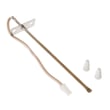
- Thermal fuse: If it opens, the oven may lose power to the control.
- Control or wiring: A burned wire, loose spade terminal, or failed electronic control can stop the oven from powering up.
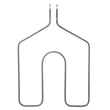
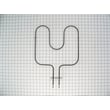
Helpful part to check for this model:
How to narrow it down (simple troubleshooting)
- Check voltage at the junction box (L1 to L2 should be about 240 VAC; L1 to neutral and L2 to neutral about 120 VAC each).
- If voltage is correct, inspect wiring for heat damage, especially near the control area.
- Test the thermal fuse for continuity (it should read closed/near 0 ohms when good).
Related DIY help:
What you’ll typically see (symptom guide)
| Symptom | Most likely area | What to do next |
|---|---|---|
| No display and no oven light | Power supply, thermal fuse, wiring | Verify breaker and 240 VAC; test fuse |
| Display works but no heat | Bake/broil circuit, sensor, control | Test elements and sensor |
| Works sometimes, then dies | Loose connection, overheating, fuse | Inspect terminals; check fuse |
Why it matters
A wall oven needs the correct 240-volt supply and intact safety circuits to power the control and heating system. Finding whether the problem is incoming power versus an internal safety shutdown prevents unnecessary part replacement.
Last updated: January 2026
Are all 30 inch wall ovens the same size?
No. “30-inch” wall ovens are a size class, not an exact measurement; the real outside width and the required cabinet cutout can vary by brand and design. For a Kenmore wall oven like model 9114012193 (a 24-inch unit), you must match the actual cutout dimensions, not the label.
What “30-inch” usually means (and what varies)
Most wall ovens are grouped into 24-inch, 27-inch, and 30-inch categories, but manufacturers can differ slightly in:
- Overall width (the frame/trim can add width)
- Cutout width (the cabinet opening requirement)
- Cutout height (single vs. double ovens vary a lot)
- Depth behind the cabinet face (clearance for wiring and airflow)
- Trim overlap (how much the front covers the cabinet edges)
Quick size comparison (typical ranges)
Use this as a planning guide, then confirm the exact cutout specs for the oven you are installing.
| Wall oven class | Typical cutout width | Typical cutout height (single) |
|---|---|---|
| 24-inch | ~22 1/2 to 23 1/2 in. | ~27 to 29 in. |
| 27-inch | ~25 1/2 to 26 1/2 in. | ~27 to 29 in. |
| 30-inch | ~28 1/2 to 29 1/2 in. | ~27 to 29 in. |
Why it matters
If the cutout is even slightly off, the oven may not slide in, the trim may not cover gaps, or airflow clearances can be compromised. That can lead to poor fit, heat issues, and a harder installation.
Related parts that come up during installs
If you are servicing the oven while measuring or reinstalling it, these model-compatible parts are commonly involved:
- Wall oven thermal fuse WB24K5046 (overheat protection)
- G.e. range bake element WB44K5013 (baking heat source)
- G.e. range broil element WB44K5009 (broiling heat source)
Last updated: January 2026
What is the code F3 on a Kenmore wall oven?
On the Kenmore 9114012193 electric wall oven, the F3 (sometimes shown as F30 or F31) error code points to an oven temperature sensing problem, most often a failed oven temperature sensor or a wiring issue between the sensor and the control.
What to check first (safe, quick steps)
- Turn the oven off and let it cool completely; then restore power and see if the code returns.
- If the code appears during preheat, note whether the oven overheats or never reaches set temperature.
- Check for obvious damage to the sensor wiring harness (burnt insulation, loose connector, pinched wires).
- If the code appears right after self-clean, suspect heat damage to wiring or a protective device opening.
Parts commonly involved with an F3 condition
F3 is usually sensor or wiring related, but an overheat event can also open a safety device.
| Symptom you notice | Most likely area | What we typically do next |
|---|---|---|
| Oven heats erratically or temperature is way off | Temperature sensor circuit | Test sensor resistance and inspect harness |
| F3 shows immediately at power-up | Sensor circuit open/shorted or control input issue | Inspect connector, then test sensor and wiring |
| F3 after heavy use or self-clean | Overheat damage | Inspect wiring; check safety devices |
If you’re troubleshooting an overheat scenario, the wall oven thermal fuse WB24K5046 is one protective part that can be involved when temperatures get excessive.
How we confirm the cause (typical diagnostic approach)
- Power off at the breaker before accessing any wiring.
- Inspect and reseat the sensor connector at the control area.
- Use a meter to check the sensor circuit for an open or short.
- If the sensor and wiring test good, the electronic control is the next common suspect.
For meter basics, use how to use a multimeter to test electrical parts video.
Why it matters
The oven control relies on the temperature sensor signal to regulate the bake and broil elements. When that signal is missing or out of range, the control posts F3 to prevent unsafe heating and to protect components.
Last updated: January 2026
What is the bottom plate of an oven called?
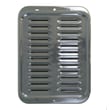
In a Kenmore wall oven like model 9114012193, the “bottom plate” people refer to is usually the oven bottom panel (the removable metal floor inside the cavity). The main heating part under it is the bake element.
What you might be pointing to
- Oven bottom panel: The flat metal panel you see at the very bottom of the oven cavity.
- Bake element: The heating element that sits at the bottom and provides most baking heat.
- Hidden bake design (some ovens): The bake element is covered by the oven bottom panel, so you do not see the element directly.
- Broil element: The top heating element used for broiling.
Quick identification guide
| What you see | Common name | What it does |
|---|---|---|
| Flat metal “floor” inside the oven | Oven bottom panel | Protects components below; helps direct heat |
| Exposed heating rod at the bottom | Bake element | Primary heat source for baking |
| Exposed heating rod at the top | Broil element | High, direct top heat for broiling |
Why it matters
Using the right name helps you order the correct part and troubleshoot faster. For example, a damaged oven bottom panel can warp and affect airflow, while a failed bake element can cause slow preheating or uneven baking.
Parts that commonly relate to “bottom of the oven” issues
- If the oven will not heat or heats unevenly, the bake element is a common suspect: g.e. range bake element WB44K5013
- If broil works but bake does not, compare with the top heater: g.e. range broil element WB44K5009
- If the oven is completely dead after overheating, a safety device may be involved: wall oven thermal fuse WB24K5046
Last updated: January 2026





