 Installation guide
 Owner’s manual
 Error Codes



How do I make my Kenmore dishwasher drain?
To make your Kenmore dishwasher model 58714022200A drain, we recommend using the control’s Cancel/Drain function first. If it still will not pump out, the most common causes are a kinked drain hose, a blocked drain path, or a drain pump problem.
Quick ways to force a drain
- Press and hold Cancel/Drain for about 3 to 5 seconds (many Kenmore models start a pump-out).
- If the controls do not respond, reset power: turn the breaker OFF for 1 minute, then back ON.
- If the tub is full, avoid running another wash cycle; focus on draining first.
Drain system checks that fix most “won’t drain” problems
The installation requirements matter because a bad drain setup can prevent proper pump-out.
- Make sure the drain hose is attached to the drain pump and routed correctly (see the 58714022200A installation guide).
- Confirm the hose has no sharp bends or kinks that restrict flow.
- Verify the dishwasher is not resting on the drain hose under the cabinet.
- If connected to a garbage disposer, remove the knockout plug in the disposer inlet (a very common missed step on new installs).
- If connected to a sink drain, the drain entry needs to be above the trap.
Parts that commonly solve a no-drain symptom
If the drain path is clear and the unit still hums or will not pump out, these parts are frequent fixes:
| Symptom | Most likely area | Example part for this model |
|---|---|---|
| Hums but little or no water moves | Drain pump or obstruction at pump | Pump A00126401 |
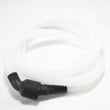
| Drains slowly, backs up, or leaks under sink | Drain hose routing or restriction | Drain hose 807117001 |
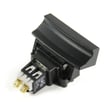
| Overfills then stops draining | Float system stuck or failed | Dishwasher float switch 154773201 |
Why it matters
A dishwasher that cannot drain leaves dirty water in the sump, can trigger cycle interruptions, and often causes odor. Correct hose routing and a clear drain path protect the pump and help the unit complete the wash cycle normally.
Last updated: February 2026
How do you reset the f2 e2 on a Kenmore dishwasher?
On a Kenmore dishwasher model 58714022200A, the F2 E2 code points to a user interface or keypad communication problem. We reset it by power-cycling the dishwasher and then clearing the control; if the code returns, the issue is usually in the control panel or electronic control.
Quick reset steps (most effective first)
- Turn the dishwasher OFF at the breaker for 1 full minute, then turn it back ON.
- Close the door firmly and try to start a normal cycle.
- If the code returns, press and hold Start and Cancel together for 3 to 5 seconds (if your console has both keys).
- If your model uses a single Cancel/Drain key, press and hold it for 3 to 5 seconds to clear the cycle.
- If the keypad is unresponsive, disconnect power again and inspect the console for stuck keys or moisture.
What to check if F2 E2 comes back
F2 E2 commonly returns when the keypad is stuck, the ribbon/connector is loose, or the control is not reading the user interface correctly.
- Check for a stuck button (key feels jammed or clicks differently).
- Wipe the console dry; moisture can cause false key presses.
- Restore power and test each key one at a time.
- If the dishwasher beeps continuously or starts acting on its own, the keypad is shorted.
- If the display lights but keys do nothing, the user interface or control board is failing.
Parts that commonly solve repeated F2 E2
| Symptom | Most likely cause | Typical fix |
|---|---|---|
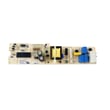
| Random beeping, “phantom” key presses | Shorted keypad/user interface | Replace the control panel/user interface assembly |
| Dead keys, no response | Failed user interface or loose connection | Reseat connections; replace user interface if needed |
| Code appears after power surge | Control logic glitch | Breaker reset; replace control if it won’t clear |
If you’re already seeing other odd behavior (won’t start, stops mid-cycle), use our Kenmore he dishwasher error codes reference to confirm whether additional codes are present.
Why it matters
When F2 E2 is active, the dishwasher may ignore commands or stop mid-cycle. Resetting restores normal operation if it was a temporary control glitch; repeated codes usually mean a control-panel or control-board problem that will keep interrupting cycles.
For model-specific button sequences and control behavior, follow the 58714022200A owner’s manual.
Last updated: February 2026
What does E22 mean on a Kenmore dishwasher?
On a Kenmore dishwasher, an E22 code points to a drain or filter restriction: water is not moving out as expected, most often because the filter area is blocked by food debris. On model 58714022200A, start by cleaning the filter and checking for a kinked drain hose.
What to check first (fast fixes)
- Cancel the cycle and let the unit drain, then restart a normal cycle.
- Remove and clean the filter area thoroughly (rinse under hot water; scrub grease with a soft brush).
- Check the drain path for obstructions (glass, labels, seeds) in the sump area.
- Inspect the drain hose routing for kinks or crushing behind the dishwasher.
- If connected to a disposer, confirm the disposer inlet plug was knocked out during installation.
Parts that commonly cause E22 symptoms
If cleaning does not help, these parts are the most common next suspects on a dishwasher like the 58714022200A:
| Symptom you see | Most likely area | Example part to inspect |
|---|---|---|
| Standing water in tub | Drain path restriction | Drain hose 807117001 |
| Hums but drains poorly | Drain pump or impeller issue | Pump A00126401 |
| Fills incorrectly or overfills | Fill control, float system | Dishwasher float switch 154773201 |
| Slow fill, weak wash, odd draining behavior | Restricted inlet screen or valve issue | Dishwasher water inlet valve 154637401 |
Why it matters
When the filter or drain path is restricted, the dishwasher can leave dirty water in the tub, redeposit soil on dishes, and strain the pump. Clearing the restriction early helps prevent repeat error codes and poor cleaning performance.
Model-specific notes from the installation guidance
For this style of Kenmore dishwasher installation, we see two repeat causes of drain-related problems:
- Kinked drain hoses can cause problems, especially after pushing the dishwasher back into the cabinet.
- If the drain hose connects to a food disposer for the first time, the disposer inlet plug must be removed.
For diagrams and the exact drain routing and connection options, use the 58714022200A installation guide.
Last updated: February 2026
What kind of Kenmore dishwasher do I have?
Your Kenmore dishwasher type is identified by its model number; for this unit, the model is 58714022200A. You’ll find the rating label on the inside edge of the door (commonly along the left side) and it lists the model and serial number.
Where to find the model and serial number
Check these common label locations on Kenmore dishwashers like model 58714022200A:
- Inside the door opening on the left side frame
- Along the top edge of the inner door
- Along the side edge of the inner door near the latch area
- Occasionally on the tub wall just inside the opening
For diagrams and exact label location details for your unit, use the 58714022200A owner's manual.
How to read the label (and why it matters)
The rating label typically includes:
- Model number (used to match parts and diagrams)
- Serial number (used to determine production run details)
- Electrical rating (voltage and amperage)
- Certification and compliance markings
Quick guide: what each number is used for
| Item on label | What we use it for | Example for your dishwasher |
|---|---|---|
| Model number | Correct parts lookup and repair instructions | 58714022200A |
| Serial number | Helps confirm the exact version within a model | Varies by unit |
When you need the model number most
Having the exact model number prevents wrong-part returns and speeds up troubleshooting, especially for issues involving:
- Leaks at the door or tub edge (often tied to the door seal)
- No fill or slow fill (often tied to the water inlet valve)
- No heat or poor drying (often tied to the heater)
If you’re chasing one of those symptoms, matching parts to 58714022200A is the fastest way to stay on track.
Why it matters
Kenmore model numbers can look similar, but internal components (like the pump, heater, and seals) can differ by revision. Using the rating label ensures we identify the exact dishwasher family and the correct replacement parts the first time.
Last updated: February 2026





