Installation guide



Can you replace the microwave on a wall oven microwave combo?
On the Whirlpool WOC75EC0HS03 wall oven/microwave combo, the microwave is built into the combination unit, so it is not replaced as a separate countertop-style appliance. In most repairs, you either service the microwave section (common) or replace the full combo assembly (less common).
What you can do instead (most common options)
- Repair the microwave section when it will not heat, will not start, or stops when the door moves.
- Replace door safety parts if the unit thinks the door is open.
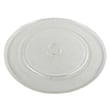
- Replace the turntable drive parts if the tray does not rotate.
- Replace the full door assembly if the door is damaged or will not seal/close correctly.
- Use the installation procedure to safely remove and reinstall the combo during service.
Parts that commonly fix “microwave not working” symptoms
If the microwave section is dead, intermittent, or not heating, these model-matched parts are often involved:
| Symptom | Common cause | Example part for WOC75EC0HS03 |
|---|---|---|
| No heat, loud hum | High-voltage component failure | Magnetron W11346197 |
| Runs only with door pushed, stops when door opens/closes | Door interlock switch issue | Switch W10211972 |
| Turntable not rotating | Drive motor or coupler issue | Microwave turntable motor W10911403 |
Safety and service notes (important)
Microwave/oven combos contain high-voltage components that can retain a dangerous charge even when unplugged. We recommend these steps before any inspection:
- Shut off power at the breaker (do not rely on the control panel).
- Confirm the display is off.
- Avoid opening the microwave chassis unless you are trained for high-voltage service.
- If the issue is door-related, inspect the latch area first (no disassembly of high-voltage parts).
Why it matters
Because the microwave and oven share a cabinet, mounting, and electrical connections, “replacing the microwave” usually means repairing the microwave section in place. Following the correct removal and reinstall steps in the installation guide helps prevent cabinet damage, wiring strain, and door alignment problems.
Last updated: February 2026
What are common issues with Whirlpool ovens?
Common issues with Whirlpool ovens (including the oven section of the Whirlpool WOC75EC0HS03 wall oven/microwave combo) include no heat or weak heat, uneven baking, temperature that seems off, a door that will not close or seal correctly, and control or keypad problems. Many fixes start with basic checks, then move to testing key parts.
Most common symptoms and what usually causes them
- Oven not heating or takes too long to preheat: failed bake element, wiring issue, or control problem
- Food bakes unevenly: convection fan issue, rack placement, or temperature sensing problem
- Temperature seems inaccurate: failed oven temperature sensor or calibration needed
- Door problems (won’t close, heat leaks, won’t remove/reinstall smoothly): hinge or latch issues, door alignment
- Microwave side won’t run or stops when door moves: door interlock switch or latch/interlock alignment
Parts that commonly solve these problems
If symptoms point to a specific failure, these model-compatible parts are common repair paths:
| Symptom | Part to check first | Example part on this model page |
|---|---|---|
| No bake heat | Bake element | Range bake element W11545804 |
| Oven temp off | Temperature sensor | Temperature sensor W11233913 |
| Microwave won’t start or is intermittent | Door interlock switch | Switch W10211972 |
| Microwave runs but doesn’t heat | Magnetron (advanced repair) | Magnetron W11346197 |
Quick checks we recommend before replacing parts
- Confirm the unit has power at the breaker (a partially tripped breaker can cause odd symptoms).
- For baking issues, try a simple preheat test and verify you are using the correct rack position.
- Inspect the oven door for a full, even seal and smooth hinge movement.
- If the microwave is involved, check that the door closes firmly and does not “bounce” back.
- If you’re comfortable with electrical testing, use a meter to confirm continuity on suspect components (power off).
Why it matters
Heating and door-related problems affect cooking performance and can also stress electrical components over time. Catching a weak bake element or a drifting temperature sensor early helps restore normal preheat times and consistent results.
Installation and handling note (door and electrical)
For safe handling during service or installation, follow the steps and warnings in the installation guide, including using two people to move the unit and disconnecting power before servicing.
Last updated: February 2026
What are the symptoms of a bad oven control board Whirlpool?
On a Whirlpool WOC75EC0HS03 wall oven/microwave combo, a failing oven control board commonly shows up as a dead or flickering display, unresponsive touch keys, random beeping, error codes, or heating that will not start or runs erratically. Use the wiring and access guidance in the installation guide before any checks.
Common symptoms you can expect
- Display is blank, flickers, or resets during use
- Touch panel buttons do not respond, respond intermittently, or select the wrong function
- Oven will not start Bake/Broil/Convect, or cancels shortly after starting
- Temperature is unstable (too hot, too cool, or swings widely)
- Fan runs when it should not, or runs constantly after the oven is off
- Repeated error codes or constant beeping with no clear cause
Quick checks before blaming the control board
These steps help separate a control issue from a power, sensor, or door-related problem.
- Confirm power is stable: a loose junction box connection or weak supply can cause resets and odd behavior.
- Power reset: turn the breaker off for 1 minute, then restore power and retest.
- Look for heat-related clues: if the oven overheats or underheats, the issue can be the control board or the temperature sensor.
- Check the oven temperature sensor circuit: a failed sensor or damaged wiring can mimic a bad board (this model uses a sensor such as temperature sensor W11233913).
- Inspect harness connections: a loose plug at the board or pinched wiring can cause intermittent failures.
What symptoms point to the board vs. another part?
| Symptom | More likely cause | Notes |
|---|---|---|
| Blank/flickering display, random resets | Control board or power supply issue | Verify supply and connections first |
| Buttons do nothing but display is on | User interface/control panel or board | Often presents as intermittent key response |
| Oven heats but temperature is inaccurate | Sensor or control board | Sensor issues are common and easier to test |
| Error codes repeat after reset | Control board, sensor, wiring | Use the tech sheet/wiring diagram path in the install docs |
Why it matters
The control board manages heating relays, temperature feedback, and user inputs. Misdiagnosing it can lead to replacing an expensive part when the real issue is a sensor, wiring connection, or power problem.
Last updated: February 2026