 Owner’s manual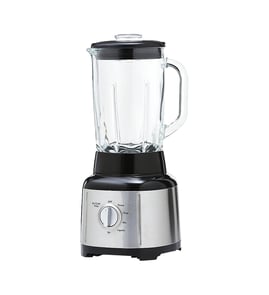



Can I put my KitchenAid blender in the dishwasher?
Yes, for KitchenAid blender model KSB4031BM0, many removable parts are dishwasher-safe, but the blender base and power cord are not. Use the top rack for most accessories, and wash the base by wiping it with a warm, damp cloth; see the KSB4031BM0 owner's manual.
What you can dishwasher-clean (and where)
These items are dishwasher-safe:
- Top rack only: personal jar, small batch jar, lids, blade assembly, reamer, juice container, pulp basket, tamper, lid center cap
- Bottom rack allowed: blender jar and glass jar
What should never go in the dishwasher
To prevent electrical damage and finish wear, keep these out of the dishwasher:
- Blender base
- Power cord
- Any electrical or control components
- Exterior surfaces that could be scratched by abrasive cleaners
Quick reference: dishwasher vs. hand-cleaning
| Part of the blender | Dishwasher-safe? | Best practice |
|---|---|---|
| Base and controls | No | Wipe with warm, damp cloth; dry with soft cloth |
| Power cord | No | Wipe only; keep dry |
| Blade assembly and lids | Yes | Top rack only |
| Blender jar / glass jar | Yes | Bottom rack is OK |
Why it matters
The KSB4031BM0 base contains the motor and electronics; water and high heat can damage internal components. Keeping the base dry and using the correct rack position helps protect seals, reduce warping, and extend the life of the jar and lid.
If you want an easier cleaning option
KitchenAid also supports a “clean function” approach: fill the jar about halfway with warm water and 1 to 2 drops of dishwashing liquid, run the clean cycle, then rinse and dry thoroughly (details are in the KSB4031BM0 owner's manual).
Last updated: February 2026
Can a broken blender be fixed?
Yes, a broken KitchenAid blender like model KSB4031BM0 can often be fixed; the right repair depends on whether the issue is a simple jam/overload, a worn drive connection, a leaking or damaged jar, or an electrical/control problem. Start with the troubleshooting steps in the KSB4031BM0 owner's manual.
Quick checks before you buy parts
- Unplug the blender and let it cool for a few minutes.
- If it stopped mid-blend, remove the jar and use a spatula to rearrange ingredients; reduce batch size and add liquid if needed.
- If it stops after about 3 minutes, turn the dial to (O), then restart (this is a normal durability feature).
- Confirm the plug is fully seated in a grounded 3-prong outlet; check the breaker if needed.
- Inspect the jar seating area for food buildup that prevents the jar from locking in correctly.
Common fixes and the parts that usually solve them
| Symptom | Most likely cause | Typical fix |
|---|---|---|
| Motor runs but blades do not spin | Worn drive connection | Replace the blender drive coupling W11627528 and check the coupler screw/plug if applicable |
| Leaks, cracks, or poor blending | Jar or blade assembly issue | Replace the jar or blade assembly (match to your exact KSB4031BM0 configuration) |
| Stops while blending | Overload or jam protection | Reduce load, add liquid, restart after clearing |
| Dead, no power | Cord, control, or motor issue | Inspect cord and controls; replace failed component if diagnosed |
Why it matters
Fixing the correct failure point prevents repeat damage. For example, continuing to run a blender with a worn coupling can strip the drive connection and overload the motor, turning a small repair into a bigger one.
When replacement is the better choice
If the motor or electronic control is the failure and the blender is within the five-year warranty window described in the manual, service or replacement through the manufacturer is often the most practical path. Use the warranty and service section in the KSB4031BM0 owner's manual to confirm coverage and next steps.
Last updated: February 2026
How do I tell which KitchenAid model I have?
To identify your KitchenAid blender model, we look for the model number on the rating label on the blender base (not the jar). For your parts page, the model is KSB4031BM0, and matching that exact number ensures you get the correct jar, blade, and drive parts.
Where to find the model number on a blender
Most KitchenAid blenders place the rating label on the underside of the base or along the back/bottom edge of the motor base.
- Unplug the blender first.
- Turn the base over carefully and look for a sticker or stamped plate.
- Write down the full model number and any serial number.
- Match every character (letters and numbers) exactly.
- Use the model number when ordering parts like a jar assembly or blade assembly.
What the model number helps you match
The model number narrows down parts that must fit precisely, especially where the jar locks into the base and where the drive system engages.
| What you’re matching | Why it matters | Example part for KSB4031BM0 |
|---|---|---|
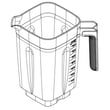
| Jar fit and locking tabs | Prevents leaks and wobble | Jar assembly W11433178 |
| Blade and sealing surfaces | Affects blending performance and leaks | Blender blade assembly W11396694 |
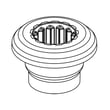
| Drive connection to motor | Prevents slipping, grinding, or no-spin | Blender drive coupling W11627528 |
Quick safety reminder while checking labels
When handling the base to find the label, keep the unit unplugged and use a properly grounded outlet when you plug it back in. We cover these electrical safety basics in the KSB4031BM0 owner’s manual.
Why it matters
KitchenAid model numbers can look similar, but small differences change the correct motor base, electronic control, lid, and coupler parts. Using the exact model number avoids ordering a part that will not mount, seal, or engage correctly.
Last updated: February 2026
How to disassemble a KitchenAid blender blade?
For the KitchenAid KSB4031BM0 blender, we disassemble the blade by removing the jar from the base, letting the blender fully stop, unplugging it, then unthreading the blade assembly from the jar (it tightens clockwise, so it loosens counterclockwise). Follow the exact handling and cleaning steps in the KSB4031BM0 owner's manual.
Safety first (before you touch the blade)
- Turn the control dial to O (Off) and wait for the blade to fully stop.
- Unplug the blender before removing the jar or working near the blade.
- Handle the blade by the housing, not the cutting edges.
- Keep the lid on while moving the jar to reduce spill risk.
- Never reach into the jar with fingers; use a spatula if you need to free stuck food.
Disassemble the blade assembly (typical steps)
- Remove the jar from the base.
- Set the jar on a towel on a stable counter.
- Grip the blade assembly at the bottom of the jar.
- Turn the blade assembly counterclockwise to loosen, then lift it off.
- Separate any gasket or sealing surfaces carefully (do not stretch or nick them).
Cleaning and reassembly tips
The manual notes that the blade assembly is dishwasher-safe (top rack only), and it also describes a “Clean” cycle using warm water plus 1 to 2 drops of dish soap.
- For routine cleaning, run the clean cycle, then rinse and dry thoroughly.
- If you remove the blade for hand-washing, avoid abrasive pads that can damage sealing surfaces.
- Reinstall by threading the blade assembly back on clockwise until snug.
| Task | Best practice | Why it helps |
|---|---|---|
| Removing blade | Loosen counterclockwise | Prevents thread damage and stuck parts |
| Cleaning | Use clean cycle or top-rack dishwasher | Reduces buildup around seals |
| Reinstalling | Tighten clockwise until snug | Helps prevent leaks |
When you should replace the blade instead of disassembling further
Replace the blade assembly if you see any of these issues:
- Leaking from the bottom of the jar
- Grinding noise, wobble, or visible damage
- Poor blending even with correct loading and enough liquid
If you need the correct replacement for this model, use the blender blade assembly W11396694.
Why it matters
Correct blade removal and reinstallation helps prevent leaks, protects the jar threads, and keeps the motor from overloading or jamming during blending.
Last updated: February 2026
What is the most common problem with the KitchenAid mixer?
For the KitchenAid KSB4031BM0 blender, the most common issues we see are the blender not blending (motor runs but blades do not turn), leaking from the jar area, or the unit not powering on; these problems usually trace back to the jar and blade interface, the drive coupling, or the power cord and controls. For model-specific use and care steps, use the KSB4031BM0 owner's manual.
Most common symptoms and what they usually mean
- Motor runs but blades do not spin: worn or stripped drive coupling, jar not seated, or blade assembly issue.
- Leaking from the jar: jar assembly or blade assembly seal area is worn, cracked, or not tightened.
- No power: outlet issue, damaged cord, or an internal control problem.
- Burning smell or loud grinding: drive coupling slipping, overloaded jar, or motor strain.
Quick checks we recommend first
- Unplug the blender, then reseat the jar and lid.
- Confirm the jar is assembled correctly and the blade area is snug.
- Try a smaller load and add liquid first for thick blends.
- Inspect the coupler area for rounding, cracking, or rubber debris.
- If cleaning is the issue, use the built-in clean method in the manual (warm water plus 1 to 2 drops of dish soap, then run the clean function).
Parts that commonly solve “won’t blend” and leak complaints
| Symptom | Most likely part area | Example part for this model |
|---|---|---|
| Motor runs, blades do not turn | Drive interface | Blender drive coupling W11627528 |
| Leaks, cracks, or worn jar components | Jar and sealing surfaces | Jar assembly W11433178 |
| Poor blending, damaged blades | Blade assembly | Blender blade assembly W11396694 |
Why it matters
A slipping drive coupling or a worn jar and blade interface can make the blender sound like it is working while the blades barely move. Catching that early helps prevent overheating, reduces mess from leaks, and restores normal blending performance.
Last updated: February 2026
Why is my KitchenAid blender leaking?
A KitchenAid blender like model KSB4031BM0 usually leaks because the jar is not seated and locked correctly, the lid or center cap is not fully secured, or the blade and jar sealing surfaces are dirty or worn. Start by cleaning and reseating the jar and lid, then inspect the jar and blade area for damage.
Quick checks that fix most leaks
- Unplug the blender and remove the jar.
- Reseat the jar on the base so it sits flat and fully engages the drive.
- Confirm the lid and lid center cap are fully installed before blending.
- Run the built-in clean cycle (warm water plus 1 to 2 drops of dish soap), then rinse and dry thoroughly; see the KSB4031BM0 owner's manual.
- Check for cracks in the jar, especially around the bottom and handle area.
Where the leak is coming from (symptom guide)
| Where you see liquid | Most common cause | What to do next |
|---|---|---|
| Under the jar, onto the base | Jar not seated, worn blade-to-jar seal area, or jar damage | Clean mating surfaces; inspect jar bottom; replace the jar if cracked |
| From the top while blending | Lid or center cap not secure, overfilled jar | Reseat lid/cap; reduce fill level; start on a lower speed |
| Only after washing | Water trapped around parts, not dried | Dry thoroughly before storage and next use |
Parts that commonly solve a leak
If cleaning and reseating do not stop the leak, the jar or blade area is usually the next place to focus.
- Replace the jar if it is cracked or the sealing surface is damaged: jar assembly W11433178
- If the jar wobbles or does not engage smoothly, inspect the drive interface on the base: blender drive coupling W11627528
Why it matters
Leaks can let liquid reach the base and controls. The manual also notes we should not immerse the base or cord in water; keeping leaks under control helps protect the motor and electronic control and prevents corrosion.
Last updated: February 2026