 Error Codes




What is the error code F5 on Magic Chef?
On the Magic Chef 59FN-5TVW electric range, an F5 error typically points to a control problem (a watchdog or hardware conflict) involving the electronic oven control (clock/control board). The most common fix is replacing the control board after confirming wiring connections are secure.
What F5 usually means
F5 is commonly used for an electronic control fault where the control detects an internal conflict or monitoring (watchdog) failure.
Common symptoms
- Beeping with F5 showing on the display
- Oven stops heating or will not start a bake/broil cycle
- Error returns after clearing power
What to check first (before replacing parts)
Turn off power at the breaker before any inspection.
- Reset power: switch the range breaker off for 1 minute, then back on
- Check for loose or damaged wire connections at the control and sensor harness
- Look for pinched wires (often after moving the range)
- If the oven overheats or temperature swings wildly, test the oven temperature sensor circuit
If the error comes back quickly after a reset, the control board is the primary suspect.
Parts that can be involved
Even though F5 often indicates the control board, these related items can contribute to false faults.
| What you test/replace | Why it matters | Example part on this model page |
|---|---|---|
| Oven temperature sensor circuit | Bad readings can confuse the control | Oven sensor 12001656 |
| Control wiring/connectors | Intermittent connection can trigger watchdog faults | (Inspect harness and terminals) |
| Electronic control (clock/control board) | Internal failure triggers F5 | (Order the exact control listed for 59FN-5TVW) |
Why it matters
An F5 control fault can shut the oven down mid-cycle and, in some cases, cause overheating or unreliable temperature control. Fixing the root cause helps protect baking performance and prevents repeat shutdowns.
Last updated: February 2026
Why is my Magic Chef oven not lighting?
If your Magic Chef 59FN-5TVW oven is not “lighting,” it usually means the bake or broil heating circuit is not turning on (electric ranges do not use a flame). The most common causes are a failed heating element, a bad temperature sensor, or a power or wiring issue.
Quick checks first (safe and fast)
- Confirm the range has full power; most electric ovens need 240 volts (a tripped double breaker can leave the display on but prevent heating).
- Make sure you are using Bake (not Delay Start or Sabbath mode, if equipped).
- Set Bake to 350°F and wait 10 minutes; check for heat and for any error code.
- Look for obvious damage: burned wire ends, loose connectors, or a melted terminal.
- If the oven heats but temperatures are wildly off, suspect the sensor.
Most likely causes and what to do
1) Failed bake element
A bake element can crack, blister, or burn open and the oven will not heat in Bake.
- Inspect for breaks or bubbling.
- Test continuity with a meter (power off).
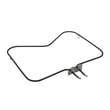
- Replace if open or visibly damaged: bake element WPY04000041.
2) Bad oven temperature sensor
If the sensor reads wrong, the control may prevent normal heating or shut it down early.
- If the oven starts heating then stops, or temps are consistently wrong, test the sensor.
- Replace if out of spec or damaged: oven sensor 12001656.
3) Wiring or control problem
Loose or burned wiring at the element or sensor can stop heating.
- Check for overheated terminals at the element and sensor connectors.
- Repair damaged wires and replace any loose terminals.
What you can test (power off)
| Test | What you’re checking | Typical result |
|---|---|---|
| Visual element inspection | Cracks, blisters, burn marks | No visible damage |
| Continuity test (element) | Element is electrically intact | Closed circuit |
| Continuity/inspection (sensor harness) | Broken wire or loose plug | Secure, undamaged wiring |
Why it matters
An oven that will not heat is often a simple part failure (element or sensor). Fixing the correct part restores safe, accurate baking and prevents repeated breaker trips or overheated wiring.
Last updated: February 2026
Why is my Magic Chef not working?
If your Magic Chef 59FN-5TVW electric range is not working at all (no heat, no display, or no response), the most common causes are a power supply problem, a failed heating component, or a failed temperature-sensing/control part. Start with the power checks, then test the bake circuit and sensor.
Start with the fastest checks
- Make sure the range is plugged in and the cord is fully seated.
- Reset the house breaker (ranges are typically on a 240V double-pole breaker).
- Confirm the outlet is supplying power; if you have a multimeter, verify L1 to L2 is about 240 VAC and each hot leg to neutral is about 120 VAC.
- If the clock is blank but the outlet has power, inspect for a burned wire connection at the terminal block (unplug power first).
Common range failures that stop heating
If the display works but the oven will not heat, these parts are frequent culprits:
- Failed bake element (often visible blistering or a break)
- Bad oven temperature sensor (can cause no-heat or incorrect temps)
- Loose/burned wiring to the element or sensor
Helpful model-matched parts to check:
How to narrow it down (basic symptom guide)
| What you see | Most likely issue | What to do next |
|---|---|---|
| Completely dead (no clock, no oven light) | No power from breaker/outlet, burned connection | Verify 240V supply; inspect wiring connections |
| Clock works, oven will not bake | Bake element or wiring | Visually inspect element; ohm-test element |
| Oven heats poorly or temps are erratic | Oven sensor or connection | Ohm-test sensor; check harness fit |
| Oven light out only | Bulb burned out | Replace oven bulb 8009 |
Why it matters
An electric range needs the correct 240V supply and an intact heating circuit (element, sensor feedback, and wiring). A single open element or bad sensor can stop baking even when the control panel looks normal.
Safety notes before you test
- Shut off the breaker before removing panels or touching wiring.
- Use a meter rated for the voltage you are testing.
- If you see melted insulation or scorched terminals, stop and repair the wiring before running the range.
Last updated: February 2026
How to light pilot light on Magic Chef RV oven?
The Magic Chef 59FN-5TVW is an electric range, so it does not use a standing pilot light. If you are trying to light an RV oven pilot, you are working on a different (gas) appliance; use your RV oven’s lighting procedure and match parts by the correct model number.
Quick checks before you try to light anything
- Confirm the appliance type: electric ranges do not have pilot lights
- Verify you are using the correct model number (RV ovens often have a separate data tag)
- If you smell gas, stop and ventilate the area before doing anything else
- Make sure the oven control knob is in the OFF position before starting
- Use a long match or long-reach lighter if your RV oven requires manual lighting
Typical RV oven pilot lighting steps (manual-light models)
These steps fit many RV ovens that use a standing pilot, and they match the general process most owners follow:
- Turn the oven knob to PILOT (or slightly toward ON, depending on the dial).
- Press and hold the knob in to open the gas valve.
- Light the pilot at the burner/pilot opening.
- Keep holding the knob in for 5 to 30 seconds so the safety device warms up.
- Release the knob slowly; the pilot should stay lit.
What to do if the pilot will not stay lit
Common causes on RV ovens include a dirty pilot, weak flame, or a safety device that is not sensing heat.
| Symptom | Most common cause | What we recommend |
|---|---|---|
| Pilot lights, then goes out when you release the knob | Safety device not heated long enough | Hold the knob in longer (up to 30 seconds) |
| Pilot flame is tiny or yellow | Pilot orifice dirty | Clean carefully; avoid enlarging the opening |
| No ignition at all | No gas flow or blocked pilot | Confirm propane supply and valves are open |
Why it matters
Trying to “light a pilot” on the wrong appliance leads to wasted time and can create a safety risk. Matching the correct model number ensures you get the right troubleshooting steps and replacement parts.
For this 59FN-5TVW electric range, common service parts we stock include the oven sensor 12001656 and bake element WPY04000041.
Last updated: February 2026




