 Installation guide
 Owner’s manual
 Error Codes




How do you reset a Kenmore electric stove?
To reset a Kenmore electric slide-in range model 66495113611, turn the range off, then reset power at the breaker (or unplug if accessible) for about 1 minute and restore power. After power returns, confirm the cooktop and oven heat normally per the 66495113611 owner's manual.
Quick reset steps (power cycle)
- Turn all surface element knobs to OFF.
- If the oven is running, press CANCEL/OFF.
- Switch the range circuit breaker OFF (or unplug the cord if you can reach it safely).
- Wait 60 seconds.
- Switch the breaker ON (or plug back in).
- Test a surface element and start a short bake to confirm operation.
If it still will not operate after the reset
Use these checks from the installation guidance for this range:
- Verify the household fuse is intact or the circuit breaker has not tripped.
- Confirm the range is plugged into a grounded outlet.
- Confirm the electrical supply is connected.
- If the control shows F9 or F9, E0, treat it as a wiring or supply issue and have a qualified electrician verify the outlet wiring.
What you should see after power is restored
| What you test | Normal result | What it suggests if not normal |
|---|---|---|
| Display powers on | Clock or indicators appear | No power to range or wiring issue |
| Surface element heats | Element glows and cycles | Possible switch, element, or wiring problem |
| Oven heats after 5 minutes | Heat builds in cavity | Possible power supply or control issue |
Why it matters
A reset clears minor control glitches and restores normal operation after a power interruption. If the range stays cold after a reset, the problem is usually power supply, wiring, or a failed heating control component.
Last updated: February 2026
Why is the digital display not working on my Kenmore oven?
On the Kenmore 66495113611 electric slide-in range, a blank or unresponsive digital display is usually caused by a power interruption, control settings that need to be cleared (like after a power loss), or a failed control component such as the electronic control or control panel. Use the checks below before replacing parts; see the owner's manual for control-display behavior.
Quick checks that fix many “no display” problems
- Press CANCEL to clear a flashing display after power-up or a power loss.
- Check for a recent power loss; the display can flash when power is restored.
- Confirm the range has full power (a range typically needs 240V; a tripped breaker can leave the control acting odd).
- Look for an error code (letter followed by a number); press CANCEL to clear and see if it returns.
- Try a simple reset: turn the range breaker off for 1 minute, then back on.
Settings that can make the oven seem “dead”
Some modes do not usually blank the display, but they can make the oven appear not to respond.
| What you see | What it means | What to do |
|---|---|---|
| Display flashing after power-up | Normal after power loss | Press CANCEL, reset clock if needed |
| Oven will not operate | Demo mode can disable heating | Turn Demo mode off per the control instructions in the manual |
| Keypad won’t respond normally | Control lockout may be on | Press and hold the lockout keypad (often labeled Hold 3 Sec) for 3 seconds |
When it points to a failed part
If the display stays blank after confirming power and resetting, a control component is the most common cause.
Common suspects on this model include:
- Electronic control board (if the display is dead or erratic)
- Control panel (if some keys do not respond or the display segment is missing)
- Wiring connection issue (loose or damaged harness between the control and power supply)
If you are comfortable doing electrical checks, use a meter to verify power at the range and inspect wiring; our how to use a multimeter to test electrical parts video helps with safe, basic testing.
Why it matters
The display is part of the electronic oven control system; when it loses stable power or the control electronics fail, the oven may not start, may show error codes, or may behave unpredictably. Clearing the display and confirming proper power prevents unnecessary part replacement.
Last updated: February 2026
Why is my Kenmore electric range not heating up?
If your Kenmore 66495113611 electric slide-in range is not heating, the most common causes are a power supply problem (tripped breaker, blown fuse, miswired outlet) or a failed heating component such as a surface element, bake element, or control switch. Use the checks below to pinpoint the failure.
Quick checks first (power and setup)
Before testing parts, confirm the range is getting the correct power.
- Make sure the household fuse is intact or the circuit breaker has not tripped.
- Confirm the range is plugged into a properly grounded outlet.
- Verify the electrical supply is connected and stable.
- If the control shows F9 or F9, E0, treat it as a wiring/power supply issue and have the home wiring verified by a qualified electrician.
- After turning the range on, wait about 5 minutes and check for heat; if it stays cold, turn it off and proceed with component checks.
For model-specific operating steps and control behavior, follow the owner's manual.
What to check next (by symptom)
Oven not heating (bake or broil)
- Look for visible damage on the bake element (blistering, cracks, separated spots).
- Test the element for continuity with a multimeter.
- If the element is failed, replace the range bake element W11447783.
Cooktop element not heating
- If one surface burner stays cold, the radiant element itself can be open.
- If the element heats only on some settings or cuts in and out, the infinite switch/control switch is a common cause.
Common related parts for this model include:
| Heating problem | Likely part to check | Example part on this model |
|---|---|---|
| One dual burner not heating | Dual radiant surface element | Range dual radiant surface element (W11517959) |
| Single burner not heating | Radiant surface element | Range radiant surface element (W11171119) |
| Burner won’t regulate heat | Infinite switch/control switch | Range infinite switch (W10917724) |
Why it matters
A range can appear “dead” or “not heating” even when the display works because the oven and surface elements need full, correct power. Once power is confirmed, continuity testing quickly separates a failed element from a control issue.
Last updated: February 2026
Why is my Kenmore electric stove broiler not working?
If the broiler on your Kenmore electric slide-in range model 66495113611 is not working, the most common causes are broil settings and door position, a failed broil heating circuit (element, wiring, or control), or a problem that occurred after a self-clean cycle. Start by confirming correct broil operation steps in the owner's manual.
Quick checks that fix many “no broil” complaints
- Make sure you are using BROIL, not BAKE or a timed cook mode.
- Close the oven door; this model’s instructions note the door should be closed to ensure proper broiling temperature.
- Try a higher broil setting; on lower settings the broil element can cycle on and off.
- Verify the oven is not in, or stuck after, Self-Clean (the door lock system can affect operation).
- If the oven is heavily soiled, expect some odor or smoke during initial use; that is normal and not a broil failure.
What to test if the broiler still will not heat
Turn off power at the breaker before accessing internal wiring.
- Broil element: Look for blisters, cracks, or separated spots; then test for continuity with a meter.
- Wiring and connections: Check for burned terminals or loose connectors at the element and control.
- Control and switching: A failed control board or control circuit can prevent the broil relay from sending power.
- Door lock system: If the door will not unlock or the range behaves oddly after self-clean, inspect the lock mechanism.
Common symptoms and likely causes
| Symptom | What it usually points to | What to do next |
|---|---|---|
| Broil never heats, bake works | Broil circuit issue (element, wiring, control) | Visual inspection, then continuity checks |
| Broil heats briefly then stops | Normal cycling on low broil, or weak element | Test on high broil; then test element |
| Problems started after self-clean | Door lock or heat-related wiring/control issue | Check lock operation; inspect wiring |
Parts that are often involved
These parts are commonly used for cooking performance and related service tasks on this model:
- Range oven door lock assembly WPW10107820 (if self-clean or locking behavior is involved)
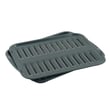
- Range broil pan 4396923 (for proper broiling results and less smoke)
Why it matters
A broiler that does not heat is usually an electrical heating circuit problem. Confirming correct broil operation (door closed, proper setting, expected cycling) prevents unnecessary parts replacement and helps you pinpoint whether the issue is the element, wiring, or control.
Last updated: February 2026





