 Owner’s manual




How do I reset my LG dishwasher after error code?
To reset an LG dishwasher model LDS5811BB-01 after an error code, we power-cycle it: turn the dishwasher off, shut off power at the breaker (or unplug it) for about 1 minute, then restore power and start a new cycle. Use the LDS5811BB-01 owner’s manual for model-specific display and operation details.
Quick reset steps (power-cycle)
- Press Power to turn the dishwasher off.
- If it is hardwired, switch OFF the dishwasher circuit breaker; if it has a plug, unplug it.
- Wait 60 seconds.
- Restore power (breaker ON or plug back in).
- Press Power, select a cycle, and press Start.
Before you reset: fix the condition that triggered the code
A reset clears the display, but the error usually returns if the underlying issue is still present.
Common checks that solve many LG dishwasher errors:
- Make sure the door closes and latches firmly (a weak latch can stop a cycle).
- Confirm the water supply valve under the sink is fully open.
- Check for a kinked or clogged drain hose.
- Clean the filters and sump area so the wash pump can circulate water.
- Verify the spray arms rotate freely and are not blocked by tall items.
What to do if the error comes back
Use the code to narrow the repair path, then inspect the most likely parts.
| Symptom you notice | What it often points to | Example model-matched part to inspect |
|---|---|---|
| Won’t drain, standing water | Drain restriction or hose routing | Dishwasher drain hose AEM69493807 |
| Poor wash, weak spray | Circulation issue, clogged filter, pump problem | Dishwasher wash pump motor EAU61383518 |
| Not drying well, water stays cool | Heating circuit issue | Dishwasher water heating element 5301DD1001G |
Why it matters
Resetting gets you running again quickly, but correcting the cause protects the motor, heater, and control from repeated faults and helps prevent mid-cycle shutdowns.
Last updated: February 2026
What is the lifespan of an LG dishwasher?
An LG dishwasher typically lasts 10 to 15 years. For the LG LDS5811BB-01, lifespan depends most on routine care (filter cleaning, correct detergent, and avoiding overloads) and fixing small issues early; good maintenance pushes you toward the high end of that range. See the LDS5811BB-01 owner’s manual for model-specific use and care guidance.
What affects lifespan the most
- Filter and sump cleanliness: keeps wash water flowing and protects the wash pump.
- Water quality and temperature: hard water and low hot-water temps increase residue and strain.
- Loading habits: overcrowding blocks spray arms and increases motor load.
- Drying and venting performance: poor drying can leave moisture that accelerates odor and buildup.
- Fast response to symptoms: addressing leaks, noise, or drain issues prevents bigger failures.
Maintenance checklist (best return for the effort)
- Clean the filter area regularly and remove debris from the sump.
- Run a monthly cleaning cycle with a dishwasher cleaner.
- Use the right detergent amount; too much can cause excess suds and residue.
- Confirm the spray arms spin freely and holes are not clogged.
- Inspect the drain path for kinks or restrictions; replace a damaged hose with the dishwasher drain hose AEM69493807.
Common wear items and what they impact
| Component | What you may notice | Example model part |
|---|---|---|
| Wash pump motor | Poor cleaning, unusual humming, weak spray | Dishwasher wash pump motor (EAU61383518) |
| Heating element | Poor drying, cool wash results | Dishwasher water heating element (5301DD1001G) |
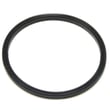
| Door gasket | Leaks at the door or corners | Dishwasher tub gasket (3920DD3005H) |
| Rack rollers | Rack falls off track, hard to slide | Dishwasher dishrack roller, lower (4581DD3003C) |
Why it matters
A dishwasher that is cleaned and loaded correctly runs with less strain on the motor, heater, and seals. That reduces breakdowns and helps your LG LDS5811BB-01 reach its normal 10 to 15 year service life.
Last updated: February 2026
What is the most common problem with the LG dishwasher?
The most common issues we see with an LG dishwasher like model LDS5811BB-01 are: it will not start, it will not drain, or it cleans poorly. These problems usually trace back to a door-latch/controls issue, a drain restriction, or a wash-circulation problem.
Most common symptoms and what they usually mean
- Will not start or seems dead: door not fully latched, control lock enabled, or a control/power issue
- Not draining: clogged filter area, kinked/blocked drain hose, or a drain path restriction
- Not cleaning well: spray arm blockage, low water fill, or circulation/wash pump performance issue
- Not drying well: drying option not selected, rinse aid issue, or heater-related problem
- Unusual noise: debris in the sump area, spray arm hitting dishes, or motor/pump noise
Quick checks we recommend first (fast, no parts)
- Confirm the door latches firmly and the cycle actually starts.
- Check for standing water in the bottom after a cycle (points to a drain issue).
- Inspect loading so spray arms can spin freely and are not striking tall items.
- Run hot water at the sink before starting to improve wash performance.
- Review operating features and options in the LDS5811BB-01 owner’s manual.
Parts that commonly relate to these problems (when a repair is needed)
If the basic checks do not resolve it, these model-matched parts are often involved:
| Symptom | Common area | Example model-matched part |
|---|---|---|
| Won’t drain | Drain path | Dishwasher drain hose AEM69493807 |
| Poor cleaning or weak spray | Circulation/wash system | Dishwasher wash pump motor EAU61383518 |
| Won’t start or stops mid-cycle | Door latch | Dishwasher door latch lock 4026DD3001A |
| Not drying well | Heating circuit | Dishwasher water heating element 5301DD1001G |
Why it matters
Start, drain, and cleaning problems can cascade. For example, a partial drain restriction can leave dirty water in the sump, which reduces wash performance and can trigger error codes. Keeping the drain path clear and ensuring proper loading protects the motor and improves results.
Related help for this LG dishwasher
Last updated: February 2026
How to remove child lock from dishwasher?
To turn off Child Lock on your LG dishwasher model LDS5811BB-01, use the control-panel Child Lock function so the Child Lock indicator lamp turns off and the buttons respond normally again. The exact button combination for this model is listed in the LDS5811BB-01 owner's manual.
How to unlock Child Lock (safe, reliable steps)
- Make sure the dishwasher has power and the control panel is awake.
- Look for a button labeled Child Lock or a lock icon, or a secondary label printed near two buttons.
- Press and hold the indicated button or button pair for about 3 seconds.
- Confirm the Child Lock lamp turns off.
- Try selecting a cycle and pressing Start to verify the controls are unlocked.
What to expect on the display
Child Lock is confirmed by the indicator lamp; unlocking turns that lamp off.
| Indicator lamp | Control response | Status |
|---|---|---|
| Child Lock lamp on | Most buttons won’t change settings | Locked |
| Child Lock lamp off | Cycle and option buttons work | Unlocked |
If the lock will not turn off
These checks fix most “stuck lock” situations on LG dishwashers:
- Press with your fingertips only; do not use hard or sharp objects.
- Press and hold long enough (a quick tap usually will not toggle the lock).
- Dry the control area; moisture can interfere with touch response.
- Power-cycle the dishwasher: turn it off for 1 minute, then try again.
- If the panel still won’t respond, a control issue can be involved; check the dishwasher display board EBR43245901 if diagnostics point to a nonresponsive user interface.
Why it matters
Child Lock prevents kids from changing settings mid-cycle. Turning it off restores normal operation so you can select cycles, use Delay Start, or cancel a running program.
Last updated: February 2026





