
What are the most common issues with 75182?
The most common problems we see with the Porter Cable 75182 router are power and wiring faults, worn brushes, bearing noise, switch issues, and collet or bit slippage. Most symptoms trace back to basic electrical checks, airflow and dust buildup, or normal wear in the motor and spindle.
Common symptoms and what they usually point to
- Won’t start or cuts out: damaged power cord, loose internal wire, worn brushes, or a failing switch
- Runs but has low power: worn brushes, dirty commutator, or overheating from clogged vents
- Sparks at the motor: brush wear or debris on the commutator (some light sparking can be normal)
- Loud whining or grinding: worn bearings or a damaged armature
- Bit slips or chatters: dirty collet, incorrect collet size, or improper tightening
- Gets very hot: restricted airflow, heavy cuts, dull bit, or extended run time at high load
Quick checks we recommend (safe, high value)
- Unplug the router; inspect the cord and plug for cuts, kinks, or heat damage.
- Blow out vents with dry compressed air; remove packed dust around the motor.
- Check brush access caps (if equipped); replace brushes if they are short or uneven.
- Clean the collet and nut; remove pitch and dust so the bit seats fully.
- Verify the bit shank is inserted correctly (not bottomed out); tighten firmly.
Troubleshooting map
| Symptom | Most likely area | What to do first |
|---|---|---|
| Dead, no sound | Power path | Inspect cord, plug, switch; check continuity |
| Starts then stops | Brushes or wiring | Check brush wear; look for loose leads |
| Excessive noise | Bearings | Stop using; inspect spindle play |
| Bit slipping | Collet | Clean collet; confirm correct size |
Why it matters
Continuing to run a router with arcing, overheating, or bearing noise can damage the armature and spindle, turning a simple maintenance fix into a larger repair.
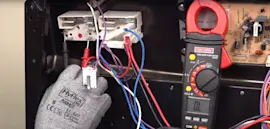
For electrical diagnosis steps, we use the same process shown in how to use a multimeter to test electrical parts video.
Last updated: March 2026
What is a router hardware?
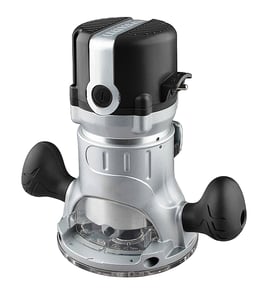
In the context of the Porter 75182 Cable router (a woodworking power tool), “router hardware” means the physical tool and its components that spin a cutting bit to shape wood. It is not the same as a Wi-Fi or internet router used for networking.
Router hardware (power tool) vs. router (networking)
Here’s a quick way to tell which “router” you have:
- Power tool router: handheld or table-mounted tool for cutting grooves, edges, and joinery
- Networking router: device that directs data between your modem and connected devices
- Power tool parts: motor, collet, brushes, switch, cord, base, depth adjuster
- Networking parts: antennas, Ethernet ports, firmware, Wi-Fi radios
| Term you see | Usually refers to | Common clue words |
|---|---|---|
| Router hardware | Woodworking router tool parts | collet, bit, base, brushes, switch |
| Wireless router | Home network device | Wi-Fi, modem, Ethernet, ISP |
What “hardware” commonly includes on a woodworking router
On a Porter Cable router like model 75182, “hardware” typically means the replaceable or serviceable components that affect safety and performance:
- Power cord and strain relief
- On/off switch and internal wiring
- Motor brushes (wear item)
- Collet and collet nut (bit-holding parts)
- Base, handles, and depth adjustment hardware
- Bearings or fan components (if the motor gets noisy)
Why it matters
Using the right term helps you get the right repair path. If your 75182 has issues like no power, intermittent running, or a bit that slips, you will troubleshoot and replace power tool parts, not networking equipment.
A good next step for troubleshooting
If you are diagnosing a no-power or intermittent-power problem, start with safe electrical checks:
- Unplug the router and inspect the cord for cuts or kinks
- Check the switch for a loose feel or inconsistent click
- Look for brush wear symptoms (sparking, power loss under load)
- Test continuity with a meter if you have one
For step-by-step electrical testing basics, use our guide: how to use a multimeter to test electrical parts video.
Last updated: February 2026
What is the diameter of Porter Cable 75182 router?
The Porter Cable model 75182 uses a large, “7518-style” motor housing; for fitment (router lift, mounting plate, or base clamp), the correct approach is to measure the outside diameter of the cylindrical motor can on your specific router with calipers so you get an exact match.
What “diameter” means for fitment
You want the outside diameter of the motor housing (motor can), not the base opening, handles, or collet nut.
- Unplug the router before measuring
- Remove the motor from the base if your base design allows it
- Measure across the round motor can with calipers (best) or a tape measure
- Take at least two readings (upper and mid-body) to confirm consistency
- Do not include rubber grips, labels, or any protruding features
- If you are using a lift, also measure the lift’s clamp bore and clamp height range
Typical sizes you will see (use as a quick check)
These are common motor-can diameter groupings used by many bases and lifts; confirm by measuring your tool.
| Router family (common grouping) | Typical motor-can diameter range | Notes |
|---|---|---|
| Porter-Cable 7518-style (includes 75182) | About 4.0 to 4.3 in | Often called “large body” routers |
| Porter-Cable 690/890-style | About 3.4 to 3.6 in | Often called “mid-size” routers |
Why it matters
Router lifts and fixed bases clamp directly to the motor housing. If the diameter is off, the motor will not seat correctly, can slip in the clamp, or the height adjust can bind.
If you are trying to match parts or accessories
Use the full model number 75182 when searching so you land on the correct diagrams and compatible items; our best general guide for model lookups is how to find your appliance model number (and what it means for parts).
Last updated: February 2026